


How to Disable Raids on a Palworld Server

In this guide we are going to go over how you can disable raids on your Palworld server. Raids are random events where enemy invaders storm your or other player bases. Disabling them can lead to having a calmer gameplay and less to worry about.
Disabling Raids
Open your Dashboard
Locate your Palworld server and click on the Panel button.
Once on your panel, Stop your server.
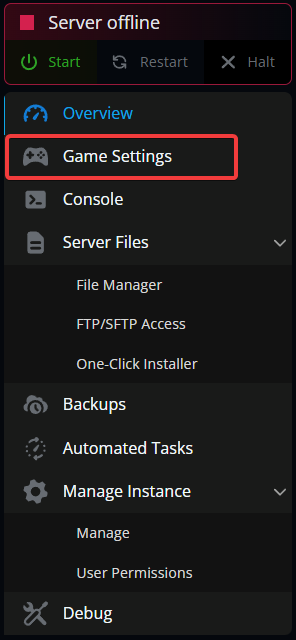
Once stopped, click on Game Settings.
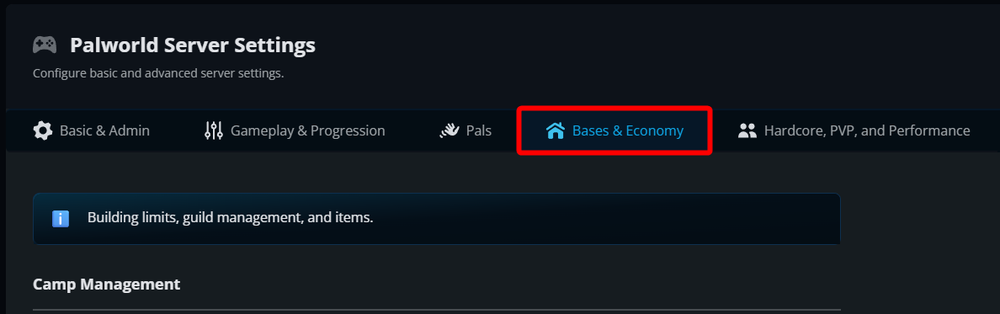
Once on your game settings page, navigate to the Base & Economy tab.
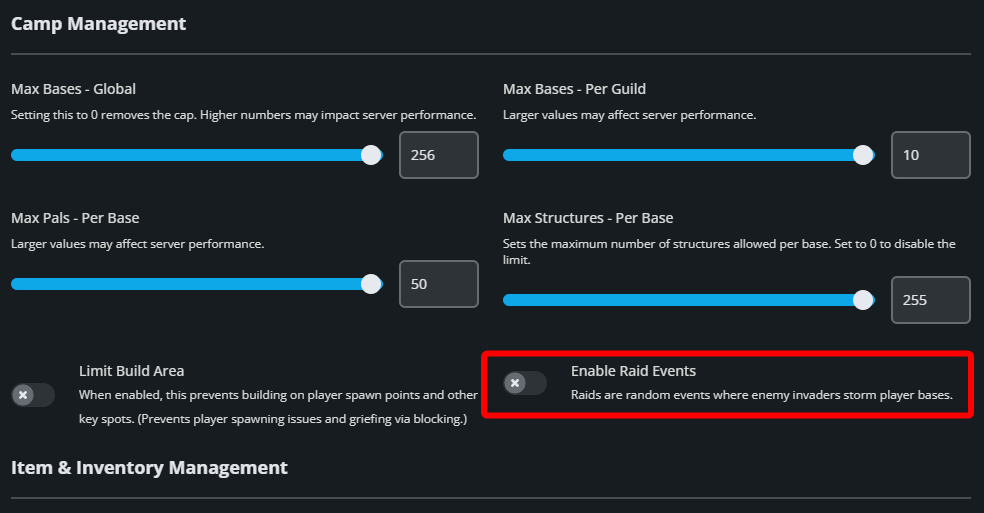
Under the Camp Management section locate the Enable Raid Events option and tick it to off.
Once set to off, scroll to the button of the page and click on Submit.
Start your server.
Conclusion
You have now disabled raids on your Palworld server. You will no longer be under threat of random enemies rushing into your base and attacking you and your Pals.
Need Help?
If you have questions or run into any issues, our support team is here to help! Reach out using the support widget on our website or visit our support center for further assistance.