


How to Become an Admin

Running a Scum dedicated server gives you complete control over the gameplay environment, allowing you to enforce rules, manage players, and customize experiences. One of the first steps in managing your server is configuring admin access.
Note: Be sure that your SCUM server is fully stopped before making any configuration changes or setting updates!
Adding Admins
Navigate to your SCUM servers’ dashboard.
Locate and click the Server Files option on the left side of your Control Panel.
Go to this path:
/SCUM/Saved/Config/WindowsServer/Inside the
WindowsServerfolder, look for a file namedAdminUsers.ini.If it doesn't exist, create a new file named
AdminUsers.ini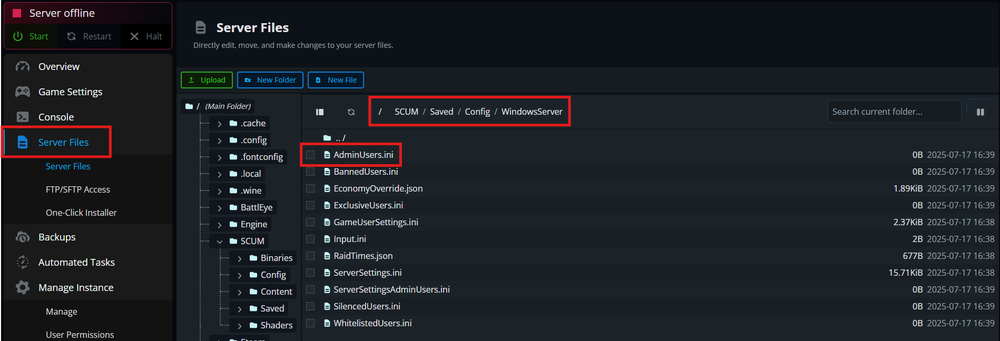
Visit https://steamid.net/ to find and copy your Steam64 ID (a 17-digit number).
Open the
AdminUsers.inifile and Paste your Steam64 ID on a new line.To add more admins, add one Steam64 ID per line.
Example:
76561198012345678
76561198087654321
9. Save and close the AdminUsers.ini file.
10. Start your Scum dedicated server so the changes take effect.
11. Launch Scum and join your server.
12. Press T to open the chat box.
13. Type an admin command, such as #ListPlayers to test if admin rights are working.
Conclusion
Setting up admin access in Scum is quick and easy—just add each player's Steam64 ID to the AdminUsers.ini file, and you're ready to go. With admin permissions, you’ll be able to manage gameplay, enforce rules, and keep your server running smoothly. Use your powers wisely and enjoy shaping your own survival experience!
Need Help?
If you have questions or run into any issues, our support team is here to help! Reach out using the support widget on our website or visit our support center for further assistance.