


How To Change the Spawn Point on a Hytale Server

This guide explains how to set a custom spawn point on your Hytale server. The server spawn location plays an important role in player experience, especially on multiplayer servers where first impressions matter. A custom spawn can place players closer to resources, hubs, or carefully designed starting areas. Using Hytale spawn commands, you can update your server spawn directly in-game or through the server console for precise control.
Changing Spawn In-game
Join your server and travel to the location of the new desired spawn point.
Run the command /spawn set to set the spawn to your exact position where you are standing.
Changing Spawn from the Console
Open your Dashboard.
Locate your Hytale server and click on the Panel button.
Click on Console.
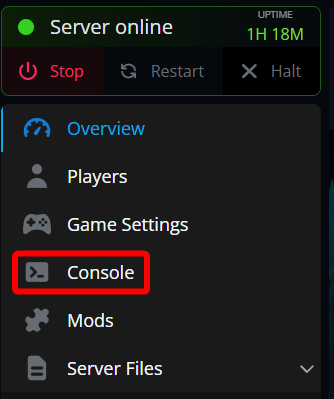
Once on your console run the command spawn set --position (x-position y-position z-position) --world (name of world)
Reverting To the Default Spawn
If you make a mistake, you can always revert the spawn to the worlds original spawn point by running the following command: /spawn default --world (name of world)
Conclusion
That's it! You now know how to set, change, and reset the spawn point on your Hytale server using both in-game commands and the server console. Custom spawn points help shape player flow, improve server organization, and create a smoother starting experience for everyone who joins. From building a central hub to relocating players closer to important areas, spawn commands give you direct control over where your Hytale server adventure begins.
Need Help?
If you have questions or run into any issues, our support team is here to help! Reach out using the support widget on our website or visit our support center for further assistance.