


How to Change Your Hytale Server Backup Frequency

In this guide we are going to change how often your Hytale server backups. By default, the server will create a backup every 30 minutes.
Changing the Frequency
Open your Dashboard.
Locate your Hytale server and click on the Panel button.
Once on your panel, Stop the server using the button in the upper left corner of the panel before proceeding.
When the server is stopped, click on Game Settings on the left-hand sidebar of the panel.
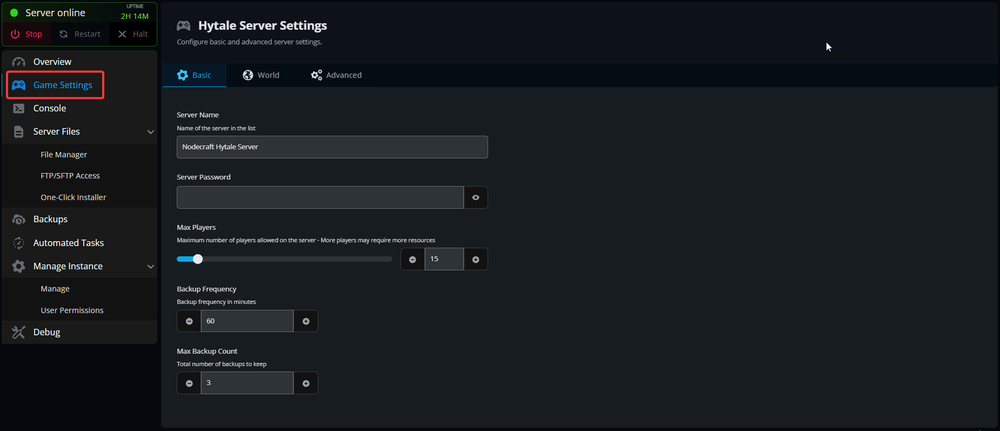
On the Game settings page scroll down till you see Backup Frequency.
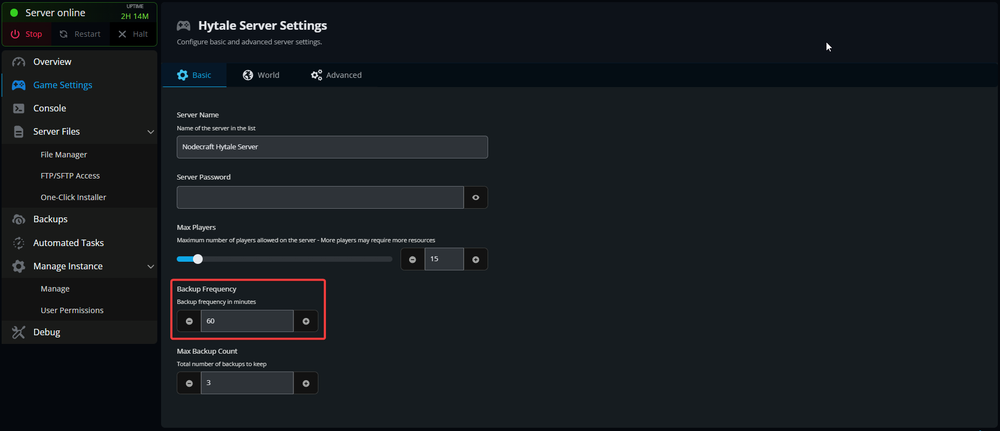
Enter or use the +/- buttons to set a new desired backup frequency in minutes, then scroll down and click the Submit button.
You have now changed how often your server will create a backup. It’s important to note that these backups are saved to a folder and do count for the disk usage of your server.
Conclusion
You now have your server creating backups at your desired interval. It's worth noting that making a backup could cause a small dip in performance while it's being created, thus quicker intervals may lead to undesirable performance more frequently.
Need Help?
If you have questions or run into any issues, our support team is here to help! Reach out using the support widget on our website or visit our support center for further assistance.