


Admin Commands for Don’t Starve Together

Using commands in Don’t Starve Together is an easy process.
You can use them from your client’s console in the main menu, in your server’s Console, such as the one we provide here at Nodecraft with Nodecraft Pro, and finally in-game.
If you wish to use commands in-game, you’ll need to be made an admin of your server. Check out our other guide on how to make yourself and admin in-game.
Open the Console
For both the client main menu and in-game, to open the console so you can enter commands, press the tilde ~ key on your keyboard. It can be found just above the tab TAB key.
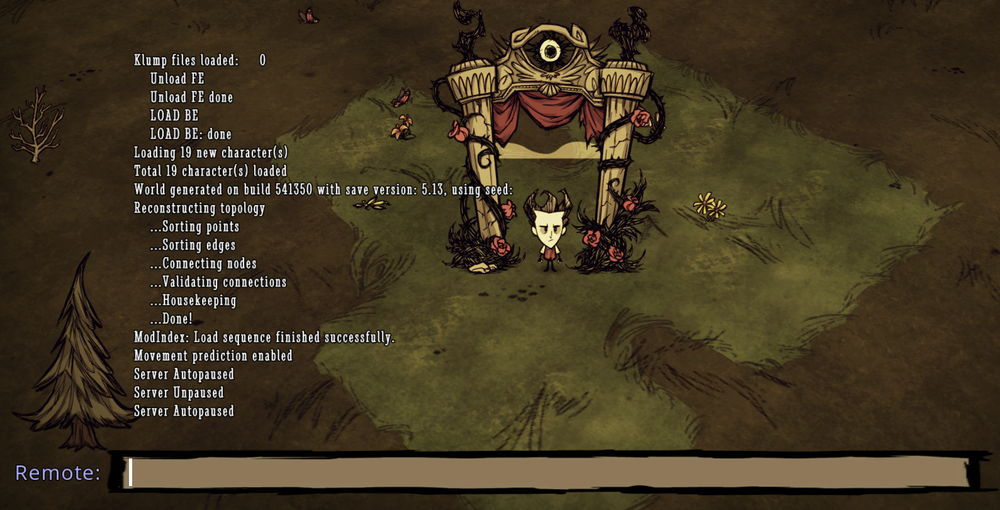 For the server console here at Nodecraft, you need to go to the Console tab on the left-hand side.
The identifying information of a player joining the server is crossed out in the screenshot below.

Commands
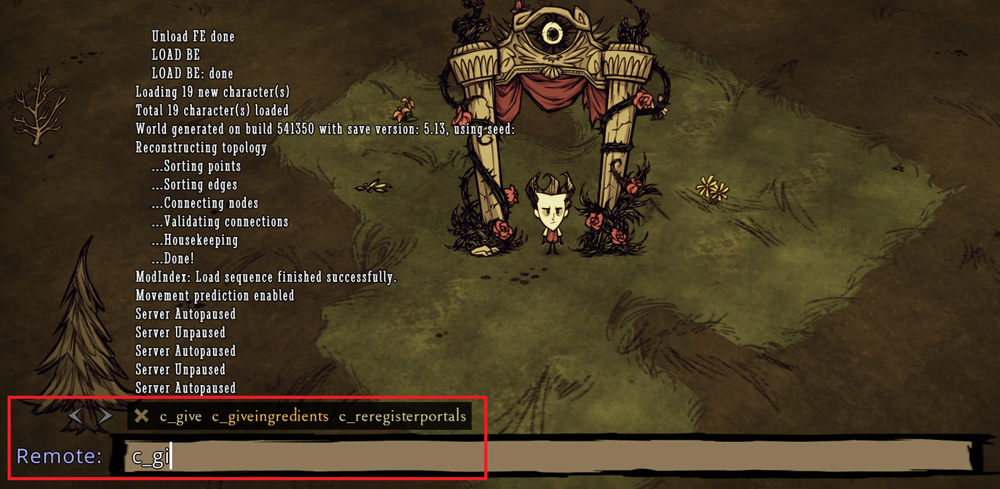
An awesome feature that the game developers added is that when you begin to type out a valid command, you will be given auto-completed options:
 Here is a list of popular commands you can use with your server.
Server Commands
| Command | Name | Description |
|---|---|---|
| TheNet:Kick(userid) | Kick Player | Kicks a player out of the server |
| TheNet:Ban(userid) | Ban Player | Kicks and denies access to the server |
| c_regenerateshard() | Regenerate a world shard | Regenerates specified items in a shard. |
| TheNet:SetAllowIncomingConnections( true / false ) | Enable/Disable new player joining | Setting it to true is the default behavior (people can join). Setting it to false prevents anyone from joining. |
| c_announce("announcement") | Make a server announcement | This allows you to announce server shutdowns/restarts, so players do not just get disconnected without warning. |
Common Commands
| Command | Name | Description |
|---|---|---|
| c_spawn("prefab",amount) | Spawn prefab | Improved DebugSpawn("prefab"), spawns the amount of selected "prefab" under the mouse cursor. |
| c_give("prefab",amount) | Give item | Generates a quantity of selected "pre-made parts" in your inventory. It only works with backpacks and items that can be stored in inventory. |
| c_goadventuring() | Go Adventuring | Gives the player a set of starting items. |
| c_doscenario(scenario) | Scenario | Apply a scenario script to the selection and run it. |
| c_sethealth(percent) | Set Your Health | Set your health to a selected percentage. Note: use fractional numbers 0.90 = 90%. |
| c_setsanity(percent) | Set Your Sanity | Set your health to a selected percentage. Note: use fractional numbers 0.90 = 90%. |
| c_sethunger(percent) | Set Your Hunger | Set your hunger to a selected percentage. Note: use fractional numbers 0.90 = 90%. |
| c_setmoisture(percent) | Set Your Moisture | Adjust its humidity to a selected percentage. Note: use fractional numbers 0.90 = 90%. |
| c_settemperature(degrees) | Temperature | Set your temperature to a selected percentage. Note: use fractional numbers 0.90 = 90%. |
| c_godmode() | God Mode | It will no longer deplete your sanity, hunger, or health when attacked. You cannot use commands to change your stats while in God mode. When he is dead, he will be resurrected (resuscitation via c_godmode () will not put him in god mode when he is resurrected). To disable God mode, use the command again. |
| c_supergodmode() | Super God Mode | Like God mode, but it also sets all your stats to maximum even if you disable it. Similar to c_godmode (), it also revives you (reviving via c_supergodmode () does not put you in god mode when revived). To disable God mode, use the command again. |
| c_maintainhealth(ThePlayer) | Maintain Your Health | Similar to Supergod mode, but constantly regenerates your health. To cancel the process, enter c_cancelmaintasks (ThePlayer). |
| c_maintainsanity(ThePlayer) | Maintain Your Sanity | Similar to Supergod mode, but constantly regenerating your mind. To cancel the process, enter c_cancelmaintasks (ThePlayer). |
| c_maintainhunger(ThePlayer) | Maintain Your Hunger | Similar to Supergod mode, but constantly regenerates your hunger. To cancel the process, enter c_cancelmaintasks (ThePlayer). |
| c_maintaintemperature(ThePlayer) | Maintain Your Temperature | Similar to Supergod mode but constantly regenerates your temperature. To cancel the process, enter c_cancelmaintasks (ThePlayer) |
| c_maintainmoisture(ThePlayer) | Maintain Your Moisture | Similar to Supergod mode, but constantly regenerates your moisture. To cancel the process, enter c_cancelmaintasks (ThePlayer). |
| c_maintainall(ThePlayer) | Maintain All | Similar to Supergod mode, but constantly regenerates all stats. To cancel the process, enter c_cancelmaintasks (ThePlayer). |
| c_makeinvisible() | Mob Invisibility | Prevent mobs from targeting the player in combat. It does not work in all circumstances. i.e boss fights |
| c_speedmult(multiplier) | Set Your Running Speed | The standard bonus running speed is 1.2, making you twice as fast, and at 12 or more you can easily walk through walls and "over" water. |
Player Commands
| Command | Name | Description |
|---|---|---|
| GetPlayer().HUD:Hide()GetPlayer().HUD:Show() | Hide and show HUD | Hide or show (after hiding) the full HUD of the game. |
| GetPlayer().components.builder:GiveAllRecipes() | Creative Mode | You can craft everything for free. This includes items you never crafted before. After switching levels, you will need to re-enter the command. |
| GetPlayer().components.health:SetMaxHealth(value) | Maximum Health | Change the Maximum Health of your Characters |
| GetPlayer().components.sanity:SetMax(value) | Maximum sanity | Change the Maximum Sanity of your Characters |
| GetPlayer().components.hunger:SetMax(value) | Maximum hunger | Change the Maximum Hunger of your Characters |
| GetPlayer().components.hunger:Pause(true) | Pause hunger | Your Characters won't starve anymore. |
| c_listallplayers() | List all players with username and player number. | This seems to not work so well anymore. If you don't get a full list try this command, it will print the player list to the chat. |
| AllPlayers[number] | Get a certain player | AllPlayers[1] will get ThePlayer if you are the host. Other players should have numbers as shown on the scoreboard (In certain situations, the number may be wrong. You can be more precise by using c_listallplayers() first to see the username and character for each player number. Most of ThePlayer commands can be used with AllPlayers[number] instead of the player. |
| AllPlayers[number]:PushEvent('death') | Kill a player | Kill a player |
| AllPlayers[number]:PushEvent('respawnfromghost') | Resurrect a player | Revive a player |
| AllPlayers[number].components.builder:GiveAllRecipes( | Give creative mode to a player | Gives Creative Mode to a player in specific |
| c_goto(AllPlayers[number]) | Teleport to a player | Teleport to a player |
| GetPlayer().components.beaverness:SetPercent(1) | Werebeaver | Turn Woodie into the Werebeaver. |
World Commands
| Command | Name | Description |
|---|---|---|
| c_gonext("prefab") | Teleport to Prefab | After pressing enter, it teleports you to the first numerical instance of the named prefab. If multiple iterations of the prefab exist, a list of the entity numbers will be displayed in the console log. Each subsequent execution of the same command will transport the player from entity to entity in the order they were generated in the world. |
| ConsoleWorldEntityUnderMouse():Remove()c_select():Remove() | Delete Item Under Mouse | After pressing enter, it deletes the item under your mouse. Use the second command on dedicated servers, the first command will not work. |
| for k,v in pairs(Ents) do if v.prefab == "prefab" then v:Remove() end end | Delete All | After pressing enter, it deletes every instance of whatever item prefab is entered. Useful for long-running servers with lots of clutter. |
| TheWorld:PushEvent("ms_nextcycle") | Skip to the Next Day Cycle | Skips x days. Change x to skip more days or parts of days (e.g. 16*30*4.5 to skip 4.5 days) WARNING: Too big values may freeze the game. (Depending on computer speed) - Note that this is here, so you can manually change the rate of the time skip. Use c_skip(x) to skip x amount. |
| c_skip(num) | Skip Day | |
| TheWorld.net.components.clock:OnUpdate(16*30*x) | Skip time | |
| LongUpdate(X) | Skip time units and update | Skips X time units and performs the "LongUpdate" function on world objects Note: There are 30-time units per segment. To skip a whole day one can either use LongUpdate(480) or use multiplicative values such as LongUpdate(X*16*30) or LongUpdate(X*TUNING.TOTAL_DAY_TIME), with X=days to skip. |
| c_speedup() | Speed up simulation | Speed up the simulation of the world. Some events are determined by time past in the game, and hence can be triggered to happen earlier through this speed up. Skipping would not bring forward those events. |
| TheSim:SetTimeScale(X) | Speed up simulation* | Set the timescale of the simulation to a specific value X. The normal timescale corresponds to the value 1. The value 0 pauses the game. Note that console can not be used while the game is paused, preventing removing pause. |
| TheWorld:PushEvent("ms_nextphase") | Skip phase | Skips the current phase |
| TheWorld:PushEvent("ms_setclocksegs", {day=x,dusk=y,night=z}) | Set segments | Allows to set duration for day, dusk, and night (total value must NOT exceed 16) |
| TheWorld:PushEvent("ms_setseasonclocksegs", {summer={day=sx,dusk=sy,night=sz}, winter={day=wx,dusk=wy,night=wz}}) | Set season segments | Allows to set the duration for the day, dusk, and night by season (total values must NOT exceed 16) |
| TheWorld:PushEvent("ms_setseasonlength", {season="summer", length=15}) | Set season lengths | Allows to set the duration of each season |
| TheWorld:PushEvent("ms_setseason", "spring") | Start Spring | Set season to spring |
| TheWorld:PushEvent("ms_setseason", "summer") | Start Summer | Set season to summer |
| TheWorld:PushEvent("ms_setseason", "autumn") | Start Autumn | Set season to autumn |
| TheWorld:PushEvent("ms_setseason", "winter") | Start Winter | Set season to winter |
| TheWorld:PushEvent("ms_forceprecipitation") | Start Rain | Start raining |
| TheWorld:PushEvent("ms_sendlightningstrike", ConsoleWorldPosition()) | Do Lightning Strike | Lightning strikes on the mouse cursor. Will hit lightning rod instead if there is one near |
| c_spawn("shadowmeteor", 1) | Meteor Strike | Meteor strikes on the mouse cursor. Spawns different kinds of rocks randomly. (This might crash the game) |
| for k, v in pairs(SPECIAL_EVENTS) do if v ~= SPECIAL_EVENTS.NONE then local tech = TECH[k] if tech ~= nil then tech.SCIENCE = 0 end end end function IsSpecialEventActive(event) return true end | Activate all Events | Activates all Events at the same time. Doesn't work if in world gen the events section is set to Auto. |
Need Help?
If you have questions or run into any issues, our support team is here to help! Reach out using the support widget on our website or visit our support center for further assistance.