


How to Create a Cobblemon Server

Cobblemon is an open-source Pokémon mod that is available through Fabric and NeoForge for Minecraft version 1.21.1.
It allows you to capture Pokémon to expand your team, battle wild Pokémon to gain experience, and level up to unlock new moves!
There are many different flavours of Cobblemon, including the popular Cobblemon Modpack, as well as Cobblemon Academy.
How to install Cobblemon on the Server
There are many ways to create a Minecraft server, but for the best performance we recommend renting a server from a well known provider such as ourselves, where we offer high performance cobblemon hosting. Go with a plan that supports a good experience with modding!
After purchase, you'll want to follow these steps:
Go to your Nodecraft dashboard.
Click “Create Server”

Choose Minecraft from the list, and then Java Edition
Complete the required items, and then click "install mods" on the right hand side
From here you can select various flavours of Cobblemon, or any other modpack you wish to plan.

If your specific pack choice isn't available here, don't worry, just proceed with a normal Minecraft install and you can import it later!
After creation, deploy your Minecraft server to your purchased service, and then proceed through to configuration.
From your Nodecraft Dashboard, click the Gear Icon with “panel” on the server’s card under “Currently Playing.
Using Nodecraft’s dynamic control panel, easily toggle on and adjust all the essential settings to your desires! Settings available in the control panel include everything from server name and game mode to Java version and jar files. You can even set up your Allowlist/Whitelist and manage OP players directly in our control panel.
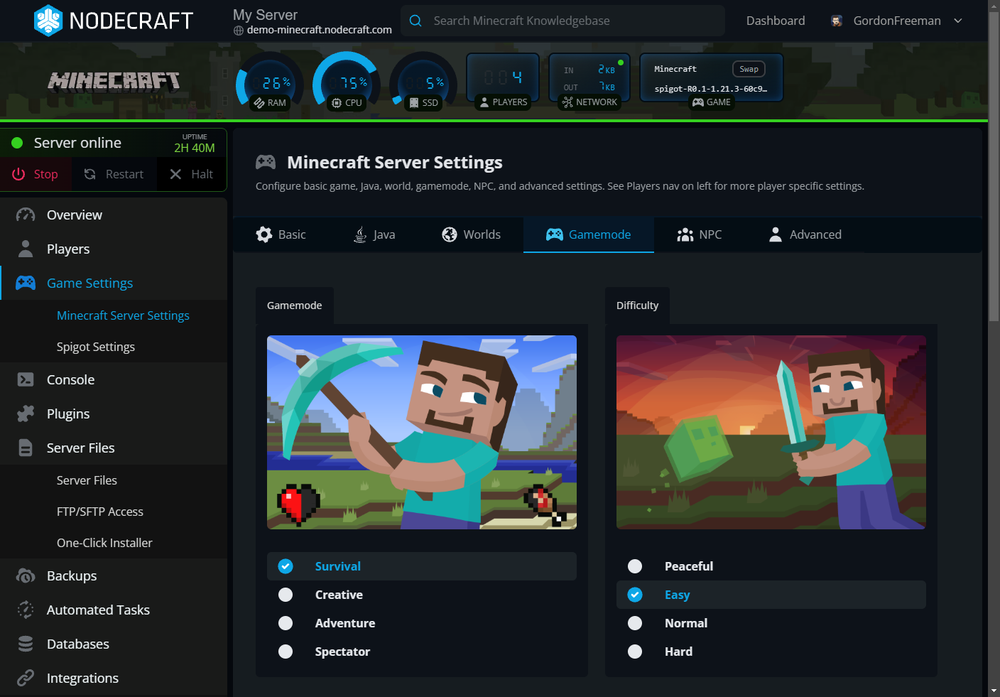 - If you need to import your own modpack, follow our guide for How to Import Your Own Modpack from CurseForge and Modrinth
Start your Minecraft server in the top left of the screen to turn it on.
Grab your Minecraft server address (IP Address or DNS Hostname) and share it with the players you want to join you.
Need Help?
If you have questions or run into any issues, our support team is here to help! Reach out using the support widget on our website or visit our support center for further assistance.