


How to Enable PvP on Your Palworld Server

PvP was introduced to Palworld as an experimental feature in the Home Sweet Home update. Enabling it allows players to fight each other, interact with other bases, and participate in PvP specific mechanics like special item drops. It's an exciting addition and adds more competition to your server! Let's get into how to enable that.
Note: Always ensure that your Palworld server is fully stopped before making any configuration changes!
PvP Server Changes
There are quite a few changes that your server experiences when PvP is enabled!
Players will harm each other
When a player enters another player's base, the pals at that base will become hostile
There is an increased damage amount to flying players and mounted Pals
There is reduced damage to summoned and base Pals
Players will be able to access chests owned by other guilds
There is reduced melee weapon damage against structures that are built by other players
The Pals on a base will defend a larger area
Online players will be notified of an ongoing attack and building and repairing objects and structures will be unavailable
Enable PvP
Open the dashboard for your Palworld server.
Click Game Settings on the left side.
Select the PVP tab. From here, you will see all PvP options in one place.
Enable the following options:
Enable Player vs Player (PvP)
Enable Player vs Player (PvP) Damage
If you would like PvP to impact bases and their items as well, also enable Player vs Player Damage to Guild Objects.
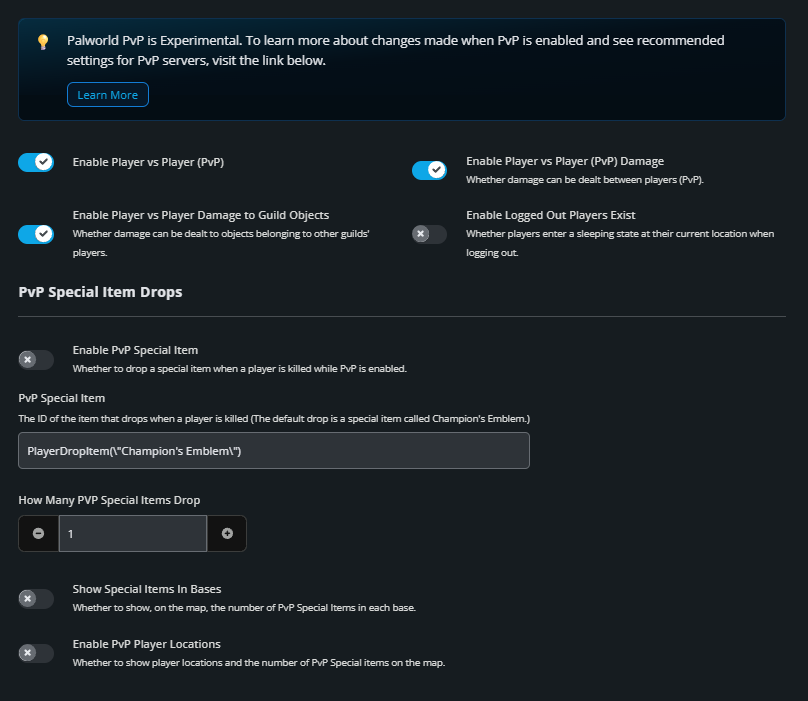
Don't forget to click the Submit button at the bottom to save your changes!
Start your server.
From here, base level PvP is enabled and ready to go! You can further edit things by enabling PvP Special Items drops and even the ability to see players on the map! Figure out the perfect settings for what you want to see on your server. That is part of the fun after all!
Need Help?
If you have questions or run into any issues, our support team is here to help! Reach out using the support widget on our website or visit our support center for further assistance.