


How to Set a Server Password on an Echoes of Elysium Server

Adding a password to your Echoes of Elysium server is a great way to keep things private and under control. A server password lets you decide exactly who can join, which is perfect for friends-only worlds, testing environments, or small community servers that are not ready to be public just yet.
Note: It's important to remember that entering a password in-game does not hide the entered password. This is especially important for content creators!
Change Your Server Password
Log in to your Nodecraft Dashboard.
Navigate to your Echoes of Elysium server panel.
On the left side of the panel, click Game Settings.

Under the Basic tab, locate the Server Password option.
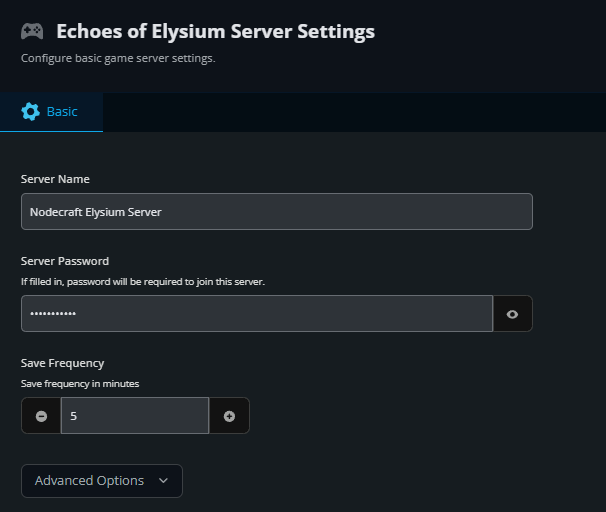
Enter the name you want your server to use.
Click the Submit button at the bottom to save your changes.
Conclusion
With a server password in place, your world stays exactly as private as you want it to be. You can share the password with friends, change it whenever needed, or remove it entirely when you are ready to open the server back up. It is a simple setting that gives you full control over who gets access to your Echoes of Elysium adventure.
Need Help?
If you have questions or run into any issues, our support team is here to help! Reach out using the support widget on our website or visit our support center for further assistance.