


How to Set a Password on Your VNyan Server

Setting a server password for your VNyan server helps keep your collabs private and prevents unexpected connections. Changing the default password is a good idea before sharing your server with others or going live. This guide walks through how to set or update your VNyan server password through Nodecraft so you stay in control of who can join.
Note: It is always recommended to ensure your VNyan Server is completely stopped before making any changes or updates.
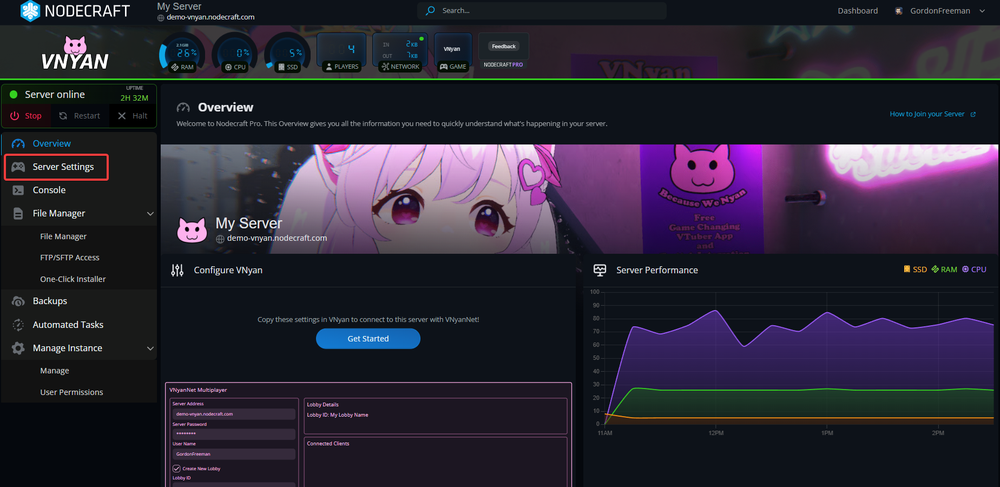
Navigate to your VNyan server dashboard.
On the left side, click on Server Settings.
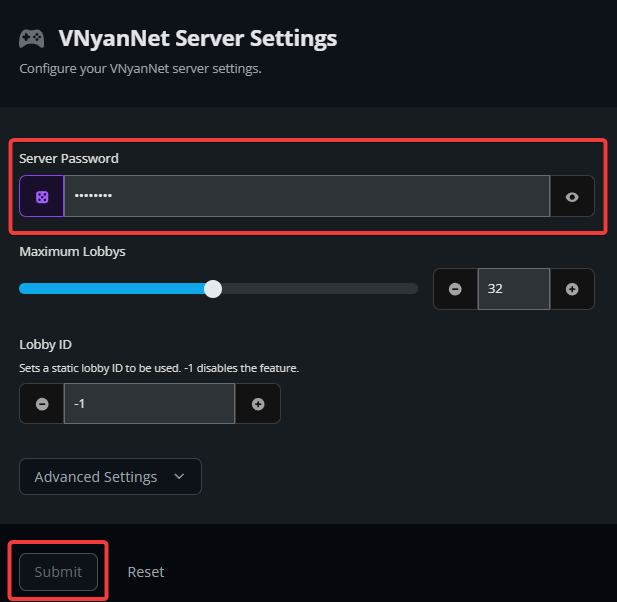
Locate the Server Password box.
Enter in your preferred password or choose the purple randomize button to generate a random password.
Once you’re ready, click the Submit button at the bottom.
Start your server.
Once the server is back online, your new password is active and ready to use. Share it only with the people you want to join your VNyanNet session. If you ever need to rotate the password before another collab, you can follow these same steps again!
Need Help?
If you have questions or run into any issues, our support team is here to help! Reach out using the support widget on our website or visit our support center for further assistance.