


How to Install and Play CrazyCraft 4.0 on Void Wrath’s Launcher

Want to play CrazyCraft 4.0 but can’t find it on other launchers? The Void Wrath Launcher is the official launcher for CrazyCraft 4. This guide will walk you through how to install CrazyCraft 4 on both the server side (Nodecraft Panel) and client side (Void Wrath Launcher).
Note: You would need these both installed and versions to match to join your server.
Installing CrazyCraft 4 via Nodecraft Panel (One-Click Installer)
Log in to your Nodecraft account and go to your Server Dashboard.
Select your Minecraft Server.
Note: Make sure your server is offline before making any changes. This ensures your edits save properly and take effect.
Navigate to the One-Click Installer tab.
In the search bar, type CrazyCraft 4.
Select CrazyCraft 4 and choose your desired version.
Choose one of the following installation types:
Archive Install: Creates a folder called old_files containing your previous server files. Use this option when updating the modpack and you want to keep your world.
Fresh Install: Wipes old files and starts with a clean setup—perfect if you want a fresh world.
Once the installation completes, start your server.
Installing CrazyCraft 4 via the Void Wrath Launcher
Launch the Void Wrath Launcher and log in with your Microsoft account.
On the left-hand side, open the Official Modpacks drop-down menu.
Choose from one of the following categories:
Official Modpacks
All Modpacks
Legacy Modpacks
Vanilla Modpacks
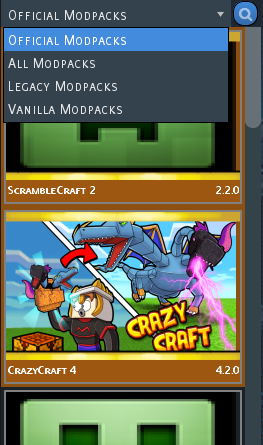
Locate CrazyCraft 4 in the list.
Click Play to start the download and installation process.
Once installation is complete, click Play again to launch the modpack.
When loaded, connect to your Nodecraft server and start playing!
Troubleshooting
If you experience any issues with installing or launching CrazyCraft 4, try the following solutions:
Launcher Issues
Launcher won’t open:
Make sure Java 8 or later is installed.
Run the launcher as Administrator.
Disable antivirus or SmartScreen if it falsely flags the launcher.
Login problems:
Ensure you’re using the same Microsoft account linked to your Minecraft Java Edition.
Clear the launcher’s cache or re-download it from Void Wrath’s website.
Modpack Issues
Modpack won’t install or crashes on startup:
Ensure you have enough RAM allocated (at least 4–6 GB is recommended).
Update graphics drivers and Java.
Delete the modpack folder and reinstall it.
Connection problems when joining your server:
Confirm both server and client are using the same modpack version.
Verify your server is online and port forwarding is correctly configured.
Disable any extra mods that weren’t included with CrazyCraft 4.
Conclusion
CrazyCraft 4.0 is one of the most chaotic and exciting modpacks ever made, and with the Void Wrath Launcher and Nodecraft’s One-Click Installer, getting started is easier than ever. Follow this guide to set up both your server and client, and if issues arise, refer to the troubleshooting tips above.
Once everything’s ready, jump in and experience the wild, over-the-top world of CrazyCraft 4, where nothing is normal, and everything is epic.
Need Help?
If you have questions or run into any issues, our support team is here to help! Reach out using the support widget on our website or visit our support center for further assistance.