


How to Create Automated Tasks on Your Hytale Server

Automated tasks on a Hytale server are a way to let the server handle the boring stuff for you. Things like restarts, backups, or cleanup can run on a schedule instead of relying on someone to remember to do them manually.
This guide walks through how to create automated tasks on your Hytale server so routine maintenance happens in the background, and you can spend more time actually playing or building instead of babysitting the server.
Using the Control Panel
Navigate to your Nodecraft Dashboard.
Click the Panel button for your Hytale server.
Locate and click Automated Tasks in the menu on the left side.
Click the Create New Task button.
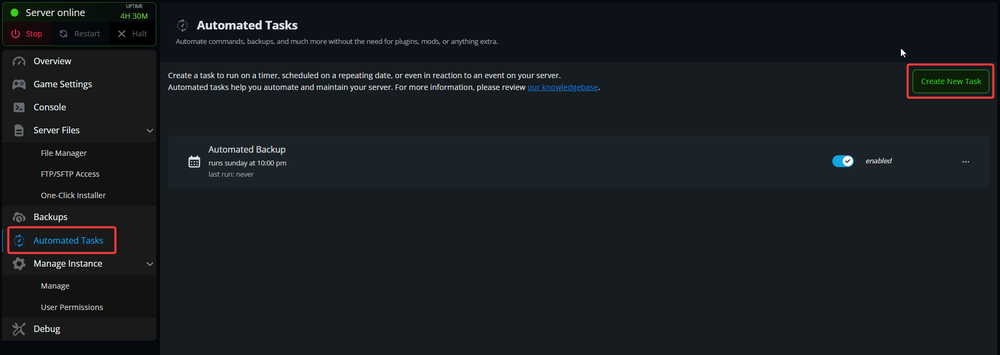
Follow the prompts to create the kind of task you would like.
Click Save Task once you have finished setting it up.
Server Restart Example
Decide how often you want your server to restart. It is recommended to restart your server daily. To set up a daily task, select the Schedule Task trigger option.

Select the days of the week you would like this to run. This option could be used to have your server restart on a weekly basis, or every couple days.

Choose a time when your server is usually not busy, when players will not be disturbed by a server restart, such as 6am.

For the Job, select Restart server.

Click Save Task to save your changes.
Conclusion
You have now successfully created an automated task! There are no limits to the number of tasks you can create, so feel free to automate as much as you’d like! As a helpful tip, you can disable tasks from the main Automated Tasks page and re-enable them at a later time if you need!
Need Help?
If you have questions or run into any issues, our support team is here to help! Reach out using the support widget on our website or visit our support center for further assistance.