


How to Enable Cheats on a Romestead Server

Cheats can be enabled when creating a new world in Romestead, allowing access to additional gameplay and administrative commands. Since this setting becomes part of the world when it is generated, it is important to decide whether you want cheats enabled before creating the world.
Note: Cheats can only be enabled during world creation. Existing worlds cannot have cheats enabled after they have been generated.
Open your Dashboard.
Navigate to your Romestead server panel.
Click on Game Settings from the left-hand toolbar.
Open the Worlds tab.
Click Create New World.
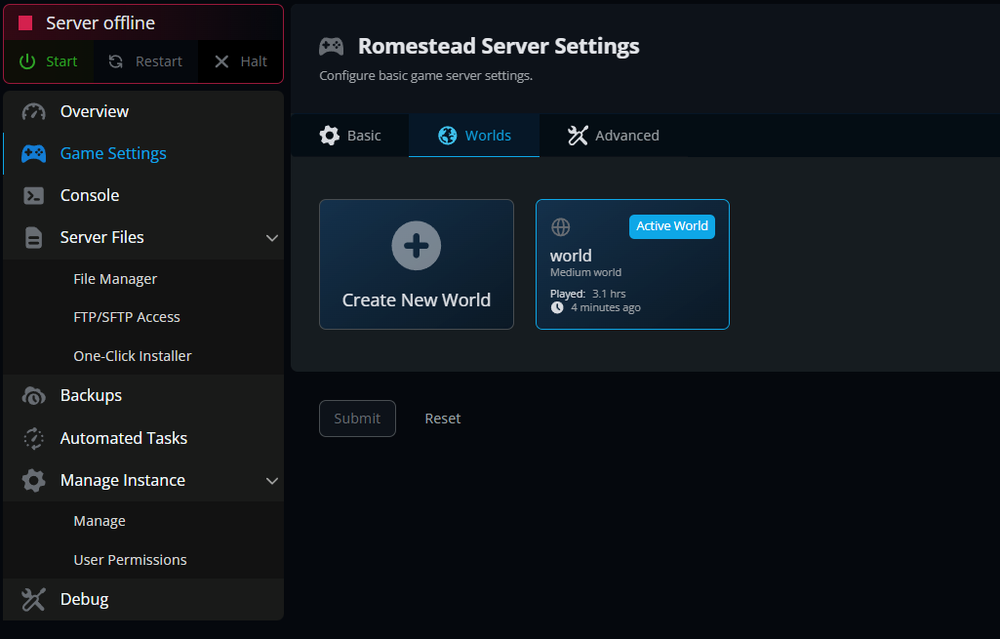
Enter your world details, including:
World Name
World Size
Seed (optional)
Enable the Cheats toggle.
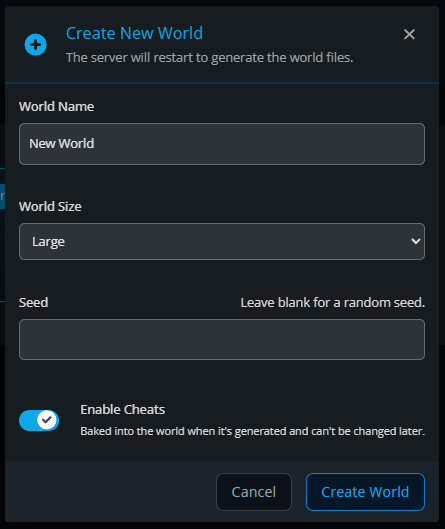
Click Create World.
Wait for the server to restart and generate the new world.
Once the world has finished generating, cheats will be enabled for that world.
Existing Worlds and Cheats
If you already have a world created without cheats enabled, the setting cannot be changed later. To use cheats, you will need to create a new world with the Cheats option enabled during the creation process.
Conclusion
Your new Romestead world will now be created with cheats enabled. If you plan to use administrative commands, test game mechanics, or experiment with different gameplay features, enabling cheats during world creation ensures those tools will be available from the start.
Need Help?
If you have questions or run into any issues, our support team is here to help! Reach out using the support widget on our website or visit our support center for further assistance.