


How to Change the Max Players on a Windrose Server

In this guide we will be covering how you can change the max player amount on your Windrose server. This may be done just to have a higher number of player slots displayed or you legitimately want to allow more players to join. It’s worth noting that the more players that join the more server performance could be impacted.
Changing the Max Players
Open your Dashboard.
Locate your Windrose server and click on the Panel button.
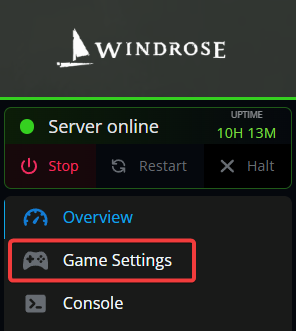
From the sidebar, navigate to the Game Settings tab.
Locate the player limit setting near the bottom of the page.
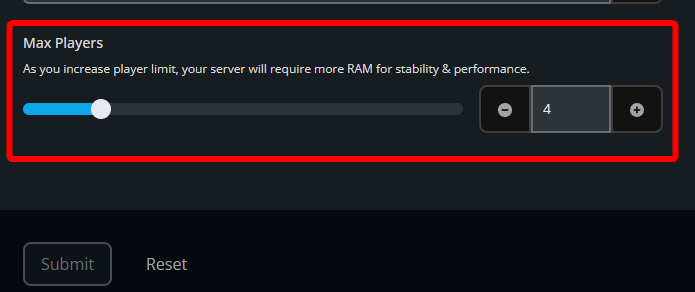
You can drag the slider to increase or decrease the total number of potential players you'd want to have as your server's limit.
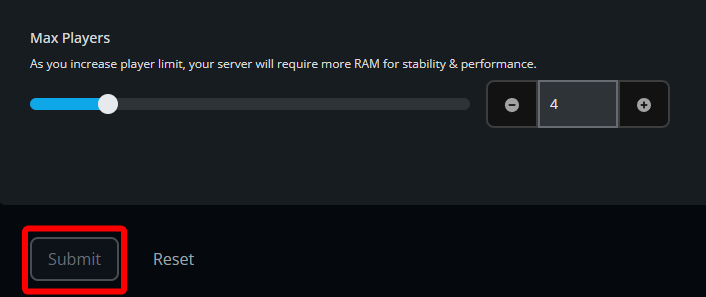
Once your desired number has been set, click on Submit.
Start your server.
Conclusion
Your Windrose server’s max player limit has now been updated. Keep in mind that raising the player count can put more strain on your server, especially if all available slots are filled at once, so it is a good idea to choose a limit that matches the experience and performance you want.
Need Help?
If you have questions or run into any issues, our support team is here to help! Reach out using the support widget on our website or visit our support center for further assistance.