


How to Switch Between Worlds on a Windrose Server

In this guide we will cover how you can switch worlds on your Windrose server. You may want to switch worlds if you want to start over, want to test something without using your main world or maybe you uploaded a world.
Switching Worlds
Open your Dashboard.
Locate your Windrose server and click on the Panel button.
Once on your panel, Stop your server.
Once the server is stopped, open your Game Settings.
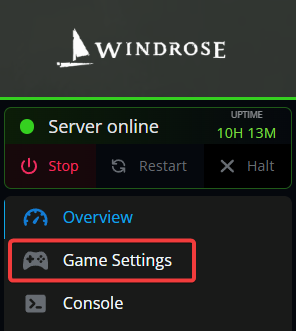
Once on the Windrose Server Settings page, click on the Worlds tab.
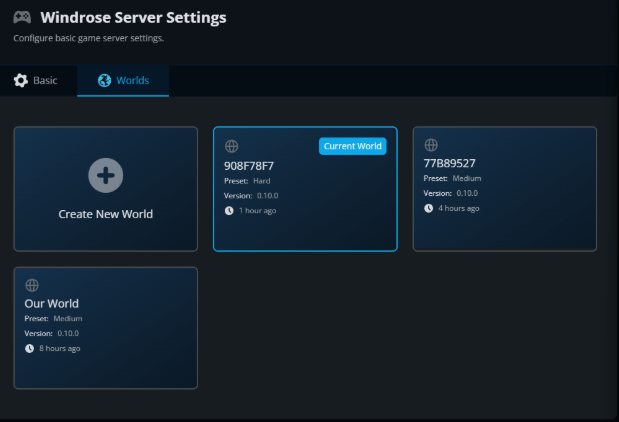
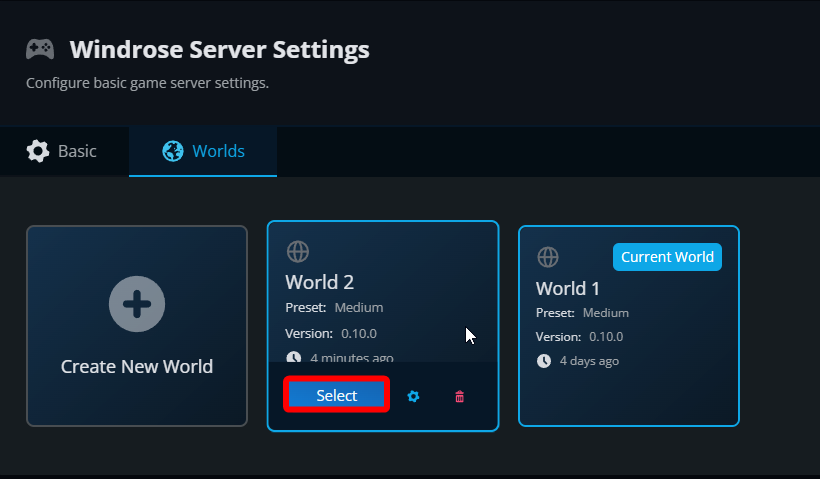
Once on the world tab, locate the world you want to use, hover over it and click on Select and the newly selected world will show as Current World.
Start your server.
Conclusion
You have now changed your Windrose server to another world. If at any point you want to change back to the original word or upload another you can use this same process.
Need Help?
If you have questions or run into any issues, our support team is here to help! Reach out using the support widget on our website or visit our support center for further assistance.