


How to Swap Between WukongMP Co-Op and PvP

This guide explains how to switch between WukongMP Co-op and WukongMP PvP on your Wukong server using the Nodecraft control panel. Both mods are available from the Mods tab and can be toggled on or off without needing to manually edit files.
WukongMP Co-op and WukongMP PvP cannot be enabled at the same time. When you enable one, the other will automatically be disabled.
Note: Be sure your server is fully stopped before making any changes!
Navigate to your Wukong server dashboard.
Click Mods in the left menu.
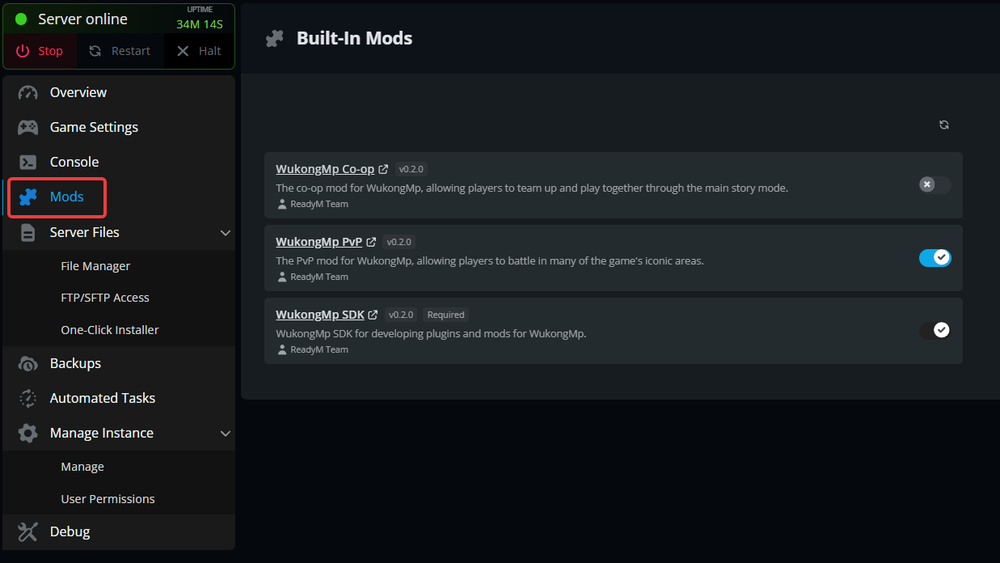
You should see the following mods installed: WukongMP Co-op, WukongMP PvP, WukongMP SDK
Enable WukongMP Co-op
Click the toggle next to WukongMP Co-op.
Start your server.
Note: If WukongMP PvP is currently enabled, it will automatically be turned off.
Your server will now load with the co-op version of WukongMP enabled, allowing players to team up and play together.
Enable WukongMP PvP
Click the toggle next to WukongMP PvP.
Start your server.
Note: If WukongMP Co-op is currently enabled, it will automatically be turned off.
Your server will now load with the PvP version of WukongMP enabled, allowing players to battle each other in supported areas.
Manually Swap Mods Using File Manager
You can also swap WukongMP modes manually using the File Manager. Enabled mods are stored in the mods folder, while disabled or optional mods are stored in the optional_mods folder.
Open your Wukong server dashboard.
Click File Manager in the left menu.
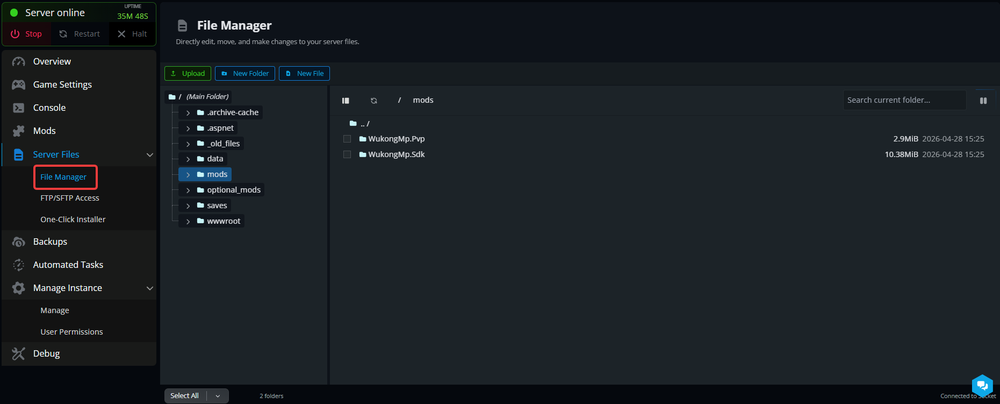
Open the optional_mods folder.
Move the mod you want to enable into the mods folder.
Make sure the other WukongMP mode is not also inside the mods folder.
Start your server.
For example, if you want to enable WukongMP PvP, move WukongMp.Pvp into the mods folder and keep WukongMP Co-op out of the mods folder.
Why Only One Can Be Enabled
WukongMP Co-op and WukongMP PvP are separate gameplay modes. Since they change how multiplayer works, they are not compatible with each other when enabled at the same time.
The Nodecraft panel handles this automatically by disabling the other mode when one is turned on.
Conclusion
You can now freely switch between WukongMP Co-op and WukongMP PvP depending on how you want to play. Whether you are teaming up to take on bosses together or turning your friends into your greatest enemies, the Nodecraft panel makes swapping modes quick and painless without needing to dig through server files every time.
Need Help?
If you have questions or run into any issues, our support team is here to help! Reach out using the support widget on our website or visit our support center for further assistance.