


How to Become an Admin on a DayZ Server

Admin access gives you additional control over your DayZ server, allowing you to moderate players and manage the server more effectively. Once logged in as an administrator, you can access moderation tools and perform actions such as kicking or banning players directly from within the game.
Note: Ensure that your DayZ server is offline before making any changes!
Setting an Admin Password
Open your Dashboard.
Locate your DayZ server and click Panel.
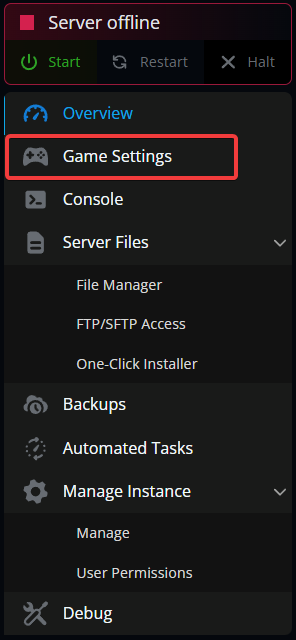
Navigate to Game Settings.
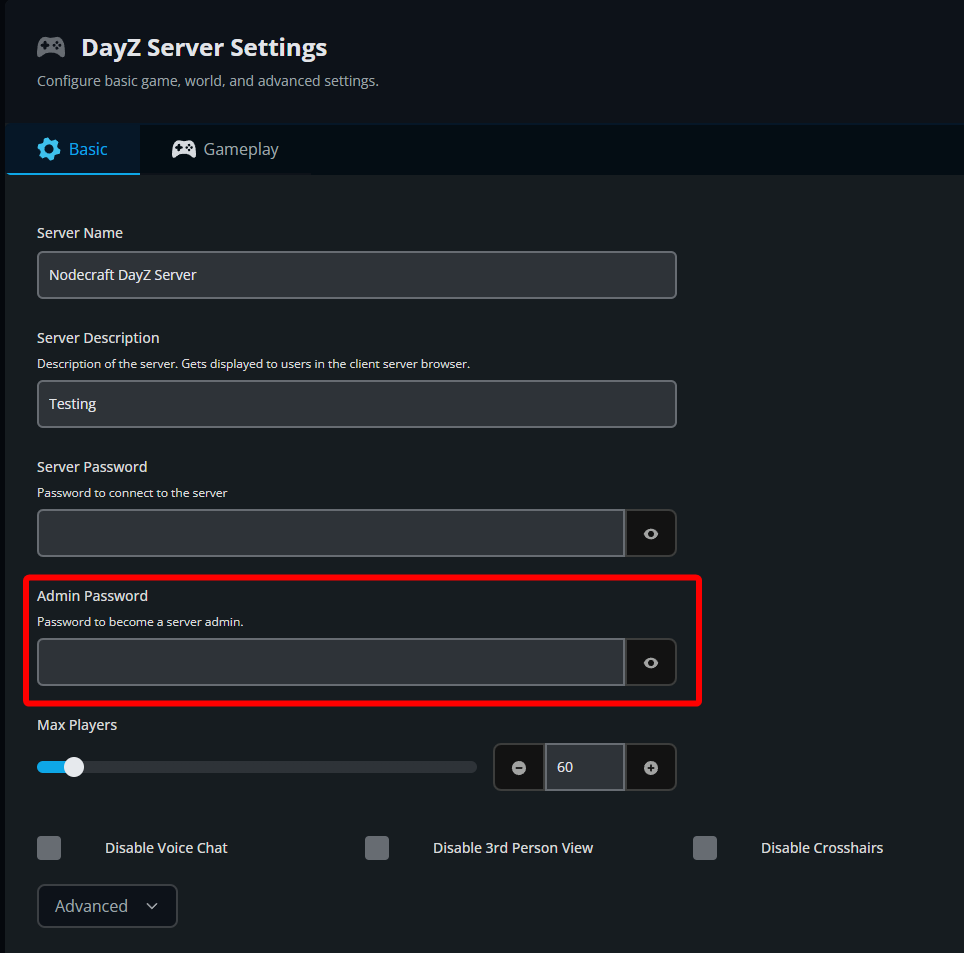
Locate the Admin Password field.
Enter your desired admin password.
Click Submit to save your changes.
Start or restart your server.
Logging In as an Admin
After the server has restarted:
Join your DayZ server.
Open the in-game text chat.
Type the following command:
#login your_passwordReplace
your_passwordwith the admin password you configured in the control panel.If the password is entered correctly, you will be logged in as an administrator and gain access to the available moderation commands.
Conclusion
You now have administrator access on your DayZ server. This allows you to help keep the server running smoothly, respond to player issues, and take action when moderation is needed. Keep in mind that admin status is not permanent, so you will need to log in again using the #login command each time you reconnect to the server.
Need Help?
If you have questions or run into any issues, our support team is here to help! Reach out using the support widget on our website or visit our support center for further assistance.