


SCP: Secret Laboratory Server Settings Guide

Create a SCP: Secret Laboratory Server today! Save & Swap between game servers with ease and no added cost.
In this guide we are going to cover all the configuration options on your Nodecraft SCP: Secret Laboratory server. All the settings covered in this guide will be on your Game Settings page on your server's panel!
How to Access Your Game Settings
Open your Dashboard
Locate your SCP server and click on the Panel button.
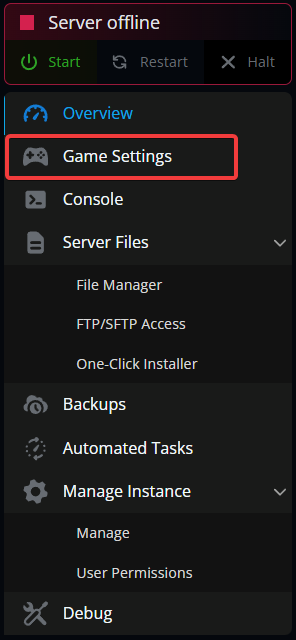
Once on your panel, click on the Game Settings tab.
Basic Settings
| Name | Description |
|---|---|
| Server Name | This will be the name of your server and how it will appear on the server browser. |
| Server Info Pastebin ID | The ID, which is the last part of the URL is used so you can store a server description and have it applied to your server. You are also able to use unity rich text. |
| Player List Title | This will be the text that is displayed at the top of the player list in-game. If the value is not set it will be the same as your server's name. |
| Contact Email | Having your email is needed for verification. It’s also used for the Safety and Compliance team. This is the email you will continue to have to use for future contacts. |
| Max Players | This slider sets the max number of players that will be able to join your server. |
| Auto Round Restart | This time defines how long after the end of a round before a new round is started. This is set in seconds. |
| Online mode | This enables or disables the connection to the central service which lists the server. |
Gameplay Settings
| Name | Description |
|---|---|
| Friendly Fire | Enables or disables the ability for teammates to damage each other. |
| Friendly Fire Multiplier | This is the amount of damage done to players involved in friendly fire. |
| Spawn Protection | Enables or Disables spawn protection. |
| Protection time | How long players are protected from damage after spawning. |
| Minimum MTF Spawn Time | The shortest time in which the Mobile Task Force spawns after their last wave. |
| Maximum MTF Spawn Time | The longest time in which the Mobile Task Force spawns after their last wave. |
| Stamina Drain | The percentage of stamina used while players, not SCPs, are sprinting. |
| Regen speed | How fast stamina regenerates . |
Security Settings
| Name | Description |
|---|---|
| Enable Allowlist/Whitelist | Enables or disables the allowlist/whitelist. |
| Enforce Same IP | This enforces the player to be using the same IP address to connect to the game and authenticate. Enabling this blocks proxies. Not enforced if a player joined from IPv4 and authenticated from IPv6 or vice versa. |
| Spawn Team Kill Detector | Enables a check that detects friendly fire within a specific time frame after a player respawns. |
| Spawn Team Kill Action | The action taken on the player that engages in friendly fire on recently respawned players. |
| Discord Report | Enables or disables discord report system. |
| Webhook URL | The URL for the discord reporting system. |
Technical Settings
| Name | Description |
|---|---|
| Auto Warhead Time | How long it takes for the warhead to automatically start. |
| Lock Warhead | Weather or not the warhead destination sequence can be cancelled or not. |
| Deadman's Switch | Whether or not the warhead sequence will continue if there are no players on the server. |
| Tickerate | The server tickrate. |
| AFK Kick Time | The time before an AFK player is kicked. |
| Idle Mode | Enables or not if the server enters an idle state when no players are connected. |
Conclusion
Those are the available configuration options for your SCP server within your game panel. When you make any changes to your server you will need to ensure to restart your server for them to apply.
Need Help?
If you have questions or run into any issues, our support team is here to help! Reach out using the support widget on our website or visit our support center for further assistance.