


How to Pre-generate a World on a Minecraft Fabric Server

In this guide we are going to cover how you can pregenerate a world on your fabric server using the Chunky mod. Pregenerating a world is a good preventive measure to reduce server load caused by having to generate worlds as players explorer.
Installing Chunky
Download Chunky making sure you download a version that matches the version of minecraft and fabric that you have installed.
Open your Dashboard.
Locate your Minecraft server and click on the Panel button.
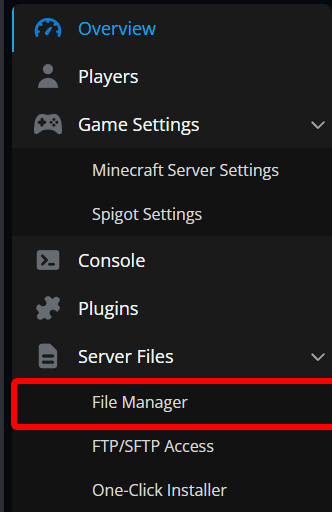
Navigate to the File Manager.
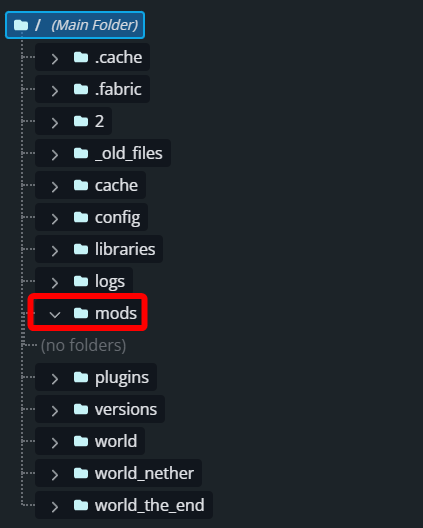
Once in the File Manager open the mods folder.
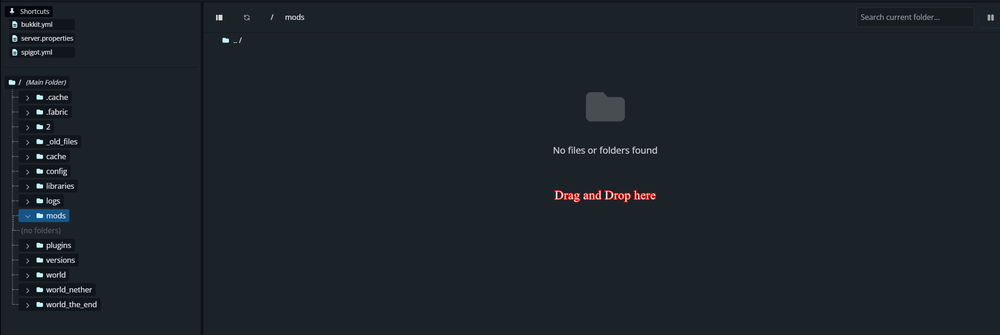
Once in the mods folder upload the Chunky mod that you downloaded by dragging and dropping it into the mods folder.
Restart your server.
Pregenerating a world
Join your server with OP permissions or open your console from your panel.
Run the following commands in order:
/chunky world (world name) - Sets the world to be pregenerated .
/chunky spawn - This sets the center of the pregeneration to the spawn of your world.
Alternatically you can specify coordinates with /chunky center (<x> <z>).
/chunky radius (radius) - how far you want the world pregenerated.
/chunky start - starts the generation process.
Once started you will need to wait. Depending on how much you are pregenerating it could take anywhere from a few minutes to hours.
Conclusion
You have now pregenerated or started to pregenerate your world on your Fabric Minecraft server! Depending on the size of the region to be generated will determine how long it takes to complete. While you can play on the server while the generation is occurring, performance may be impacted.
Need Help?
If you have questions or run into any issues, our support team is here to help! Reach out using the support widget on our website or visit our support center for further assistance.