


How to Change Max Players on s&box Servers

Whether you're looking to host a massive 128-player chaotic sandbox or a cozy private session, adjusting your player limit on s&box is straightforward.
Keep in mind that while you can set limits up to 128 players, some specific gamemodes have hardcoded limits that will override your manual configuration.
How to Adjust Max Players via Nodecraft Control Panel
Follow these steps to update your server capacity:
Access your Dashboard: Log in to your Nodecraft Dashboard.
Open the Server Panel: Click the Panel button (represented by the gear icon) on your s&box server card.
Navigate to Settings: Locate Game Settings in the left-hand menu of your control panel.
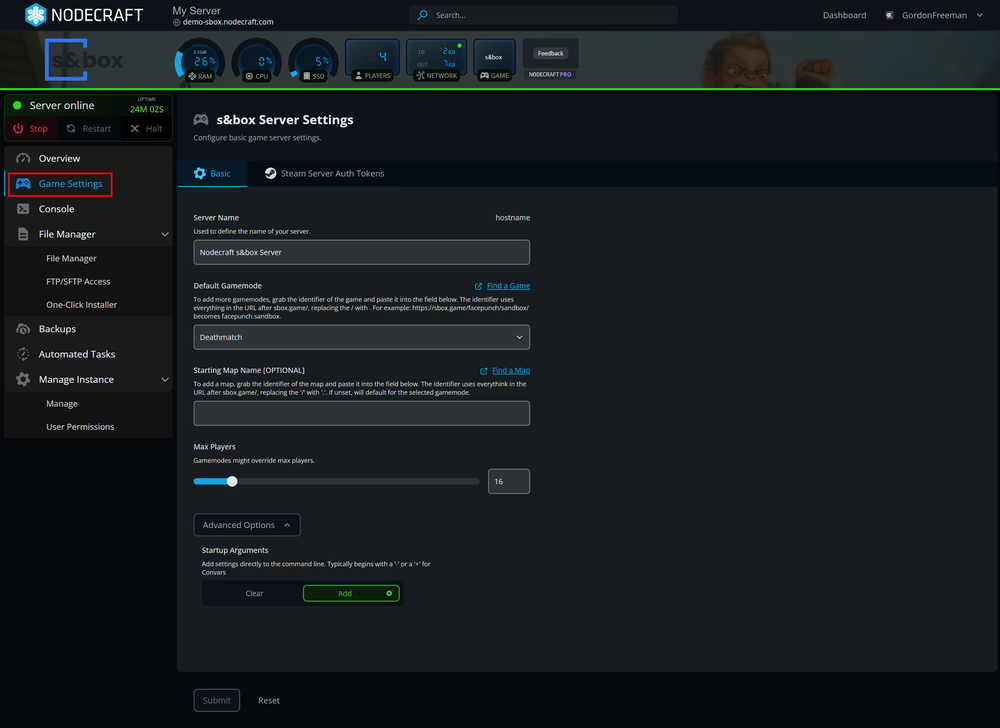
Update the Max Players: In the Basic tab, find the Max Players field and set the number of players you'd like.
Save Changes: Click the blue Submit button at the bottom of the page to save your configuration.
Restart Server: Restart your server for the new max players to initialize.
Quick Tip: If your player count doesn't seem to change after a restart, check the documentation for the specific gamemode you are running; it likely has a built-in player cap that ignores external settings.
Conclusion
Changing your s&box max players is a seamless process through the Nodecraft control panel. Whether you're sticking to the classics or hosting a brand-new community creation, just remember to Save your changes and Restart the server to see the updates in action!w
Need Help?
If you have questions or run into any issues, our support team is here to help! Reach out using the support widget on our website or visit our support center for further assistance.