

Deep Dive into Hytale’s Creative Mode

Creative Mode in Hytale is designed as more than a place to build without limits. It is a full creation environment where worlds, systems, and experiences are developed from the ground up. Instead of focusing on survival or progression, Creative Mode gives players direct access to tools that shape terrain, control characters, build reusable structures, and test ideas in real time.
This deep dive looks at the specific tools and systems that define Creative Mode, how they work together, and why Creative Mode plays such a central role in Hytale’s creation pipeline.
Creative Mode as a Creation Workspace
When entering Creative Mode, traditional gameplay restrictions are removed. Players can fly freely, move quickly through the world, and access every block and item without limits. Health, hunger, and environmental damage are disabled so experimentation can happen without interruptions.
Creative Mode also introduces a dynamic Quick Settings Panel. This panel updates based on the tool currently selected and allows creators to adjust movement behavior, flight speed, and other settings. Building, terrain editing, and precision placement all benefit from different movement styles, and Creative Mode supports that flexibility.
Scripted Brushes and Terrain Shaping
 Source: Hytale Creative Mode
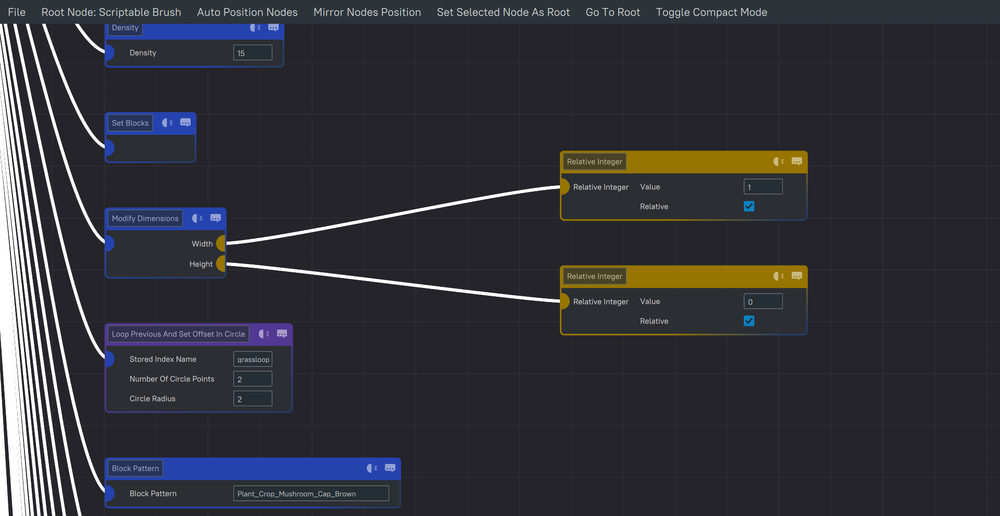
One of the standout features of Creative Mode is the Scripted Brush system. These brushes allow creators to shape terrain quickly while maintaining natural variation and structure. Instead of manually sculpting every hill or path, creators can use brushes to generate landforms, carve valleys, or place architectural shapes in a controlled way.
Scripted Brushes are asset defined, which means they can be edited or expanded by modders. Brushes can be stored in the inventory and used like tools, making large scale world shaping far faster than traditional block by block editing.
Player Models, NPCs, and World Population
Creative Mode includes a Player Model Changer and NPC Browser that provides access to a wide catalog of character models. Players can temporarily change their own model or place NPCs and creatures directly into the world.
These characters can be used for visual detail, testing animations, storytelling, or gameplay interactions. NPCs can deliver dialogue, participate in combat, trigger events, or simply populate towns and environments so they feel lived in rather than empty.
Prefabs and Reusable Structures
Prefabs are a core part of Creative Mode’s workflow. A prefab is a reusable structure or object, such as a building, ruin, or decorative element. The Prefab Browser allows creators to preview and select prefabs, while the Prefab Editor opens them in a dedicated workspace for modification.
Creators can edit prefabs, combine them with other pieces, or save new ones for future use. This makes it easier to maintain consistency across large projects and speeds up the creation of towns, dungeons, and repeated architectural elements.
Precision Placement with the Paste Tool
 Source: Hytale Creative Mode
Once a structure or prefab is ready, the Paste Tool allows it to be positioned with precision. Large objects can be moved, rotated, and aligned before being placed into the world. This level of control is especially useful for detailed builds or when integrating structures into existing terrain.
Prefabs can also be used as brushes, allowing creators to place complex structures repeatedly across an area while maintaining consistent spacing and orientation.
Cinematic Creation with Machinima Tools
Creative Mode includes built in Machinima tools that support cinematic content creation. Camera actors can be placed in the world, keyframes can be set, and camera movement can be animated directly in game.
These tools allow creators to produce trailers, cutscenes, flythroughs, and story sequences without relying on external software. Camera speed, angles, and transitions can all be adjusted as part of the animation process.
Custom Flight, Movement, and Precision Tools
Flight in Creative Mode is fully customizable. Players can adjust speed, inertia, and hover behavior to suit different tasks. Slower movement supports precise placement and editing, while faster movement helps with navigating large environments.
Additional tools support precision work, including shape brushes for placing geometric forms, selection tools for editing large areas, and measurement tools like rulers and laser pointers. These features help creators work accurately at both small and large scales.
Creative Mode and Modding Integration
Creative Mode is closely integrated with Hytale’s modding tools. Mods can be loaded and tested directly inside a Creative world, allowing creators to spawn modded items, entities, and mechanics instantly. Changes can be tested and refined without constant restarts, which supports rapid iteration during development.
This turns Creative Mode into a practical testing environment for both small tweaks and large system changes.
From Creative Mode to Playable Experiences
Most custom content in Hytale begins in Creative Mode. Once a world or system is complete, creators can apply Adventure Mode rules or server settings to control difficulty, progression, and player interaction.
This workflow allows free experimentation early on, followed by structured gameplay later. The same tools used for prototyping are also used to finalize polished experiences.
Final Thoughts
Creative Mode in Hytale is where ideas stop living in your head and start causing problems in the best possible way. You can build freely, test systems, break things on purpose, and fix them without worrying about falling off something very tall for the fifth time.
If you want to place a few blocks and call it a day, Creative Mode has you covered. If you want to accidentally build a fully scripted dungeon at 2 a.m., it is also ready for that. Either way, this is where most worlds begin.
Need Help?
If you have questions or run into any issues, our support team is here to help! Reach out using the support widget on our website or visit our support center for further assistance.