


How to Spawn Items and Vehicles on a Project Zomboid Server

In this guide we are going to cover how you can spawn items and vehicles on your Project Zomboid server. As an admin, you can use these options to provide supplies, replace lost items, or spawn vehicles for players to use.
Spawning Items
Join your server as an admin. If you need to set up admin access, follow our how to become admin guide.
Locate the Admin button on the left side of your screen and click on it.
Click on ItemsListViewer to open the item list.
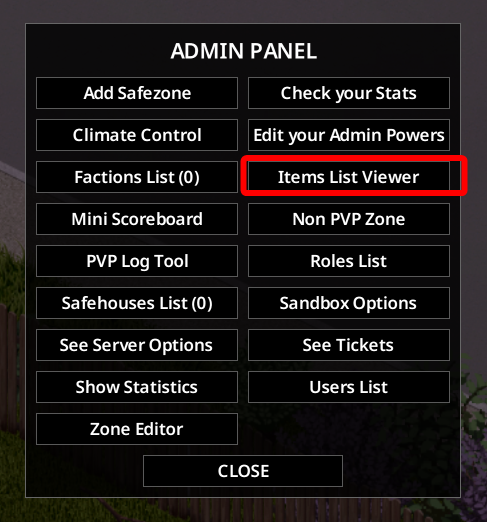
Find the item you want to spawn on the list.
Double-click on the item to spawn it into your inventory.
Spawning Vehicles
Join your server as an admin. If you need to set up admin access, follow our how become admin guide.
Right-click on an open space where you want to spawn a vehicle to open the debug menu.
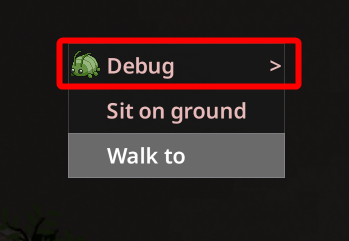
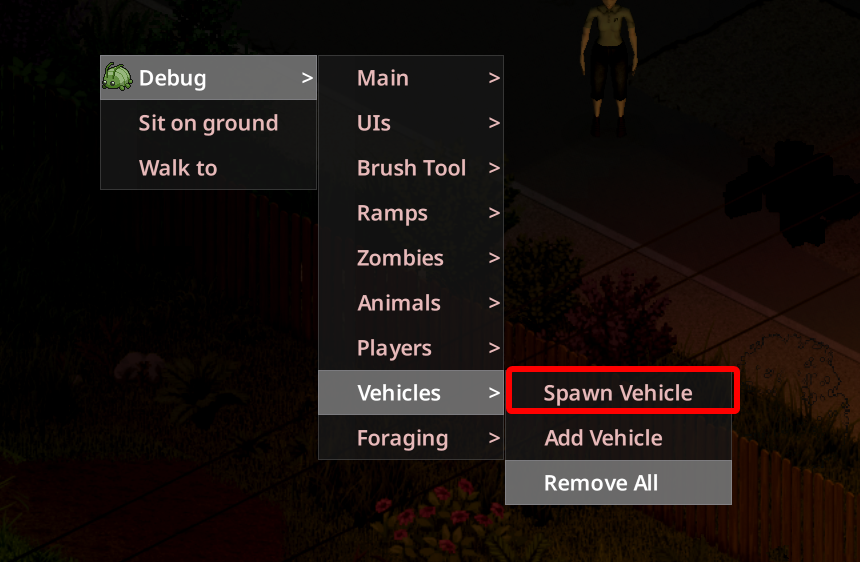
Expand the Debug menu.
Go to Vehicles, then click on Spawn Vehicle.
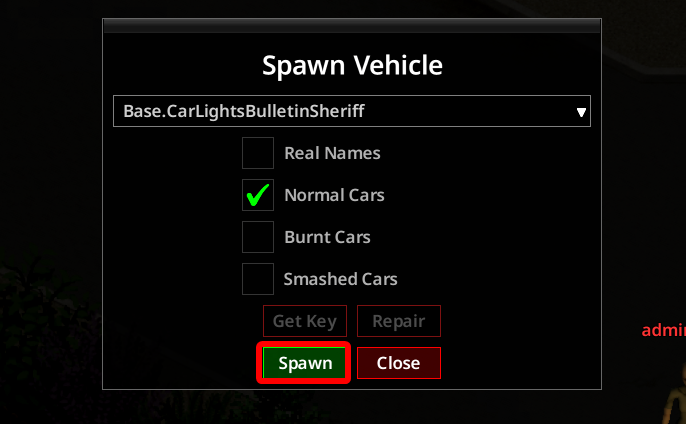
Choose the vehicle you want to spawn with its options and confirm your selection with the spawn button.
Conclusion
You now know how to spawn items and vehicles on your Project Zomboid server. Using the admin item list and the vehicle spawning menu, you can provide supplies and transportation while managing your server.
Need Help?
If you have questions or run into any issues, our support team is here to help! Reach out using the support widget on our website or visit our support center for further assistance.