





Budget Project Zomboid Server Hosting
- Online when you are
- Shuts down when unused
- Wake & Play to resume
$12.52 first month, then
$17.88 per month
$16.69 first month, then
$23.84 per month
$25.03 first month, then
$35.76 per month


Premium Project Zomboid Server Hosting
- 24/7, always online
- Static IP address
- Set automated tasks
$20.99 first month, then
$29.98 per month
$27.99 first month, then
$39.98 per month
$41.99 first month, then
$59.98 per month

* Trials available only while supplies last. A valid cell/mobile phone number will be required to verify your eligibility for a trial. One trial per person.
Budget or Premium?
What is the difference between Nodecraft Plans?
| | Wake & Play Server | | 24/7 Server | |
|---|---|---|
| Starting At SALE! $17.88 $ 12 .52 /MO $12.52 first month, then Get started! Not recommended for this game | Starting At SALE! $29.98 $ 20 .99 /MO $20.99 first month, then | |
Server OnlineLite servers hibernate when unused, and wake up with a link you can give your friends. | Online When You Are Shuts down when unused, Wake & Play anytime to resume | 24/7 Always online, you're always in control |
| yes | yes | |
Easy to use Control PanelAdjust settings and manage your server directly from the control panel. | yes | yes |
DDoS ProtectionDDoS shield protects your server with low latency | yes | yes |
Manual Cloud BackupsProtect your game servers with Nodecraft's Cloud Backups. Included at no extra fee with all plans. | no | yes |
Automated TasksInstantly Automate backups, commands, & Discord. No plugins, mods, or coding required. | no | yes |
 How does a Wake & Play Server work?
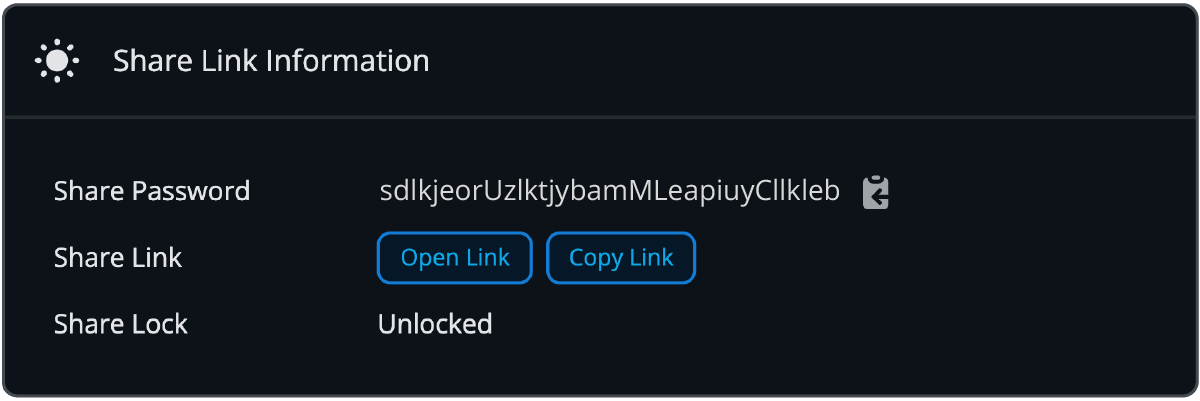
 Go to the Share Settings on the Control Panel.
Copy out the Share Link & Password to give to your friends.
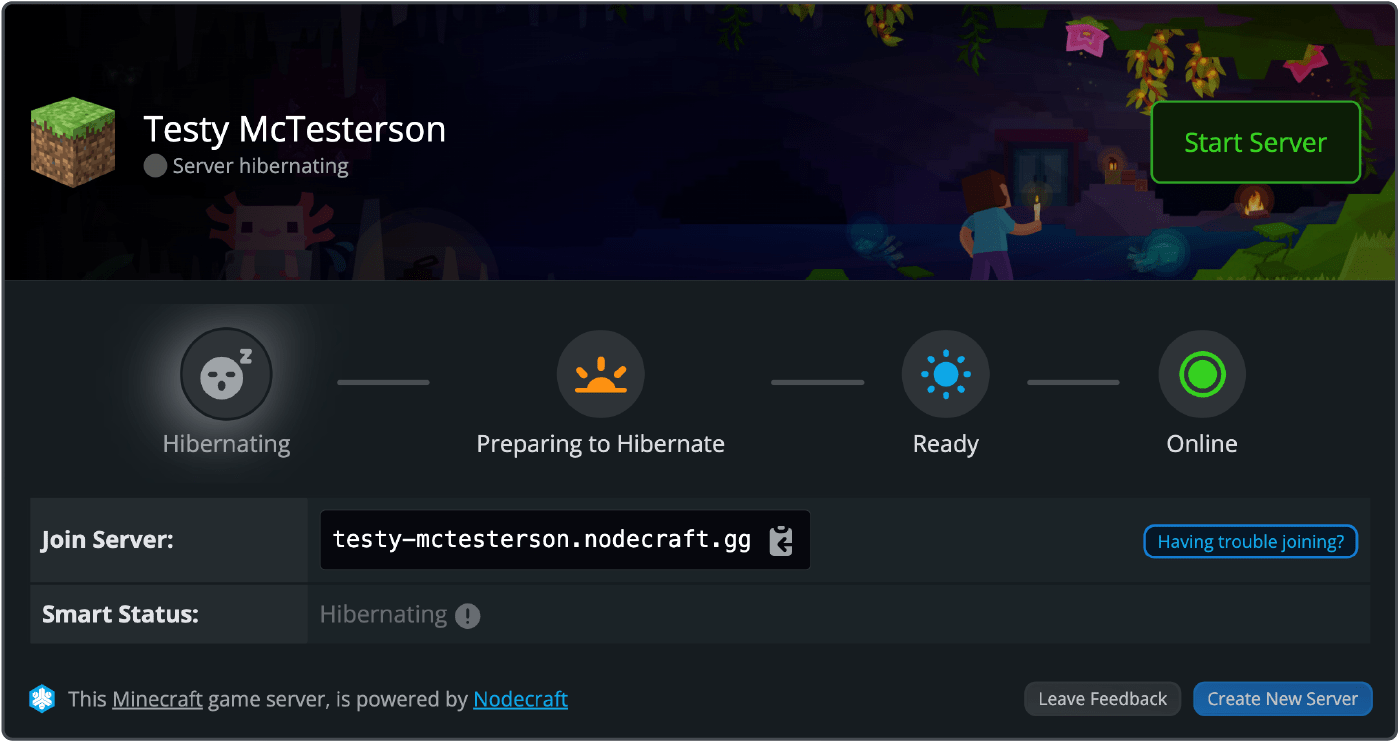
Your friends see this when they click the share link. Hit Start Server to wake it up!
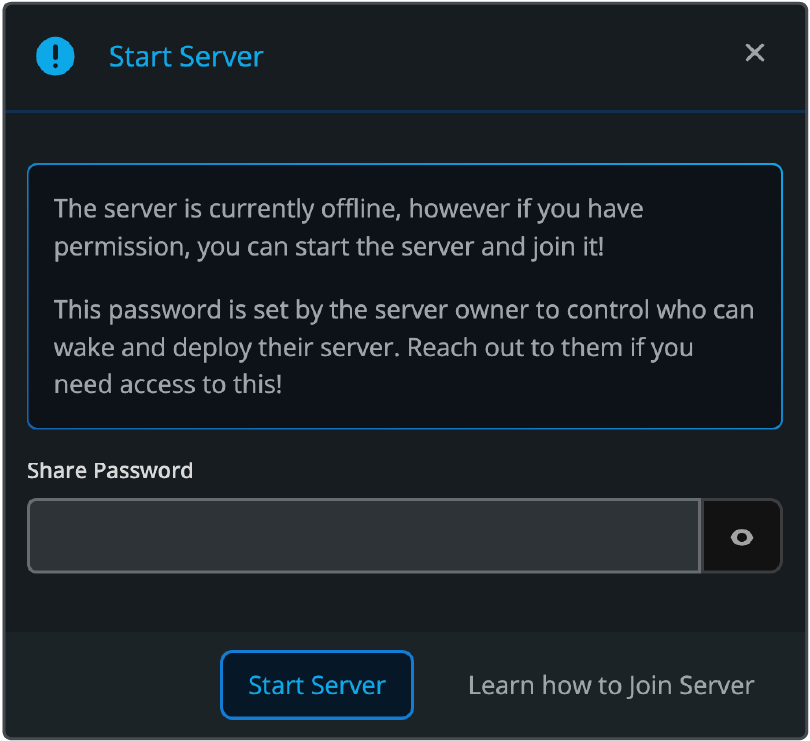
Using the password your friends can start the server anytime!
Launch Your Project Zomboid Dedicated Server Today!
Deploy Knox Country instantly with high-performance hardware, automated cloud backups, and Build 42 Ready support.High-Performance Project Zomboid Dedicated Server Features

Don't let server lag or memory spikes cost your group a long-term survival run. Experience flawless Project Zomboid server hosting powered by high-frequency AMD Ryzen 9 and EPYC CPUs. Specifically tuned to handle Build 42’s expanded map depth, complex crafting, and massive zombie hordes. With built-in DDoS protection and a strict no-overselling policy, your Knox Country world stays smooth, responsive, and online 24/7.
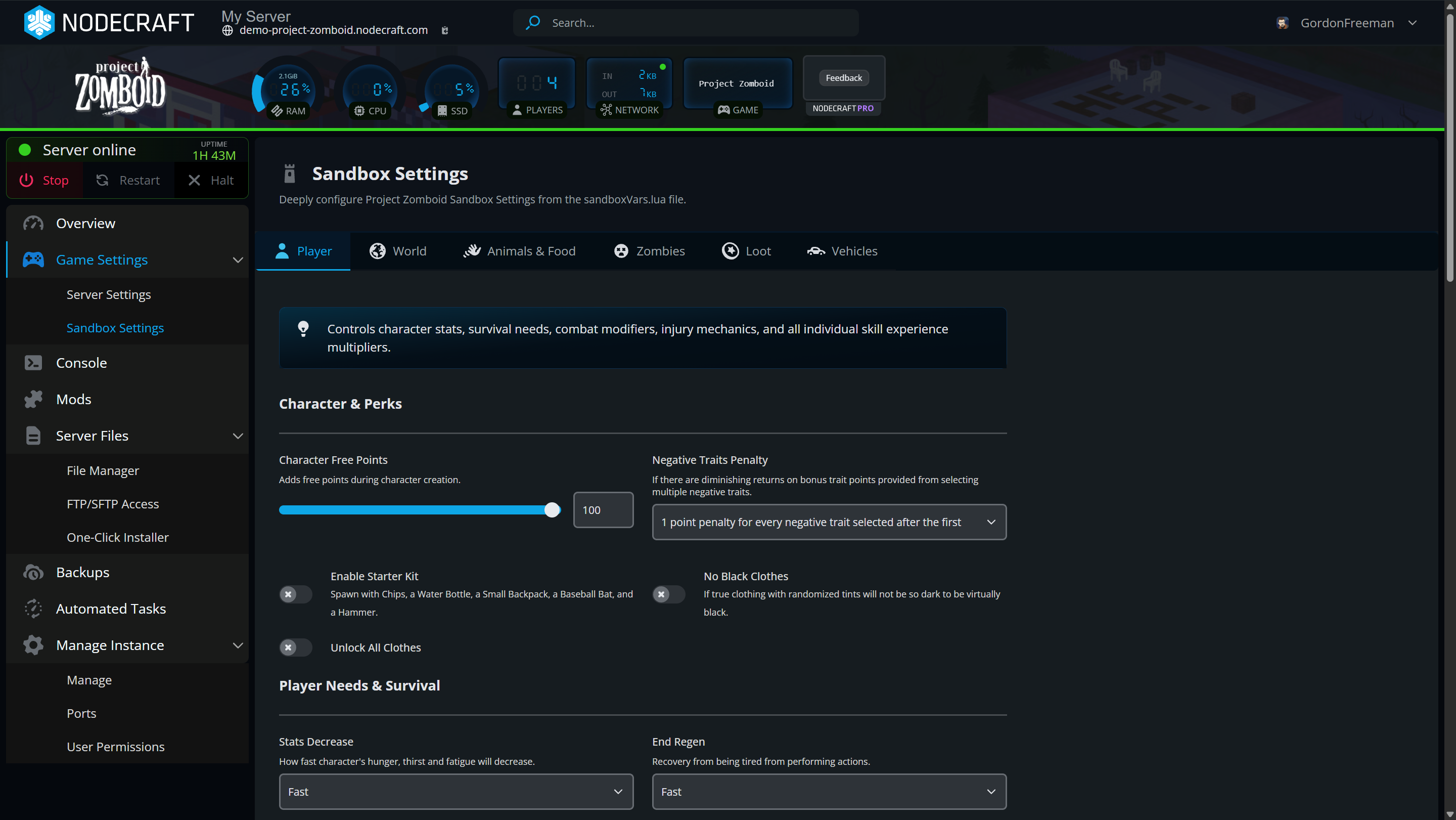
Launch your Project Zomboid dedicated server instantly with our Build 42 Ready web control panel. Effortlessly tweak server config and sandbox settings from world seed and and PVP rules to loot rarity and zombie strength. Keep your Knox Country survival run safe with automated cloud backups.
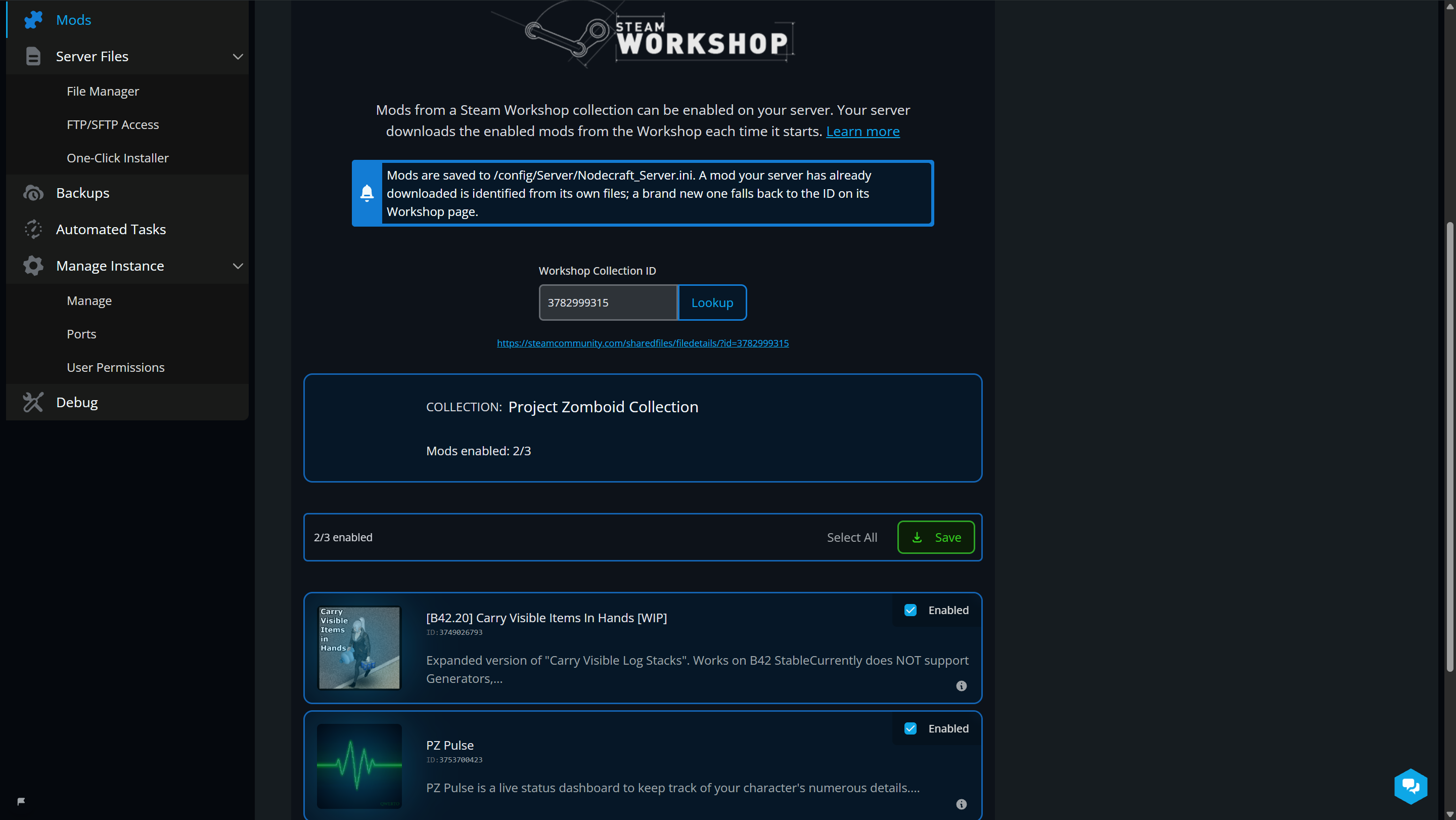
Want to inject even more chaos into Knox Country? Enjoy full Project Zomboid modded server hosting with Build 42 Ready support and 1-click Steam Workshop Mod Management right inside our web control panel.

Take complete control of your Project Zomboid server hosting with developer-grade tools. Seamlessly manage sandbox files and server settings via (S)FTP, execute live admin commands in real-time with our interactive server console, and schedule automated tasks like world backups and server restarts. No complex coding or manual config editing required.
Need a break from Knox Country? Never get locked into just one game. Instantly save your Project Zomboid world and server configuration to the cloud, then swap your dedicated server to any of our 68 supported games or modpacks at zero extra cost, and hop right back to your zombie survival save whenever you're ready.
Ready for Ultimate Zombie Survival?
Get your heavily modded or vanilla Project Zomboid server online in seconds with no technical setup required.- North America LATENCY (ms)
- Seattle, Washington
- San Jose, California
- Denver, Colorado
- Queretaro, Mexico
- Dallas, Texas
- Houston, Texas
- Chicago, Illinois
- Atlanta, Georgia
- Miami, Florida
- Toronto, Canada
- Washington, D.C.
- Boston, Massachusetts
- South America LATENCY (ms)
- São Paulo, Brazil
- Europe LATENCY (ms)
- Madrid, Spain
- London, United Kingdom
- Paris, France
- Amsterdam, Netherlands
- Copenhagen, Denmark
- Prague, Czech Republic
- Zagreb, Croatia
- Bucharest, Romania
- Asia-Pacific LATENCY (ms)
- Paya Lebar, Singapore
- Tokyo, Japan
- Melbourne, Australia
- Sydney, Australia
- Auckland, New Zealand
REAL PLAYER REVIEWS
Why Players Choose Nodecraft for Project Zomboid Server Hosting
My Go-To Game Server HostIn the past I've tried many hosting services. Nodecraft stands out to me because of its great control panels and its lightning fast support. I've personally used Nodecraft Servers for Eco, Minecraft, Terraria and Project Zomboid - each heavily modded - and never had a problem. Whenever I had a question, support stepped up immediately to help. 5/5 would host a server here again anytime :)
Great GUI and staff response.By far the best gui and staff experience I have used for minecraft server hosting (I have tried ALOT of them including all the most common ones and a few more not so well known.) The price itself is fair for what you're getting and I have had next to no lag even running large mod-packs such as all the mods. The quick switch feature is also really well made. I have recently come back to this site after using a few others and the new Lite servers are an amazing deal for what you get. I'd highly recommend it for close friends servers or modpacks. I have now been using them on and off for nearly 3 years.
Nodecraft : Best multi-games hostingNodecraft is a great server host for gaming, and probably the best one if you want to play multiple games on the same server. The prices are quite good and you can freely and easily switch between a lot of popular game. The server UI is also easy to use with all the necessary options (mods included). Lastly their support service is stellar: the very few specific problems I had where solved in a few hours by a really nice and quick support team.
Nodecraft's server support staff will answer your questions within minutes!
On average, we respond to your conversations within 5 minutes and resolve your problems within an hour. Our support staff is available from 11.30am - 8pm CST every day!
You can reach support toll-free by calling us at +1-888-907-3220, or by using the live chat here on our website.
- How to Join Your Project Zomboid Dedicated Server
- How to Become Admin and Enter Commands on Your Project Zomboid Dedicated Server
- How to Change the Settings on Your Project Zomboid Server
- How to Upload Worlds to Your Project Zomboid Dedicated Server
- How to Download and Enable Workshop Mods on Your Project Zomboid Server

Project Zomboid
Project Zomboid is the ultimate in zombie survival. Alone or in MP: you loot, build, craft, fight, farm and fish in a struggle to survive. A hardcore RPG skillset, a vast map, massively customisable sandbox and a cute tutorial raccoon await the unwary. So how will you die? All it takes is a bite..


F.A.Q.
-
What is the difference between Nodecraft Lite and Pro subscriptions?
In short, Nodecraft Lite is the same high quality product as Nodecraft Pro, but with slightly different features to allow us to offer a budget friendly option. You can read more about the feature differences in the comparison chart on this page or visit our knowledge base article below.
What is the difference between Nodecraft Lite and Nodecraft Pro -
Does Nodecraft offer free trials?
Nodecraft offers two options to trial our platform on all of our available plans except the Build Your Own.
Option 1: No credit card required; test our platform for free for 24 hours.
Option 2: Upgrade to a 3-day free trial by entering payment details.
What's included in the trial plan?
You can trial Nodecraft Pro server hosting and customization for any of our games.
If you have any questions regarding the free trial or our services, please contact our support team.
-
Do I need to enter my credit card info to sign up?
No! Our free 24-hour trial is available with no credit card required.
-
What payment methods do you accept?
Nodecraft is working on expanding the payment methods that are supported. Today we support the following payment methods:
All Major Debit/Credit Cards
Apple Pay
Google Pay
PayPal
Securing Payments
Nodecraft protects your payment information by using a PCI certified payment gateway. In doing so Nodecraft never has direct access to any of your sensitive payment details. All communication between customers, Nodecraft, and the payment gateway are secured using TLS (SSL) encryption and modern tokenization.
-
Can I upgrade or downgrade my plan?
You can automatically upgrade or downgrade your Nodecraft Pro Server plan at any time via the billing dashboard, which you will have access to as soon as you log in.
While in Open Beta, if you want to change between Nodecraft Pro and Nodecraft Lite, you will have to cancel your current subscription and create a subscription with the other product.
You can learn more about the process in this article. -
When will I be billed?
Understanding the billing for your game server subscription is important to every server owner. Nodecraft offers a transparent and simple subscription service that ensures you always know when payments are coming and offers full control so there are no surprises.
Every game server subscription is billed with:
Full subscription management, cancel anytime
Payment Reminder 7 days before autopay
A grace period of 3 days, after which unpaid subscriptions are automatically terminated.
Read more about when you will be billed in our knowledgebase.
-
What is your refund policy?
Nodecraft offers a generous and extensive refund and money back guarantee. Learn more in our full refund policy and money back guarantee.
-
Do my servers run 24/7?
Nodecraft offers two products: Nodecraft Pro and Nodecraft Lite. Nodecraft Pro servers are able to be online 24/7 where Nodecraft Lite servers hibernate automatically when unused.
-
Do servers include DDoS Protection?
Our data centers have both external and internal packet scrubbing to protect against large-scale attacks against each server.
-
What is an instance?
Nodecraft allows users to save and swap between games and modpacks by utilizing the server instances available to each plan. These instances can be thought of like save slots that are able to hold a game server's files in a saved state for you to pop back into your server to play later.
Learn more about Instances and how to use them.
-
How many player slots does my server have?
Nodecraft does not limit player slots on your server, so you can have as many player slots as the game allows!
-
How do I cancel my service?
Our entire team understands the anxiety around canceling your online subscriptions. Your game server subscriptions can be canceled instantly and at any time by following the instructions below:
Login to your Nodecraft account and visit the Billing Overview.
Click on the game server subscription you'd like to cancel.
Find the cancellation page from the tabbed navigation.
Complete the cancellation form.
-
Have more questions?
At Nodecraft, we are on a mission to empower every gamer to run their own customized game servers regardless of technical expertise. Our support staff is highly knowledgeable, always human, and happy to help. If you have any additional questions, please reach out!