


How to Claim Safehouses on a Project Zomboid Server

In this guide we are going to cover how you can claim a safehouse on your Project Zomboid server. Claiming a safehouse allows you to establish a home base where you and your group can settle in while surviving the zombie apocalypse.
Claiming a Safehouse
Join your Project Zomboid Server.
Locate a location that you’d like to use as a safehouse. Clear out any zombies that may be in the immediate area.
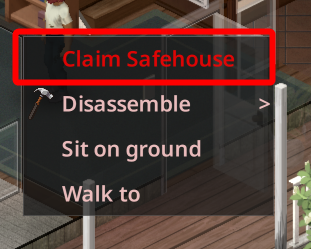
Once the area is free of zombies, right click on the floor of the building you are in and select Claim Safehouse.
Conclusion
You now know how to claim a safehouse on your Project Zomboid server. With a safehouse established, you and your group have a place to call home as you continue exploring and gathering supplies. If at any time you need to edit or remove a safehouse, simply right click on the floor again click on View Safehouses.
Need Help?
If you have questions or run into any issues, our support team is here to help! Reach out using the support widget on our website or visit our support center for further assistance.