


Spawn Items on a Valheim Server

Valheim usually rewards patience, preparation, and another trip into the wilderness. Still, server owners occasionally need a faster way to replace a lost item, test a build, or correct a small problem. The spawn command handles those jobs without changing the server into a permanent creative world. On a dedicated server, the player entering the command needs admin access and the Server devcommands mod on the Valheim client used to connect.
Note: Before continuing, make sure you are considered an admin on the server!
Prepare the Valheim Client
Install a compatible mod manager, such as Thunderstore.
Install Server devcommands by JereKuusela.

Launch the modded version of Valheim.
Open Settings and select Gameplay.
Turn on Enable Console.
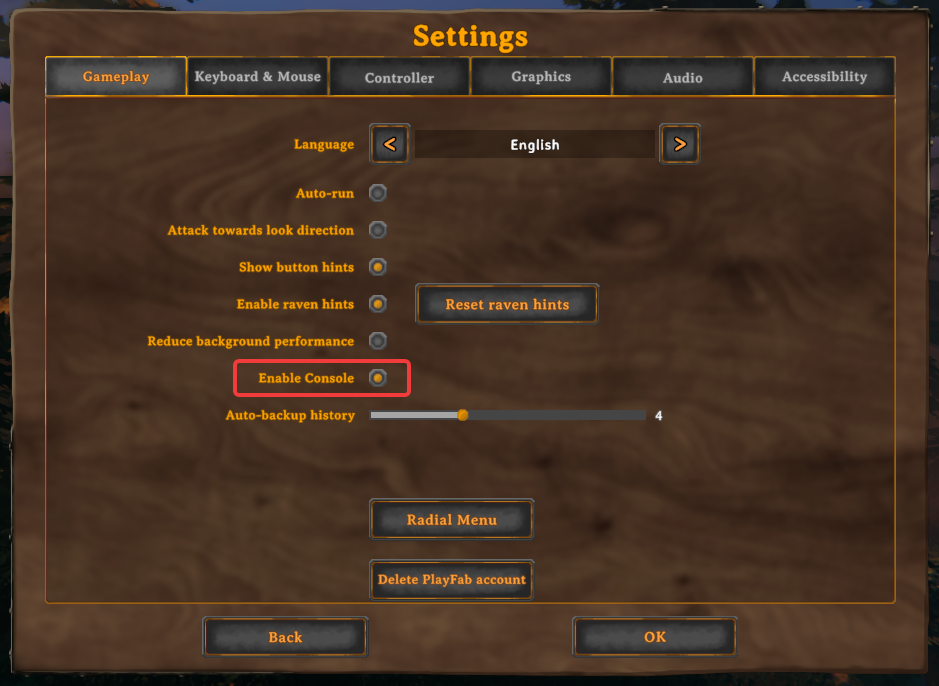
Join your server with the modded client, then press F5 to open the console.
Spawn an Item
Press F5 to open the console.
If needed, enter search_id [name] to find the internal Item ID.
Enter spawn [Item ID] [Amount]. For example, enter spawn Wood 50.
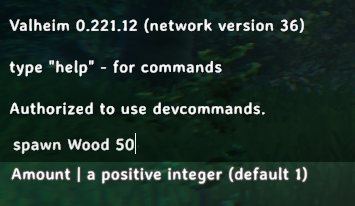
Confirm that the items appeared near your character.

Optional: use spawn [Item ID] [Amount] [Level] when the object supports a level.
Achievement Warning
Using spawn in Valheim 1.0 marks the character and world as cheated and blocks achievements for both. Spawned items are also marked as cheated.
Final Thoughts
Once everything is configured, the spawn command becomes a useful safety net for server owners. It can replace a resource lost to a glitch, speed up testing, or help correct a small problem without changing how the group normally plays. Use it thoughtfully and in sensible amounts, and it will stay a practical admin tool instead of becoming the reason everyone is suddenly running from 500 trolls.
Need Help?
If you have questions or run into any issues, our support team is here to help! Reach out using the support widget on our website or visit our support center for further assistance.