


Best Valheim Server Hosting Providers: What to Look For

Valheim has always been better with a few extra Vikings around, and a dedicated server means your shared world does not disappear every time the person hosting locally logs off. With Valheim 1.0 now live, that matters even more. The game supports full crossplay across PC, Xbox, PlayStation 5, Nintendo Switch 2, Mac, and Linux, while dedicated servers still support up to 10 players.
That 10-player limit also makes comparing Valheim server hosts a little different from other survival games. Giant player-slot numbers are not the selling point here. The hardware behind the server, backups, world management, mod support, crossplay, and how easy the control panel is to use matter much more.
If you are comparing Valheim hosting providers, here is what is actually worth paying attention to before choosing one.
Why Valheim Server Hosting Needs the Right Features
Valheim is not the most demanding dedicated server game out there, but worlds can become much heavier over time. Large builds, terrain changes, multiple players exploring different areas, and mods can all increase the amount of work your server has to handle.
A good Valheim server host should offer:
Strong CPU performance
Enough RAM for your world, especially if you plan to use mods
Fast SSD or NVMe storage
Reliable backups
DDoS protection
Easy world uploads and downloads
Crossplay support
Simple server settings and file access
Mod support for PC-based groups
Helpful support when something inevitably stops behaving
Player slots still matter, but every normal Valheim server tops out at 10 players. That makes it more useful to compare the resources and tools behind those 10 slots instead of choosing whichever host managed to print the largest number on a pricing page.
Best Valheim Server Hosting Providers to Compare
There are plenty of companies willing to rent you a Valheim server. The better question is what you actually get once the server is running.
Nodecraft
Nodecraft is a strong choice for Valheim players who want a server that is easy to manage without giving up control. NodePanel puts server settings, files, worlds, backups, player management, and other tools in one place instead of making routine changes feel like a scavenger hunt.
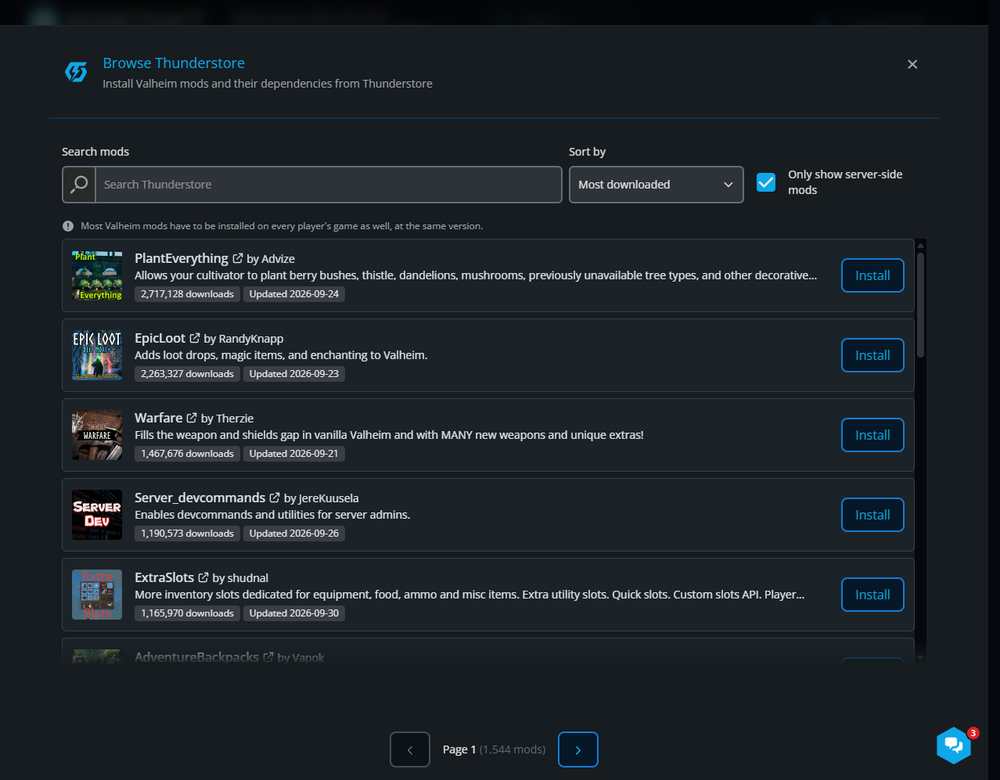
Valheim modding is also built directly into the panel. Nodecraft supports one-click BepInEx setup and Thunderstore integration, so supported mods can be installed and managed without manually moving every file around. Player tools for admins, bans, and allowlists are also available from the dashboard.
Nodecraft offers Lite and Pro Valheim servers depending on how your group plays. Lite servers use Wake & Play and can shut down while nobody is using them, while Pro servers stay online 24/7 and include additional automation and backup options. Plans also clearly list the RAM behind the server, which is much more useful for Valheim than pretending a 10-slot server tells you anything about the hardware running it.
Nitrado
Nitrado is one of the most recognizable game server hosts and remains a common choice for Valheim. Its current Valheim servers support 10 players and include DDoS protection, daily backups, server mods, adjustable rental periods, and the ability to switch the active game.
That makes Nitrado a familiar option, especially for players who have already used its hosting ecosystem. The tradeoff is that some server owners may prefer a different control panel, clearer resource-based plans, or more direct tools for managing worlds, mods, and backups. If those things matter to you, it is worth comparing several hosts before committing.
GPORTAL
GPORTAL is another major Valheim hosting provider. Its current Valheim offering includes 10-player servers, crossplay, backup storage, DDoS protection, save imports, ValheimPlus integration, and one-click BepInEx and Thunderstore mod installation.
For players who want a straightforward managed Valheim server with built-in mod tools, GPORTAL is a reasonable option to compare. Its plans are still centered around the game's 10-player limit, so the same rule applies here: look beyond slots and compare the management tools and resources that come with the server.
Apex Hosting
Apex Hosting offers Valheim plans based on RAM instead of only player slots, with automatic backups and updates, DDoS protection, FTP access, modpack support, and a web-based server panel. It also supports Valheim crossplay.
That makes Apex another option for groups that want a traditional managed host while still having access to files and modding. As with any host, the important part is matching the resources of the plan to the kind of world you expect to run instead of buying entirely on price.
Self-Hosting or Using a VPS
You can also skip a traditional game server provider and run Valheim on your own computer, another machine at home, or a VPS. For experienced users, that gives you a huge amount of control.
It also means you are responsible for the operating system, SteamCMD, networking, firewall rules, updates, backups, monitoring, and whatever mysterious new problem appears at 11:47 p.m. when everyone was supposed to be playing. If managing the server itself sounds fun, a VPS can be a good fit. If you mostly want to play Valheim, managed hosting is usually the easier route.
Why Nodecraft Is Our Top Valheim Hosting Pick
Nodecraft is our top overall pick because it balances ease of use with the tools Valheim server owners actually need. Instead of making routine server management feel like a systems administration exercise, NodePanel keeps settings, worlds, files, backups, players, and mods in one place.
For Valheim, Nodecraft includes:
A control panel built around game server management
RAM-based plans for vanilla and modded worlds
Lite Wake & Play or Pro 24/7 hosting options
Manual and automatic cloud backups
Integrated file management and SFTP access
One-click BepInEx setup
Thunderstore mod integration
Built-in player management for admins, bans, and allowlists
Game switching without throwing away your Valheim setup
DDoS protection
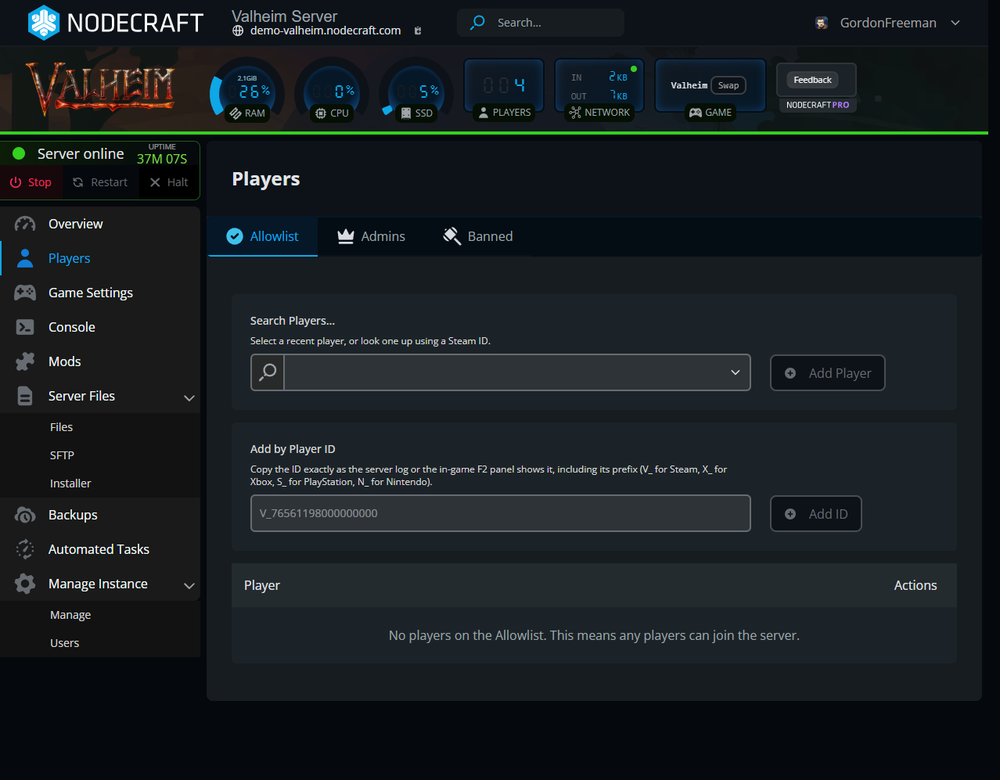
The recent Valheim 1.0 updates to NodePanel make the difference even more noticeable. Thunderstore integration lets you browse and manage supported server mods from the panel, while the Players section gives server owners direct tools for admins, bans, and allowlists.
Nodecraft also makes it clear how much RAM is included with each plan. Since Valheim itself only supports up to 10 players, that is more useful than comparing hosts entirely by slot count. A small vanilla group can choose a lighter plan, while larger builds or heavily modded worlds can move to more resources without changing providers.
What Should You Avoid in a Valheim Host?
The cheapest Valheim server is not automatically the best deal. A low price is considerably less exciting if the host makes backups difficult, hides the resources behind the plan, or expects you to edit every important setting through raw files.
When comparing hosts, be cautious if it is not clear:
How much RAM or processing power the plan provides
How backups are created and restored
Whether you can upload or download your own world
How crossplay is enabled
What mod support is available
Whether you have file access
How easy it is to change settings
What happens when you need support
Mods deserve a little extra attention with Valheim 1.0. Iron Gate does not provide official mod support, and console players do not have the same modding options as PC players. If your group includes several platforms, crossplay and vanilla compatibility may be more important than choosing the host with the longest mod list.
So, Which Valheim Host Should You Pick?
If you want the easiest answer, Nodecraft is our top overall Valheim server hosting pick.
Nitrado, GPORTAL, Apex Hosting, and VPS providers can all work depending on what you need. Nodecraft stands out for players who want clearly defined server resources, a control panel that makes everyday management simple, cloud backups, built-in Valheim mod tools, player management, game switching, and the choice between Wake & Play and a server that stays online 24/7.
The best choice ultimately depends on your group. A few friends starting a fresh vanilla world have very different needs from a long-running server with enormous builds and a Thunderstore profile that has become its own administrative department.
Final Thoughts
The best Valheim server host is not just the one with the lowest price or the most dramatic marketing page. For Valheim, focus on performance, backups, crossplay, mod support, world management, server locations, and how much control you actually have when you need to change something.
Nodecraft is a strong choice for Valheim players who want reliable hosting with the tools to manage, customize, and grow their world without making server administration a second hobby.
Start your Valheim server with Nodecraft and get back to the important part: building something wildly overcomplicated, sailing farther than you planned, and discovering that nobody remembered to bring portal materials.
Need Help?
If you have questions or run into any issues, our support team is here to help! Reach out using the support widget on our website or visit our support center for further assistance.