

All About Sparkworks in Enshrouded

Sparkworks is Enshrouded’s system for making objects interact. Pull a lever to open a door, step on a pressure plate to activate a trap, or trigger an encounter when someone enters a room. It turns a build into something your friends can actually play through.
How Sparkworks Works
A basic setup has an input and an output. The input starts something, such as pulling a lever. The output is what happens next, such as a door opening. The Sparkworks Tool connects the pieces, while a Switchbox opens a visual graph editor for more complicated rules.
| What starts it | What happens | Build idea |
|---|---|---|
| Lever | Door opens | Controlled entrance |
| Pressure plate | Trapdoor opens | Trap or hidden passage |
| Button | Light switches | Interactive room lighting |
| Trigger zone | Enemy spawns | Combat encounter |
| Timer / clock | Signal activates | Timed obstacle course |
You can keep it that simple or add logic. An OR rule activates when at least one connected input is on. A NOT rule reverses a signal. Clocks and delays help control when things happen. Start with one connection before turning your hallway into an engineering project.
How to Get Started
Pick up Contraptions And Mechanisms from Cade Hawthorn, the Carpenter.
Follow the quest marker to the trapped Night Sanctum and search for the Sparkworks Tool.
Craft the Sparkworks Workbench at the Carpenter and place it in your base.
Use the workbench to make interactive props, then try a simple lever-and-light connection.
The workbench requires 2 Nails, 4 Metal Sheets, 2 Copper Bars, and 2 Archaic Essence of any grade.
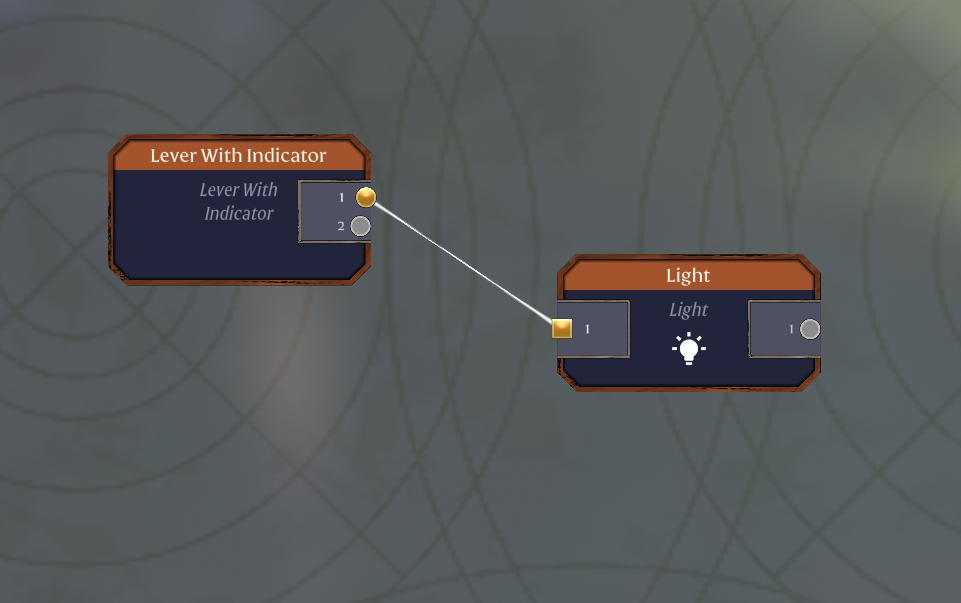
For your first project, place a lever and a light, then use the Sparkworks Tool to connect the lever’s signal to the light. Test it before adding extra rules. Unlike a Push Button’s short signal, a lever holds its state until you use it again.
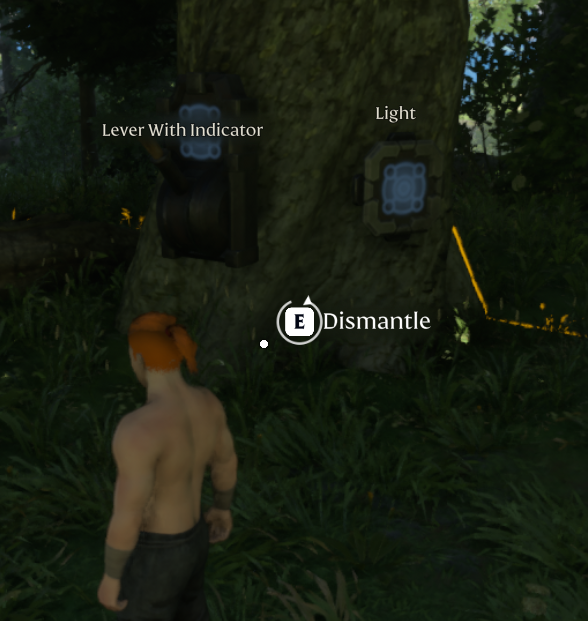
Once that works, try a pressure plate and a trapdoor. Leave yourself a safe route around it while testing. Your first successful connection does not need to be followed by your first successful fall.
Building and Sharing Adventures
Sparkworks supports more than convenient doors. You can build puzzle rooms, parkour courses, traps, water mechanisms, and triggered enemy encounters. For larger creations, the graph editor shows the connections and rules together so you can follow what activates each part.
Adventure Sharing is the separate feature that lets other players discover and visit your world. Players can browse community adventures, search with tags, use Share Codes, and subscribe to worlds. Sparkworks provides the interactive mechanics; Adventure Sharing gives people a way to find and experience them.
Final Thoughts
Start with a switch and one clear result, then build from there. When your group is ready to test its next puzzle or dungeon, explore Nodecraft for the best Enshrouded server hosting service for your co-op adventures.
Need Help?
If you have questions or run into any issues, our support team is here to help! Reach out using the support widget on our website or visit our support center for further assistance.