


How to set Gamepass or Xbox Admins on a Valheim Server

You can make an Xbox or PC Game Pass player an admin through the Players page in your Nodecraft dashboard. The player manager, also used for bans and allowlists, lets you add their complete Platform User ID on the Admins tab without editing adminlist.txt.
Enable Crossplay
Xbox players can only join a dedicated Valheim server when crossplay is enabled. If the player is already able to join your server, you can skip ahead to finding their Platform User ID.
Navigate to your Nodecraft dashboard.
Locate your Valheim server and click Manage.
Click Game Settings in the menu on the left.
Locate Crossplay and make sure it is enabled.
Save your changes and restart the server.
Find a Player’s Platform User ID
Valheim 1.0 uses different Platform User ID formats depending on the player’s platform.
Steam: V_${steamid}
Nintendo Switch 2: N_${ingameid}
Xbox: X_${ingameid}
PlayStation: S_${ingameid}
The information inside ${} represents the player’s actual ID and should not be entered literally. Platform User IDs are case-sensitive, so make sure the complete ID and platform prefix are copied exactly as shown. These ID formats are also used in Valheim’s other player list files.
For more information on how to locate Valheim Player IDs, check out our article here!
Add the Player Through the Dashboard
Navigate to your Nodecraft dashboard.
Locate your Valheim server and click Manage.
Click Players in the menu on the left, then select the Admins tab.
Under Add by Player ID, enter the player's complete ID, including the X_ prefix, and click Add ID.
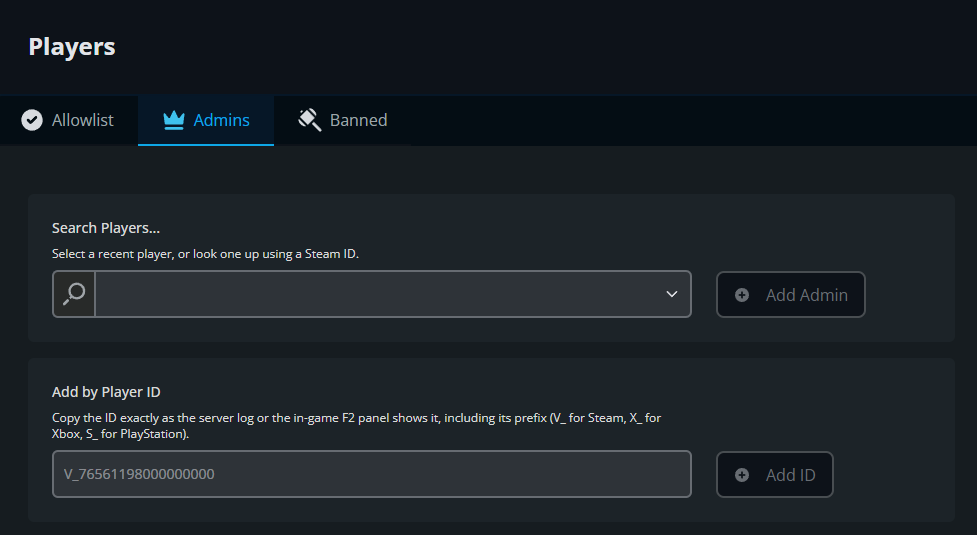
Confirm that the player appears in the admin list. Repeat for any other players you want to make admins.
Have the player reconnect to the server before testing their admin commands.
Final Thoughts
Xbox and PC Game Pass players can help manage your Valheim server once their complete Platform User ID is added through the dashboard. Add the correct X_ ID on the Admins tab, then have the player reconnect to try their admin commands.
Need Help?
If you have questions or run into any issues, our support team is here to help! Reach out using the support widget on our website or visit our support center for further assistance.