


Adding World Modifiers to Your Valheim Server

World modifiers let you shape your Valheim server around the way your group wants to play. You can make combat tougher, increase resource drops, change what happens when players die, or adjust how portals work.
You can choose a ready-made preset or create your own combination from the World tab in your Nodecraft dashboard.
Change World Modifiers from the Dashboard
Navigate to your Nodecraft dashboard.
Locate your Valheim server and click Manage.
Stop the server.
Click Game Settings in the menu on the left, then select the World tab.
Confirm that World Name shows the world you want to configure.
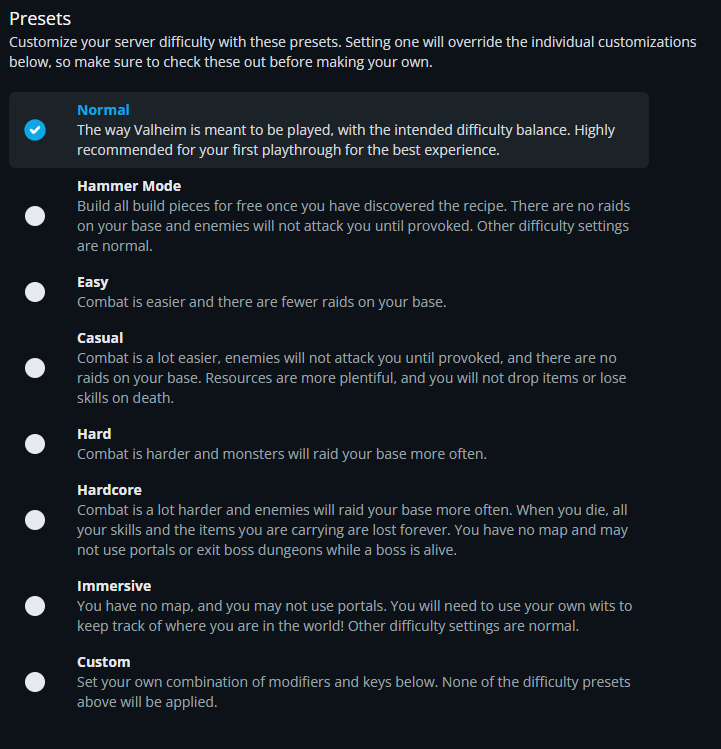
Under Presets, choose the difficulty preset you want to use. Select Custom if you want to set individual modifiers yourself. The available presets are shown below.
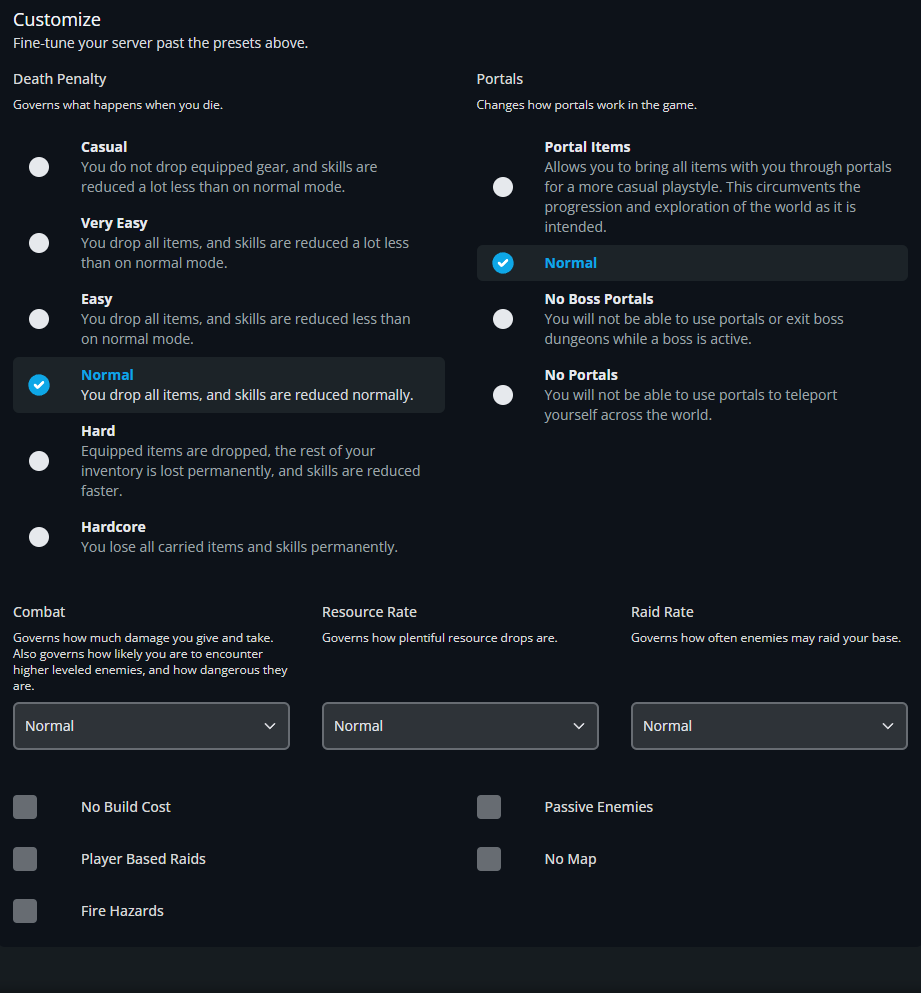
If you selected Custom, scroll to Customize. Adjust Death Penalty, Portals, Combat, Resource Rate, and Raid Rate, then enable any of the checkboxes you want to use. The screenshot below shows these controls.
Click Submit, then start the server.
Join the server and check that your chosen settings are active.
Selecting a preset overrides individual customizations. Use Custom when you want your own combination, and review your settings before clicking Submit.
World Modifier Options
Presets
Presets change several settings together. Normal uses the standard balance. Easy reduces combat difficulty and raids, while Hard increases both. Casual offers a more forgiving experience with passive enemies, no raids, and more resources. Hammer Mode focuses on building, with free construction once recipes are discovered and enemies that attack only when provoked.
Hardcore adds severe death penalties and removes the map, with restrictions on portals and leaving boss dungeons during a fight. Immersive removes the map and portal travel while keeping other difficulty settings normal. Choose Custom to configure the controls below yourself.
Custom Modifiers
Death Penalty controls item loss and skill reduction when a player dies. Read the selected option carefully, especially Hard and Hardcore, which can permanently remove carried items.
Portals controls travel restrictions. Portal Items allows all items through, Normal keeps the standard restrictions, No Boss Portals blocks portal use and leaving boss dungeons while a boss is active, and No Portals disables portal travel.
Combat changes damage dealt and received, the likelihood of higher-level enemies, and the danger of areas.
Resource Rate changes how plentiful resource drops are.
Raid Rate changes how often enemies raid your base.
Additional Toggles
The checkboxes let you switch individual rules on or off. No Build Cost removes building material costs, Passive Enemies makes enemies leave you alone until provoked, Player Based Raids ties raids to individual player progress, and No Map disables the map. Fire Hazards controls whether fire can spread and damage flammable structures.
Restore the Default World Modifiers
Stop the server.
Open Game Settings, select World, and confirm the selected World Name.
Select Normal under Presets to return to the standard difficulty settings.
Click Submit, then start the server.
Final Thoughts
World modifiers give your group room to make Valheim as relaxed or demanding as you like. Choose a preset for a quick setup, or use Custom to keep the parts of the challenge you enjoy and change the ones you don't.
Need Help?
If you have questions or run into any issues, our support team is here to help! Reach out using the support widget on our website or visit our support center for further assistance.