


Valheim Player Commands Overview

Valheim includes player commands that anyone can use without enabling devcommands or becoming a server admin. These commands work in single-player worlds and on dedicated servers, giving players quick ways to manage chat, adjust local settings, check connection information, and reset certain character or world preferences.
Vahleim Command Types
| Command Type | Requirements | Available in Single-Player Worlds? | Available on Dedicated Servers? |
|---|---|---|---|
| Player commands | Player must use the console to enter commands | Yes | Yes |
| Admin commands | The Player's ID must be listed in adminlist.txt | N/A | Yes |
| Cheat commands | Player must use the console and enter devcommands | Yes | No, unless modded |
Using the In-Game Console
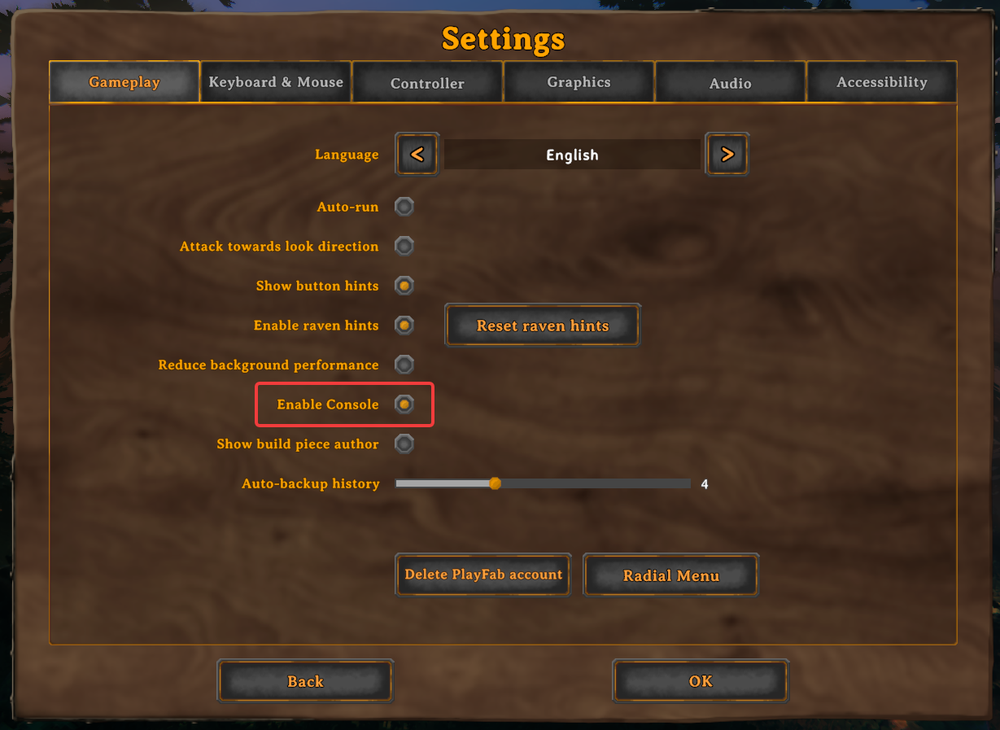
To use the in-game console, open Settings and select the Gameplay tab. Enable the Enable Console option highlighted below, then return to your game and press F5 to open the console. Type help without a leading / to view command information there.
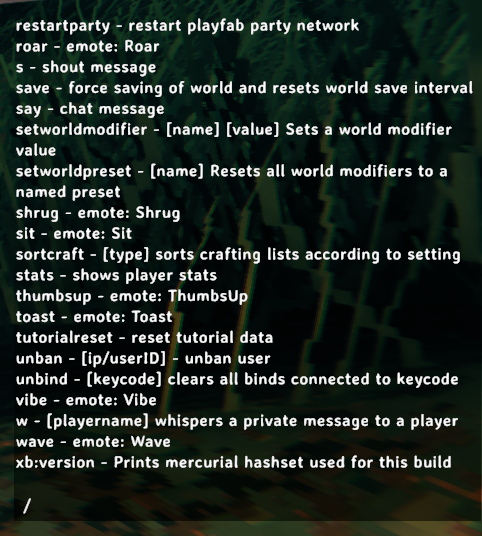
 To view command information in chat, open the chat window, type /help, and press Enter. The list includes command names and short descriptions, as shown below. Enter chat commands with a / at the beginning.
 Some commands change local display or character settings, while others can affect world behavior when run on the server. Reset commands may remove saved preferences, map data, known recipes, or spawn information, so review the effect before using them.
Valheim Player Commands
| Command | Effect | Notes |
|---|---|---|
bind [keycode] [command] | Binds a custom command to a Unity keycode. | For example, bind mouse4 cheer makes the player perform the cheer emote when mouse4 is pressed. Multiple commands can be bound, including devcommands. |
clear | Clears the console window. | — |
cr | Unloads unused assets. | Valheim does this automatically every 20 minutes, but this command forces a fresh unload. |
die | Kills your character. | — |
exclusivefullscreen | Switches between exclusive fullscreen and borderless windowed mode. | — |
filtercraft [name] | Filters the crafting list using part of an item's name. | — |
fov [number] | Changes the field of view. | — |
hidebetatext | Toggles the beta text on or off. | — |
help [page] [pages = 5] | Displays the available commands. | The optional values divide the command list into pages. For example, help 2 4 displays the second quarter of the list. |
info | Displays current system information. | — |
lodbias [number] | Changes the draw distance. | Accepts a value from 1 through 7. |
maxfps [FPS] | Sets the maximum frame rate. | — |
nomap | Toggles map visibility. | When run on the server, this also toggles the nomap global key. |
noportals | Toggles whether portals can be used. | When run on the server, this also toggles the noportals global key. |
optterrain | Converts nearby terrain modifications made before update 0.150.3 to the newer terrain system. | — |
ping | Pings the server and displays your latency. | — |
printbinds | Displays your current custom command bindings. | — |
printseeds | Displays the seeds and positions of nearby dungeons. | — |
resetbinds | Removes all custom command bindings. | — |
resetknownitems | Resets the character's known items and recipes. | Use carefully because this removes discovery progress for the character. |
resetplayerprefs | Resets saved settings and variables. | This does not reset the saved game. |
resetsharedmap | Removes shared map data received from a cartography table. | — |
resetspawn | Resets the character's spawn location. | — |
resetworldkeys [name] | Resets world modifiers to their default values. | — |
respawn | Kills the character and begins the respawn process. | — |
restartparty | Restarts the PlayFab party network connection. | — |
s [message] | Sends a shout message in chat. | — |
say [message] | Sends a normal chat message. | — |
setworldmodifier [name] [value] | Sets a world modifier to the specified value. | — |
setworldpreset [name] | Resets all world modifiers to the selected preset. | — |
sortcraft [type] | Changes how crafting lists are sorted. | — |
tutorialreset | Resets the list of tutorial messages the character has viewed. | — |
tutorialtoggle | Toggles tutorial messages on or off. | — |
unbind [keycode] | Removes all custom command bindings assigned to a Unity keycode. | — |
w [player name] [message] | Whispers a private chat message to another player. | — |
xb:version | Displays the Mercurial changeset hash used for the current build. | — |
Using Command Parameters
Text inside brackets is a parameter that must be replaced with the value you want to use. Do not type the brackets themselves. For example, bind mouse4 cheer assigns the cheer command to mouse4, while w PlayerName Hello sends a private message to the named player.
Commands such as fov [number], lodbias [number], and maxfps [FPS] require a number. Commands such as nomap and tutorialtoggle work as toggles, so running the same command again reverses the setting.
Final Thoughts
Valheim player commands give every player access to useful chat, display, network, crafting, and reset tools without requiring admin access or devcommands. Use the help command whenever you need to review what is available and take extra care with reset commands that change character or world information.
Need Help?
If you have questions or run into any issues, our support team is here to help! Reach out using the support widget on our website or visit our support center for further assistance.