


Valheim Cheat Commands Overview

Valheim cheat commands let you experiment with your character, spawn items, change the world, and control the camera. Available commands depend on your current session: some work while connected to a server, while others are restricted to single-player or a manually hosted game. Enabling devcommands or being listed in adminlist.txt does not bypass those restrictions.
Note: Cheat commands are available in singleplayer unless your server is modded!
Vahleim Command Types
| Command Type | Requirements | Available in Single-Player Worlds? | Available on Dedicated Servers? |
|---|---|---|---|
| Player commands | Player must use the console to enter commands | Yes | Yes |
| Admin commands | The Player's ID must be listed in adminlist.txt | N/A | Yes |
| Cheat commands | Player must use the console and enter devcommands | Yes | No, unless modded |
Cheats and Achievements
As of Valheim 1.0, most cheat commands permanently block achievements for the current character and world. Spawned items are also marked as cheated; a player who picks them up is temporarily ineligible for achievements until all cheated items are removed from their inventory. Turning devcommands off does not undo a permanent cheat flag. Review any in-game confirmation before proceeding.
Enable Cheat Commands
Open Settings and select Gameplay. Turn on Enable Console, highlighted below, then return to your game and press F5 to open the console.
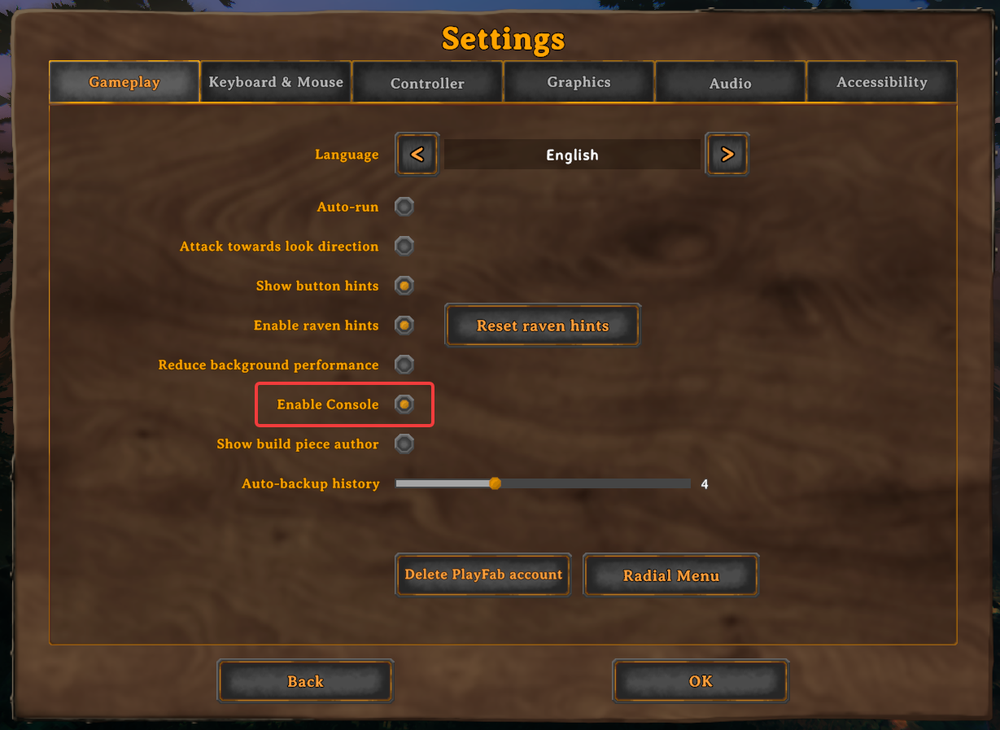
Type devcommands and press Enter, responding to any confirmation shown by the game. The console displays Dev commands: True when enabled, as shown below. You can then enter a command without a leading /. Availability still depends on the command and your session. Type devcommands again to disable access.

Disabling devcommands does not reverse changes already made to your character or world. Make backups before testing destructive commands.
Command Restrictions on Servers
You can enable devcommands while connected to a server, but only some commands are allowed there. If a command is unavailable in your current session, the console reports that it is not valid in the current context. The example below shows fly being rejected even though devcommands is enabled. This does not mean the activation failed and enabling it again does not remove the restriction.
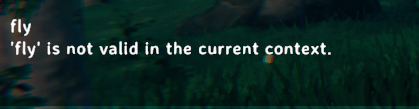
The table describes each command's effect; it is not a list of commands confirmed to work on every server. Check the console response for the command you are using. Commands restricted in a vanilla server session may require single player, a manually hosted game, or a compatible modded setup.
Valheim Cheat Commands
| Command | Effect | Notes |
|---|---|---|
addstatus [name] | Applies a status effect. | Examples include Rested, Burning, SoftDeath, and Wet. |
aggravate | Makes nearby neutral creatures hostile. | Affects neutrals within 20 meters. |
beard [beard#] | Permanently changes your beard. | Omit the argument to remove the beard. |
clearstatus | Removes active status effects. | Removes beneficial and harmful effects. |
dpsdebug | Toggles damage-per-second debug output. | Run again to turn the output off. |
env [env] | Overrides the environment for testing. | Use env followed by an environment name. The supplied list includes Clear, Twilight_Clear, Misty, Darklands_dark, Heath clear, DeepForest Mist, GDKing, Rain, LightRain, ThunderStorm, Eikthyr, GoblinKing, nofogts, SwampRain, Bonemass, Snow, Twilight_Snow, Twilight_SnowStorm, SnowStorm, Moder, Ashrain, Crypt, and SunkenCrypt. Names containing spaces are reproduced from the supplied reference; confirm accepted spelling in your game's command suggestions. Run resetenv to return to normal. |
exploremap | Reveals the whole map. | Use resetmap to hide the map again. |
event [name] | Starts a named event. | Use the event's internal name. |
ffsmooth 1 | Enables smooth free-camera movement. | Use ffsmooth 0 to restore normal movement. |
forcedelete [radius=5] [*name] | Deletes nearby objects within the chosen radius. | Defaults to 5 meters, up to 50 meters. An optional ID filter limits deletion to IDs containing that text. Players, tombstones, the Valkyrie, points of interest, dungeons and their rooms, Vegvisirs, and starting-temple boss stones are never removed. Back up your world before deleting objects. |
find [text] [pingmax] | Finds matching objects and marks their positions. | pingmax defaults to 1. Values above 1 place map pins instead of a single ping. |
findtp [text] | Finds matching objects and teleports you to the nearest. | Check the search text before running it. |
fly | Toggles flight. | Equivalent to Z while debug mode is active. |
freefly | Toggles a free camera. | Use ffsmooth to adjust camera smoothing. |
gc | Displays garbage-collection information. | Diagnostic output. |
genloc | Redistributes locations that have not been placed. | Changes pending world-location placement. |
ghost | Toggles ghost mode. | Enemies ignore you while it is active. |
god | Toggles invulnerability. | Lethal damage leaves your health at 1 rather than killing you. |
goto [x] [z] | Teleports you to world coordinates. | Use pos to check your current coordinates. |
hair [hair#] | Permanently changes your hair. | Omit the argument to remove your hair. |
heal | Refills health, stamina, and eitr. | Restores all three resources. |
itemset [name] [keep] | Grants a predefined equipment set. | Without keep, current items are dropped. Sets also change skills. Meadows: Skills 1; wood and flint weapons with a Bronze pickaxe. BlackForest: Skills 10; wood and flint weapons. Swamps: Skills 10–20; bronze weapons and armor. Mountains: Skills 25; iron weapons and armor. Plains: Skills 35; silver weapons and wolf armor. PlainsBoss: Skills 40; blackmetal weapons and padded armor. Mistlands: Skills 70; upgraded blackmetal weapons and padded armor. MistlandsGear: Skills 70; Mistlands weapons and carapace armor. MistlandsMage: Skills 70; eitr armor, magical staffs through Mistlands, and eitr food. MistlandsWarrior: Skills 70; Mistlands weapons and carapace armor. Ashlands: Skills 30; all Ashlands weapons plus flametal and embla armor. AshlandsMage: Skills 30; magical staffs through Ashlands, embla armor, and eitr food. AshlandsWarrior: Skills 30; Ashlands weapons and ammunition, flametal armor, and food. AshlandsFood: Skills 30; ten of each Ashlands food. AshlandsWeapons: Skills 30; all variants of Ashlands weapons. AshlandsMedium: Skills 30; Ashlands weapons, Ask armor, and food. Fisherman: Skills 40; a fishing rod, 50 of each bait, five of each fish, and Fenris armor. |
killall | Kills nearby enemies and tamed creatures. | Does not kill players. |
killenemies | Kills nearby enemies. | Equivalent to K while debug mode is active. |
killtame | Kills nearby tamed creatures. | Includes your tamed animals. |
listkeys | Lists global keys. | Useful before changing progression-related keys. |
location [name] | Spawns a location instance. | Permanently disables saving. |
location [name] SAVE | Spawns a location while keeping saving enabled. | The SAVE argument changes the saving behavior. |
model [0-1] | Switches between masculine and feminine character models. | Use 0 or 1. |
nextseed | Regenerates the next dungeon with a forced seed. | Permanently disables saving. |
nocost | Toggles building and crafting without resource costs. | Equivalent to B while debug mode is active. |
players [number] | Overrides difficulty scaling. | Use 0 to restore automatic scaling. |
pos | Displays your position coordinates. | Use the x and z values with goto. |
printcreatures | Displays counts and levels of active creatures. | Diagnostic output. |
printlocations | Lists loaded locations and their positions relative to you. | Includes distances and offsets. |
puke | Clears active food effects. | Returns health and stamina to their base values. |
raiseskill [skill] [amount] | Changes a skill by the specified amount. | Use All for every skill. A negative amount lowers the skill. |
randomevent | Starts a random event. | Use stopevent to stop the active event. |
recall [name] | Teleports matching players to your position. | Omit the name to recall all players. |
removebirds | Removes active birds. | Applies to currently active birds. |
removedrops | Removes nearby dropped items. | Equivalent to L while debug mode is active. |
removefish | Removes active fish. | Applies to currently active fish. |
removekey [name] | Removes a specified global key. | Can affect world progression. |
resetcharacter | Resets all character data. | Use only on a character you are prepared to reset. |
resetenv | Clears the environment override. | Restores normal environmental behavior. |
resetkeys [name] | Removes all global keys. | The name parameter has no effect; this does not limit the reset to one key. |
resetmap | Hides the entire map. | Clears revealed map coverage. |
resetskill [skill] | Resets a skill to level 0. | Use All to reset every skill. |
resetwind | Clears the wind override. | Restores normal wind angle and intensity. |
save | Saves the current world state. | Also appears in the admin utility list; it is not exclusively a cheat command. |
setfuel [value] | Changes fuel in nearby fire sources. | Defaults to 10 and does not overfill. Negative values remove fuel down to zero. |
setkey [name] | Adds a global key. | Can change world progression conditions. |
setpower [name] | Sets your Forsaken power and resets its cooldown. | Examples include GP_Eikthyr and GP_TheElder. |
skiptime [seconds = 240] | Moves the world clock by the specified seconds. | Defaults to 240 seconds. Moving backward does not update object timestamps, which can cause the following issues until time catches up: Enemy spawn zones stop spawning enemies. Animals and plants stop growing. Fermenters, smelters, and kilns may stop processing. Rebuilding an affected processing structure can fix its timestamp issue. |
sleep | Advances time by one day. | Skips forward without normal waiting. |
sortcraft | Sorts the crafting list. | Also available among player commands. Sorting options: Name: Alphabetical order. Type: Groups items by category, then alphabetically: materials; food excluding feasts; one-handed melee and thrown weapons; bows and crossbows; shields; helmets; chest armor; arrows and bolts; leg armor; two-handed melee weapons and scythes; light sources; miscellaneous items; capes; utility items; tools; TwoHandedWeaponLeft; and ballista ammunition. Weight: Lightest to heaviest, then alphabetical. Does not account for total weight per craft or the maximum quantity you could craft. Count: The supplied reference does not establish how this ordering is calculated. Original: Restores default ordering. |
spawn [entity name] [amount] [level] | Spawns the requested entity, quantity, and level. | Use an internal entity ID; see the Item IDs list. For example, spawn Wood 10 creates ten Wood items. An entity name ending in * spawns each entity whose ID contains the search text. Items spawn individually before stacking. Spawning thousands may freeze the game. Creatures at level 10 or above may freeze the game on death by dropping thousands of items. Some spawned entities cannot be removed without mods. |
stopevent | Stops the active event. | Works with events started through event or randomevent. |
tame | Tames nearby creatures that support taming. | Does not make every creature type tameable. |
test [value] | Toggles a test value. | oldcomfort restores the older, non-optimized comfort calculation. |
time | Displays the current time and whether sleeping is possible. | Reports the current world-time state. |
timescale [target = 1] [fadetime = 0] | Changes simulation speed, up to 5x. | Supports speeds up to 5x. A target of 1 is normal speed; fadetime controls transition duration. A target of 0 pauses simulation. Freefly remains available while paused. Opening the single-player pause menu with Esc clears time scaling. |
tod [0-1] | Overrides the time of day. | 0 and 1 are midnight; 0.5 is noon. Use -1 to restore normal time. |
wind [angle] [intensity] | Overrides wind direction and strength. | Angle: 0–360 degrees. 0 is wind from the south; 270 is wind from the east. Intensity: 0–1. Example: wind 90 0.5 creates moderate wind from west to east. Run resetwind to restore normal wind. |
The table follows the supplied cheat-command list. Some entries, including save and sortcraft, also appear in other command categories and are not exclusive to devcommands. The keyboard equivalents mentioned in the table apply only while debug mode is active.
Using Command Parameters
Replace bracketed parameters with the values you want, without typing the brackets. Values shown after = are defaults. Use internal IDs where a command expects an entity, effect, event, location, or power name. For example, raiseskill Run 10 raises Run by 10, while raiseskill Run -10 lowers it by 10. Use All where supported to apply a skill change to every skill.
For a small spawning test, enter spawn Wood 10 in a supported game context to create ten Wood items.
Final Thoughts
Cheat commands are useful for building experiments, testing equipment, and exploring Valheim's systems in supported game contexts. Command availability differs on servers. Keep backups, check each command's effect, and consider the achievement impact before making changes. Turning cheats off stops further cheat-command use but does not restore deleted objects or undo permanent changes.
Need Help?
If you have questions or run into any issues, our support team is here to help! Reach out using the support widget on our website or visit our support center for further assistance.