


How to Make a Space Engineers Server Private
In this guide we are going to cover how you can make your Space Engineers private. Making your server private is a great option if you only want to have certain people who have the information to join. There are few different online modes that you can set on the server.
Making Your Server Private
Open your Dashboard
Locate your Space Engineers server and click on the Panel button.
Once on your panel, stop your server and open your File Manager.
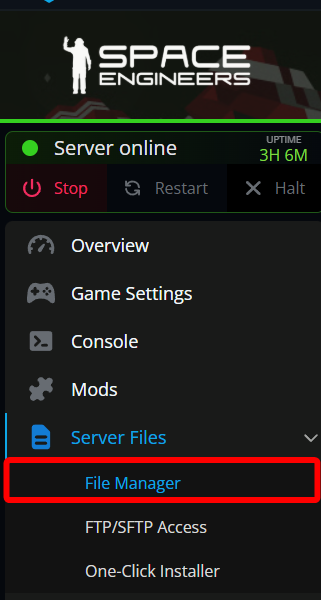
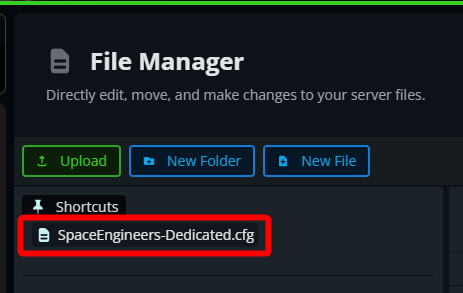
Once on the file manager, locate the SpaceEngineers-Dedicated.cfg under the shortcuts section and double click it to open the file.
Once the file is open locate the OnlineMode section which should be near the top of the file.
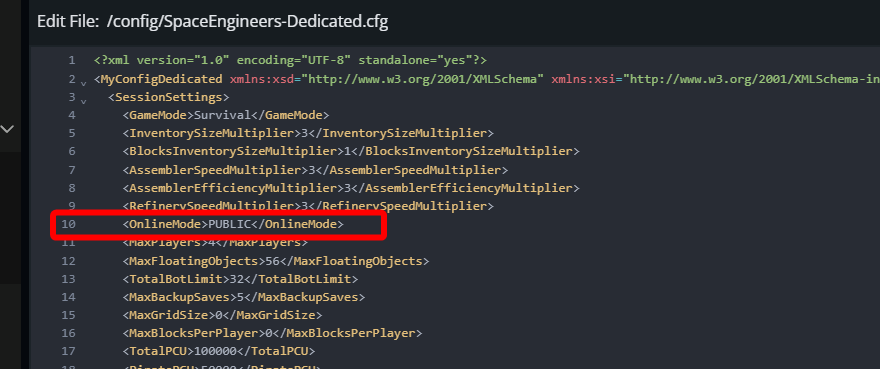
By default, the server will be set to PUBLIC. There are 3 different modes you can set it to.
PUBLIC will be the mode which allows anyone to see and join the server.
PRIVATE will only allow players to directly connect using the servers IP:PORT.
FRIENDS will use steam's internal friend system so only those on your friends list will be able to see and join the server.
Once you have set your desired mode, click on Save Changes.

Start your server.
Conclusion
You have now set up your server to no longer be a public server but a private server using only the IP:port to join or only those who are on your steam friends list. If you are just wanting a server for friends/family, changing the server to a private mode is a great way to ensure only those you intend can join.
Need Help?
If you have questions or run into any issues, our support team is here to help! Reach out using the support widget on our website or visit our support center for further assistance.