---
title: How to Add Oxygen to a Space Engineers Server
description: Learn how to enable oxygen usage on your Space Engineers server by updating your world’s configuration file in the Nodecraft dashboard.
source: "https://nodecraft.com/support/games/space-engineers/how-to-add-oxygen-to-a-space-engineers-server"
image: "https://dynamic-assets.nodecraft.com/signedurl/w7vokBAexMnVlnMZ1Q/image.jpg?modifications=W3sibmFtZSI6InRleHQiLCJ0ZXh0IjoiSG93IHRvIEFkZCBPeHlnZW4gdG8gYSBTcGFjZSBFbmdpbmVlcnMgU2VydmVyIn1d&s=6d0ce90f1eb5b9cc9e0b9733c2d444219094319de155ba32b7ad1466fff85790"
published: "2026-11-09T20:53:00.757Z"
updated: "2026-11-09T20:53:00.757Z"
---
# How to Add Oxygen to a Space Engineers Server
Learn how to enable oxygen usage on your Space Engineers server by updating your world’s configuration file in the Nodecraft dashboard.
In this guide we are going to cover how you can enable oxygen usage on your Space Engineers server.
## Enabling Oxygen
1. Open your [Dashboard.](https://app.nodecraft.com/dashboard)
2. Locate your Space Engineers server and click on the **Manage** button.
3. Stop your server before editing the configuration file.
4. Under **Files & Backup**, click on **Server Files**.
5. Navigate to **/config/Saves/World**.
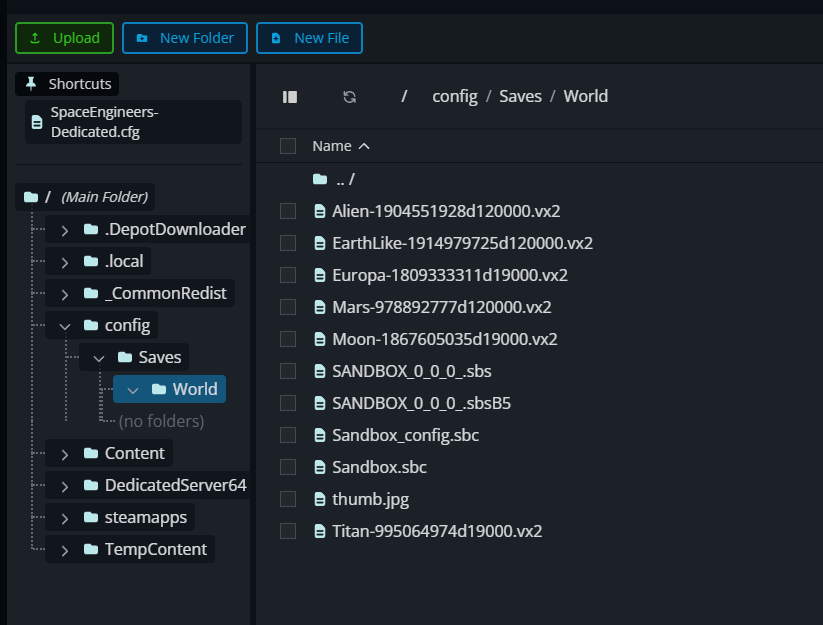
6. Double-click on **Sandbox\_config.sbc** to open the file.
7. Look for the following line, which should be around halfway through the file: **false**
8. Change **false** to **true** so the line looks like this: **true**

9. Click on **Save Changes** to save the file.
10. Start/Restart your server to apply the change.
## Conclusion
You have now enabled oxygen on your Space Engineers server by updating your world’s configuration file. Players will now be held to oxygen usage and requirements while playing on the server.