


Reset the World on a Project Zomboid Server

This guide will be covering the process to reset your world on your Project Zomboid server. Resetting your world is an easy way to give your server a fresh start while retaining your server settings. It’s recommended that you backup your server before proceeding but you can also complete this process without deleting the world if you may want to return to it later.
Open your Dashboard
Locate your Project Zomboid server and click on the Panel button.
Once on your server, Stop the server.
Go to the File Manager tab.
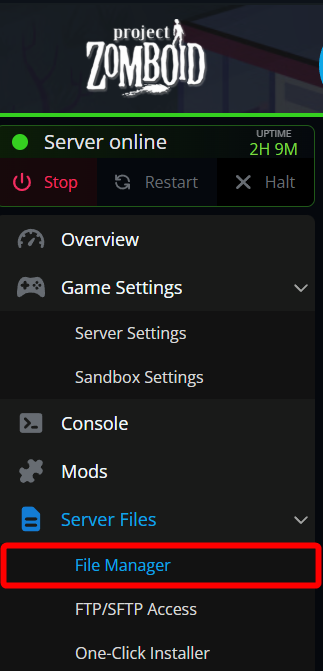
Once on the file manager, navigate to /config/Saves/Multiplayer.
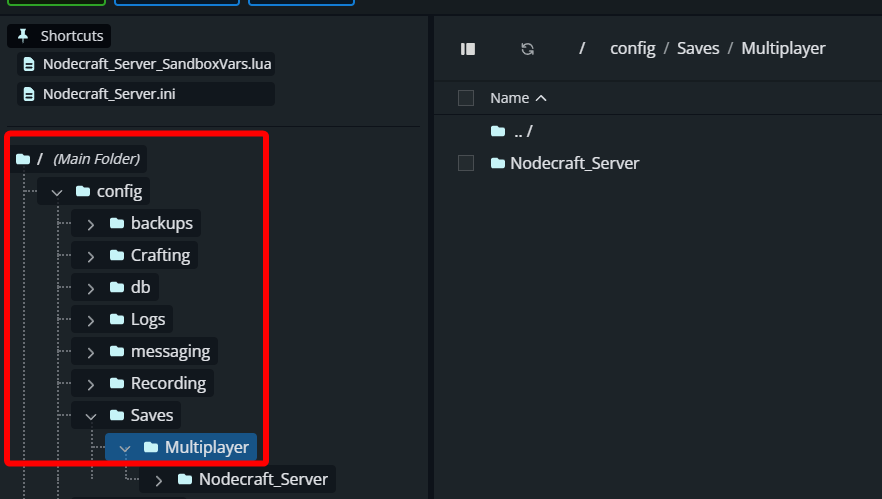
You should now see a folder that is named Nodecraft_Server. At this point you can right click on Nodecraft_Server and Rename it, archive it by compressing it or just delete it. If you may want to return to the world later renaming it or archiving will be the best option. If you know you don’t want to return you can just delete it.
Note: If you delete the world without a backup, it will not be recoverable.
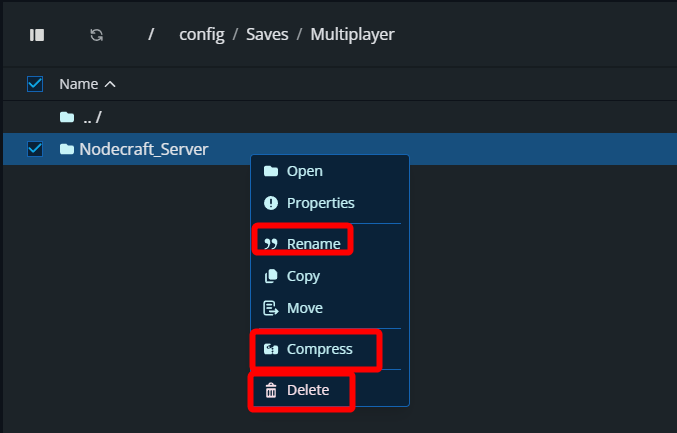
Once you have renamed the world or deleted it, Start your server.
Conclusion
You have now reset the world on your Project Zomboid server. Your server will now feel like it’s just as the day your first started it, but your settings will have been retained.
Need Help?
If you have questions or run into any issues, our support team is here to help! Reach out using the support widget on our website or visit our support center for further assistance.