


Change the Server Visibility on a Project Zomboid Server

In this guide we’ll be covering the process of changing your server's visibility on the in-game browser. Having the server visible in-game can be a good thing for those who want a more of a public server setup. This option can also make it so the server is not visible if you want a private server. It’s worth noting this does not affect the steam server browser and the server will always be visible on steam regardless of the setting.
Changing the Visibility
Open your Dashboard
Locate your Project Zomboid server and click on the Panel button.
Once on your panel, go to the Server Setting tab.
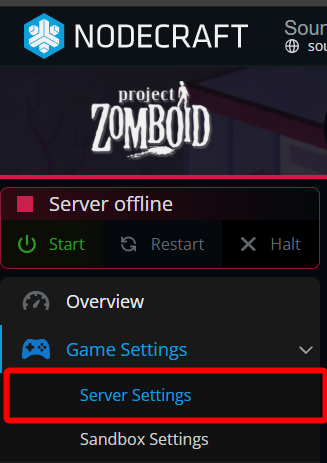
Once on the server settings page, look for the Public options under the Server Identity and Visibility section.
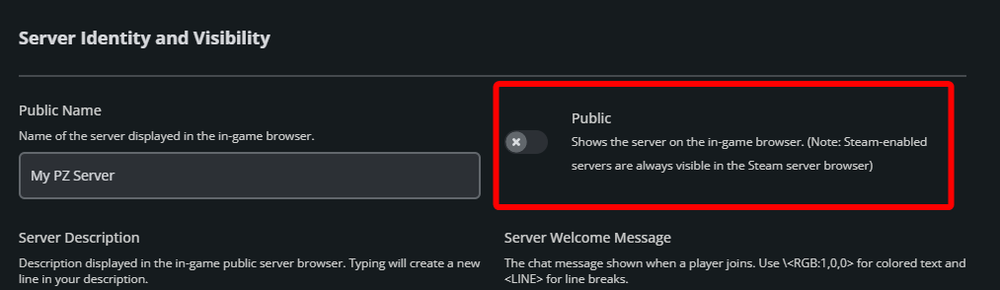
Once found, you can turn the option off to remove the server from being visible in-game or turn it on to make the server visible inside the in-game server browser.
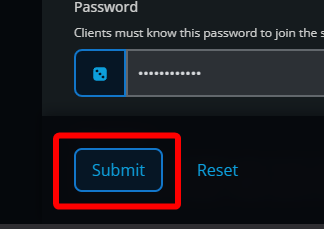
Once you have made your selection, click Submit at the bottom of the page.
Start/restart your server.
Conclusion
Your server visibility settings have now been changed. If it is set to off the server will not be visible in the in-game browser where if it’s on it will be visible. Keep in mind that this does not affect the steam server browser. The server will always be visible on steam regardless of the setting.
Need Help?
If you have questions or run into any issues, our support team is here to help! Reach out using the support widget on our website or visit our support center for further assistance.