


How to Disable Raids on a Palworld Server

In this guide we are going to go over how you can disable raids on your Palworld server. Raids are random events where enemy invaders storm your or other player bases. Disabling them can lead to having a calmer gameplay and less to worry about.
Raids are random events where groups of enemies invade a player’s base. They can provide useful rewards and give your defensive structures something to shoot at, but they can also interrupt production and leave you repairing half the base afterward.
Palworld 1.0 significantly changed the raid system by adding wave-based attacks, regional enemies, scaling difficulty, and the new Negotiator NPC. This guide explains how the updated raid system works and how to disable raids completely on your Nodecraft server.
How Raids Changed in Palworld 1.0
Base raids now consist of multiple waves of enemies. Players receive rewards after defeating every wave and successfully protecting their base.
The enemies attacking a base can vary depending on its location. For example, bases in Crescent Moon Shore may be attacked by the Free Pal Alliance, while bases around Mount Obsidian may face the Eternal Pyre Faction.
Enemy levels also scale based on the Work Pals assigned to the base, making stronger and more developed bases eligible for more difficult attacks.
Other changes introduced in Palworld 1.0 include:
Defensive structures no longer consume ammunition.
Additional measures help prevent invading enemies from becoming stuck.
Bases containing a Gold Coin Assembly Line can experience a dedicated raid event.
The Negotiator may visit before an upcoming raid and offer to cancel it for a price.
How the Negotiator Works
The Negotiator is an NPC who may appear at your base before an upcoming raid.
![A game character in an orange tunic and hat walks on a sandy ground near stone steps; a name tag above reads [10] Negotiator.](https://cms-a.nodecraft.com/f/133932/326x439/26144b696b/palworld-negotiator-npc.png/m/)
Speaking with the Negotiator allows you to pay Gold Coins to cancel the approaching raid. The cost shown in the example below is 10,000 Gold Coins.

Paying the Negotiator only prevents that specific raid. It does not permanently disable future raid events.
To stop all random raids from occurring, you will need to disable them through your Nodecraft server settings.
Disabling Raids
Open your Dashboard
Locate your Palworld server and click on the Panel button.
Once on your panel, Stop your server.
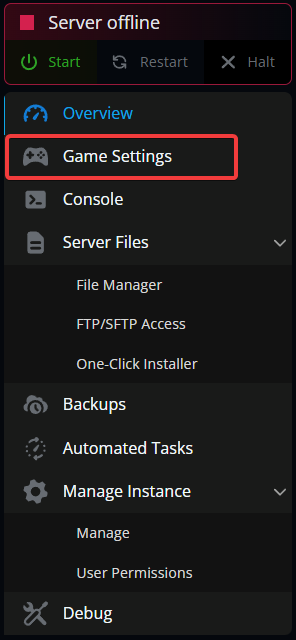
Once stopped, click on Game Settings.
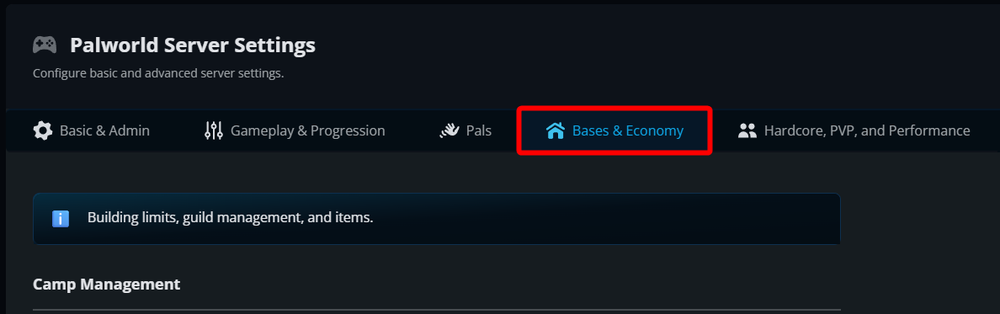
Once on your game settings page, navigate to the Base & Economy tab.
Under the Camp Management section locate the Enable Raid Events option and tick it to off.
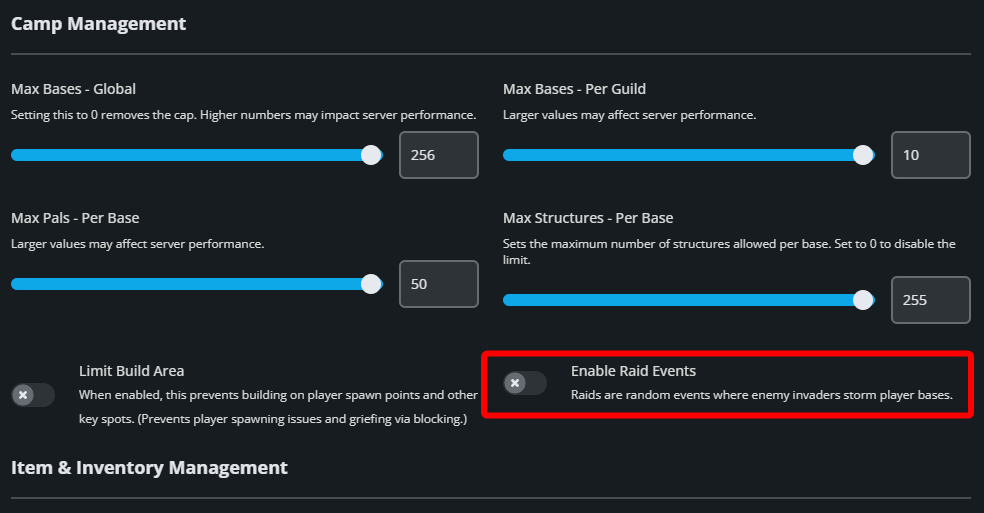
Once set to off, scroll to the button of the page and click on Submit.
Start your server.
Conclusion
You have now disabled raids on your Palworld server. You will no longer be under threat of random enemies rushing into your base and attacking you and your Pals.
Need Help?
If you have questions or run into any issues, our support team is here to help! Reach out using the support widget on our website or visit our support center for further assistance.