


How to Set an Enshrouded Server to Private

If you want to keep your Enshrouded server limited to friends or invited players, setting passwords for its user groups is the easiest way to do it. Each group can have its own password and permissions, so you can decide who gets normal access and who gets the keys to the kingdom.
Note: Making an Enshrouded server private does not hide it from the server list. It simply prevents players from joining unless they have a valid user group password.
Set Your Enshrouded Server to Private
Navigate to your Nodecraft dashboard.
Locate your Enshrouded server and click Manage.
Stop the server.
Click Players in the menu on the left.
Find the user group you want players to use, click Manage in its Password column, and enter a password.
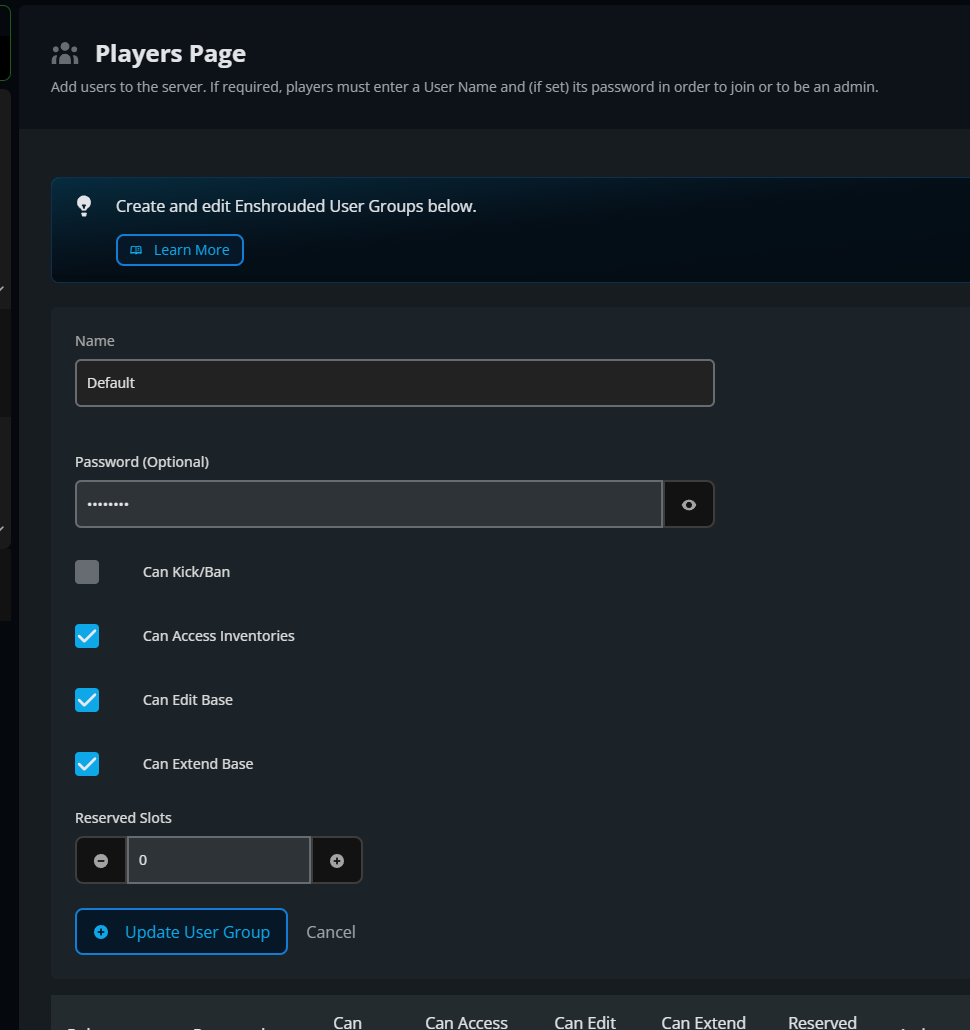
Repeat this for any additional groups you plan to use. Different passwords let you control which players receive different permission levels.
Save your password changes.
Start the server again.
When you invite someone, give them the password for the group you want them to use. Keep the Admin password limited to players you trust unless surprise remodeling projects are part of the plan.
Final Thoughts
User group passwords control who can join, even when your server remains visible in the browser. For private groups, the best Enshrouded server host makes those boundaries easy to manage, and Nodecraft gives you separate passwords and permissions for each group.
Need Help?
If you have questions or run into any issues, our support team is here to help! Reach out using the support widget on our website or visit our support center for further assistance.