


How to Disable Weapon Durability on an Enshrouded Server

In this guide we are going to go over how you can disable weapon durability on your Enshrouded server. Disabling weapon durability on your server can create a more simple aspect of game play but allowing players a longer period of time without the need to worry about weapons breaking.
Disabling Weapon Durability
Open your Dashboard
Locate your Enshrouded server and click on the Manage button.
Navigate to the Game Settings.
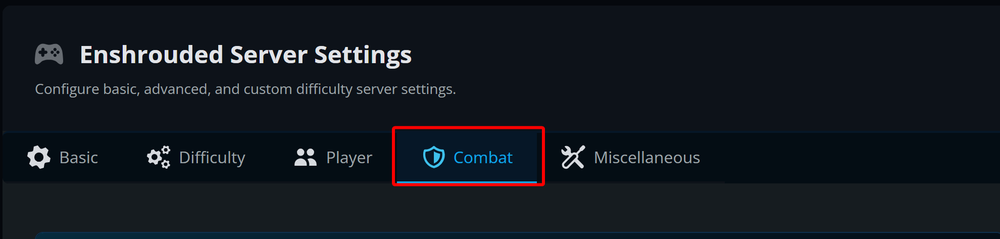
Go to the Combat tab.
On the combat tab, locate the Weapon Durability options under the Combat & Equipment section then turn it off.
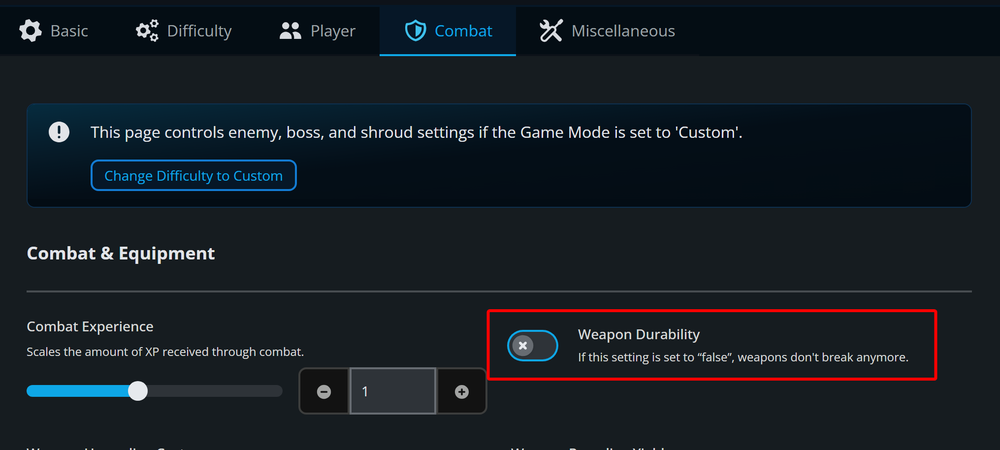
Note: If the option can't be changed, you need to set the difficulty to Custom.
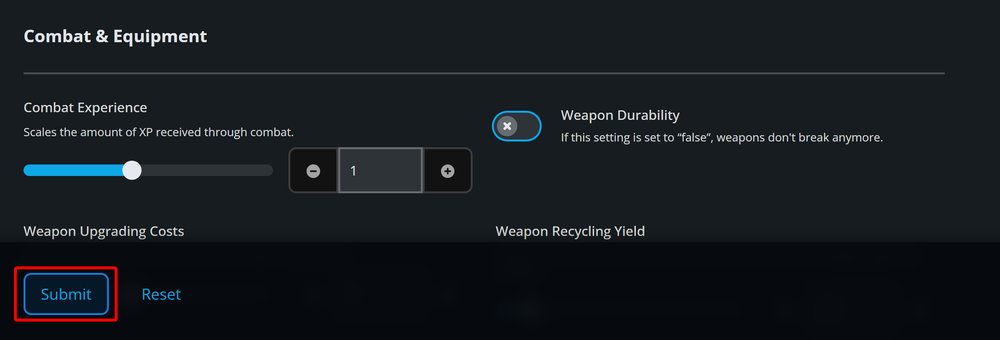
Once the option has been changed, click on Submit.
Start/restart your server.
Conclusion
You have now disabled weapon durability on your Enshrounded server. WIth this change players no longer need to worry about their weapons breaking. This option can be changed at any time if you ever wanted to enable weapon durability again.
Need Help?
If you have questions or run into any issues, our support team is here to help! Reach out using the support widget on our website or visit our support center for further assistance.