


How to Disable Death Penalties on an Enshrouded Server

Dying in Enshrouded normally means leaving some or all of your backpack behind in a tombstone. If you would rather let players keep everything when they die, you can disable that item-loss penalty from your Nodecraft server settings. Death can still be inconvenient without turning the trip back into a scavenger hunt.
Disable Death Penalties
Navigate to your Nodecraft dashboard.
Locate your Enshrouded server and click Manage.
Stop the server.
Click Game Settings in the menu on the left.
Select the Player tab.
If your server is not already using Custom difficulty, click Change Difficulty to Custom. Individual Player settings only apply while the server is using Custom difficulty.
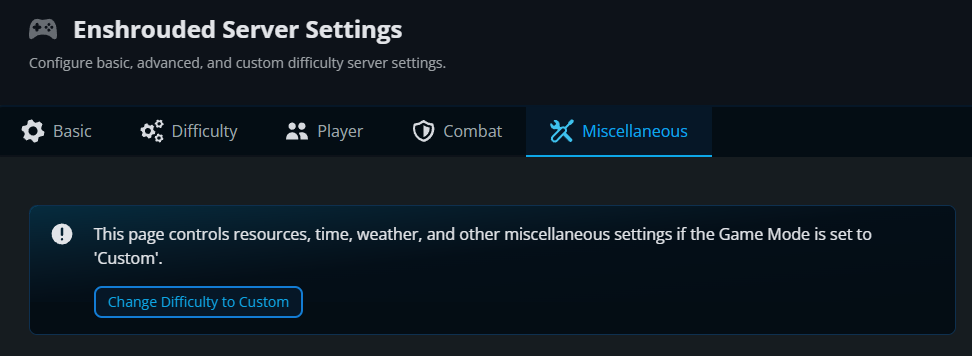
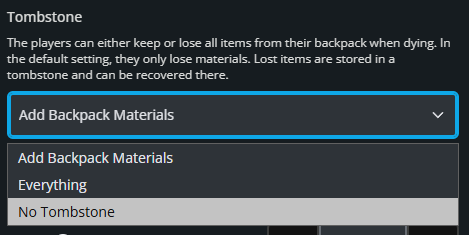
Under Core Player, open the Tombstone dropdown.
Select No Tombstone.
Click Submit to save the changes.
Start the server again.
What Does No Tombstone Change?
The Tombstone setting controls what happens to backpack items when a player dies. No Tombstone lets players keep their backpack contents instead of dropping them into a tombstone. This does not prevent death or make players invulnerable. It only removes the backpack item-loss penalty.
Final Thoughts
Keeping backpack items after death lets your group get back to exploring without a recovery trip. The best Enshrouded server host gives you control over choices like this, and Nodecraft keeps those settings straightforward.
Need Help?
If you have questions or run into any issues, our support team is here to help! Reach out using the support widget on our website or visit our support center for further assistance.