


How to Change the Password on an Enshrouded Server

Enshrouded does not use one universal server password. Instead, passwords are assigned to user groups, which lets you give different groups their own access and permissions. If a password has been shared a little too widely, changing it only takes a few clicks in your Nodecraft server settings.
Change an Enshrouded Server Password
Navigate to your Nodecraft dashboard.
Locate your Enshrouded server and click Manage.
Stop the server.
Click Players in the menu on the left.
Find the user group whose password you want to change and click Manage in its Password column.
Replace the existing password in the Password (Optional) field with the new password.
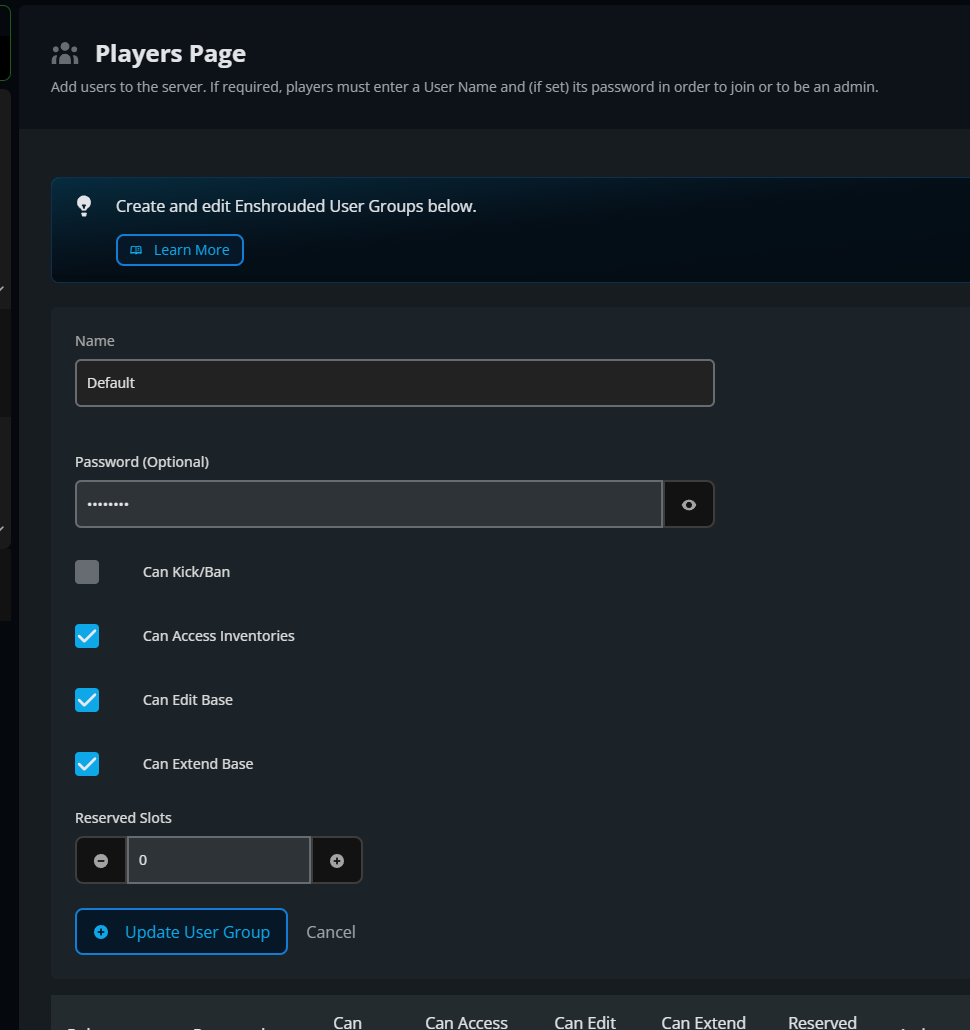
Click Update User Group.
Click Submit to save the changes.
Start the server again.
How Enshrouded Passwords Work
Each Enshrouded user group can have its own password and permissions. Changing a group's password means players using that group will need the new password the next time they connect. If you use a separate Admin group, you can change its password without changing the password used by regular players.
Final Thoughts
Keeping user group passwords current helps you control who joins and what they can do. That straightforward access management is something to expect from the best Enshrouded server hosting, and Nodecraft puts it right in your dashboard.
Need Help?
If you have questions or run into any issues, our support team is here to help! Reach out using the support widget on our website or visit our support center for further assistance.