


How to Change the Gather Rate on an Enshrouded Server

If your group spends more time gathering materials than actually building with them, increasing the gather rate can make progression feel a lot smoother. Enshrouded lets you adjust how many materials appear in loot stacks, so you can spend less time hoarding twigs and more time putting them to work.
Change the Gather Rate
Navigate to your Nodecraft dashboard.
Locate your Enshrouded server and click Manage.
Stop the server.
Click Game Settings in the menu on the left.
Select the Miscellaneous tab.
If your server is not already using Custom difficulty, click Change Difficulty to Custom. Individual Miscellaneous settings only apply while the server is using Custom difficulty.
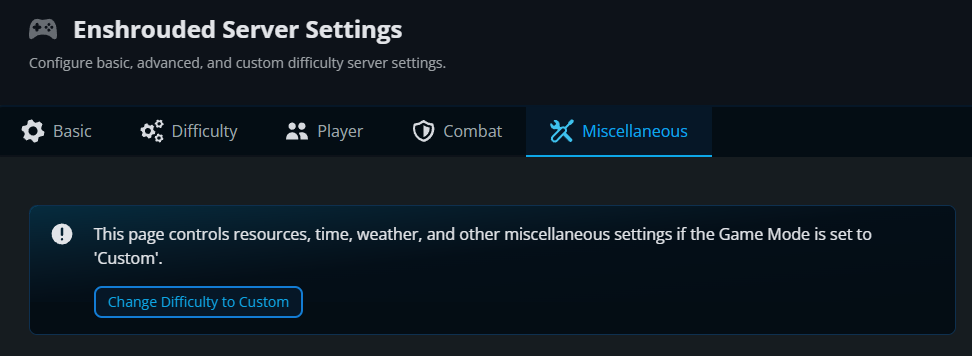
Under Resources, locate Resources Gain Modifier.
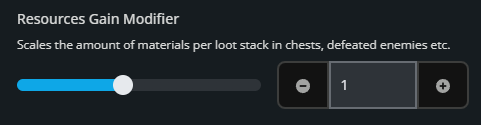
Adjust Resources Gain Modifier to the amount you want. The default value is 1. Values can range from 0.25 to 2, so 2 doubles the amount of materials in applicable loot stacks while 0.5 cuts it in half.
Click Submit to save the changes.
Start the server again.
Resources Gain Modifier vs. Mining Effectiveness
Resources Gain Modifier controls the amount of materials in loot stacks from sources such as chests and defeated enemies. If you are specifically trying to increase the amount of resources gained while mining, adjust Mining Effectiveness on the same Miscellaneous tab. That setting increases mining damage and the amount of resources gained per hit.
Final Thoughts
Adjusting the gather rate can leave your group more time to build with the materials you collect. The best Enshrouded server hosting gives you that flexibility, and Nodecraft makes it easy to change the pace from your dashboard.
Need Help?
If you have questions or run into any issues, our support team is here to help! Reach out using the support widget on our website or visit our support center for further assistance.