


How to Become an Admin on an Enshrouded Server

Enshrouded gives you admin permissions through the password you use to join. Set up a user group with the permissions you need, then connect with that group’s password. Owning the Nodecraft server does not automatically give your character admin access.
Set Up Admin Access
Navigate to your Nodecraft dashboard.
Locate your Enshrouded server and click Manage.
Stop the server.
Click Players in the menu on the left.
Find the Admin user group and click Manage in its Password column. If it does not exist, create a separate Admin group using the user group controls.
Enter a unique password in Password (Optional). Enable Can Kick/Ban, Can Access Inventories, Can Edit Base, and Can Extend Base for full access to those actions. If a world-editing permission is shown, enable it too.
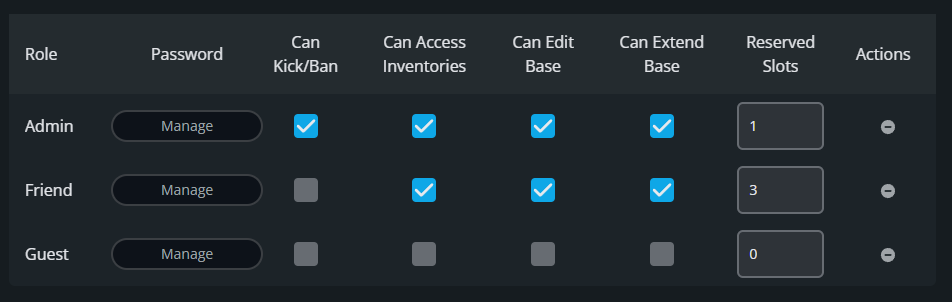
Click Update User Group.
Click Submit to save the changes.
Start the server again, then join in Enshrouded using the Admin group’s password. If you were already connected, disconnect and rejoin with that password.
Check Your Admin Permissions
Open the in-game player list and check that kick and ban controls are available; you do not need to remove anyone to test access. If they are missing, confirm Can Kick/Ban is enabled, save the group, restart the server, and reconnect with its password. A group’s name alone does not grant permissions. Use a different password for regular players and share the admin password only with people you trust. Enshrouded’s server roles guide explains how group passwords determine access.
Final Thoughts
Keep the admin password with players you trust and use separate permissions for everyone else. The best Enshrouded server hosting puts you in control of your world, and Nodecraft makes that control easy to manage from the Players page.
Need Help?
If you have questions or run into any issues, our support team is here to help! Reach out using the support widget on our website or visit our support center for further assistance.