


How to Ban players from an Enshrouded Server

In this guide we are going to cover how you can ban players from your Enshrouded server. Banning players is an effective way to stop trolls or remove players that are breaking rules of the server.
Banning Players from the Control Panel
Open your Dashboard
Locate your Enshrounded server and click on the Manage button.
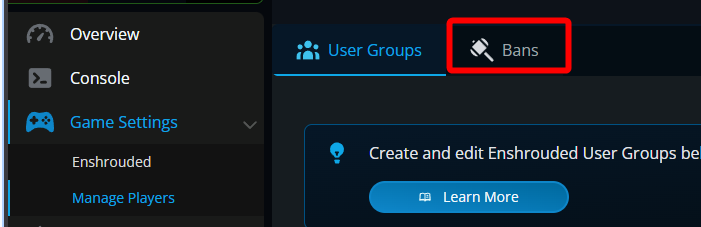
Once on your control panel, navigate to the Manage Players tab.
Once on the players page, click on the Bans tab.
On the bans tab, search for the player that you want to ban from your server then select the name from the list then click on the Ban Player button.

Once done, you will see a message that says Successfully banned (Player).
![Dark admin panel with the Bans tab active; a green success banner shows a checkmark and the text Successfully banned [redacted].](https://cms-a.nodecraft.com/f/133932/981x166/b560734d9d/nodecraft-ban-panel-successful-ban.png/m/)
Conclusion
You have now banned a player from the server. Banning a player does not immediately kick them if they are active on the server automatically. Once the player is kicked or leaves the server the ban will prevent them from joining again.
Need Help?
If you have questions or run into any issues, our support team is here to help! Reach out using the support widget on our website or visit our support center for further assistance.