


Nodecraft has a habit of spotting useful infrastructure shifts early and putting them to work for game servers before they become obvious. We moved MCVersions onto Cloudflare Workers Sites when the product was barely a week old, ended up serving nearly a billion API requests a month from the edge (it's well over this now), and rebuilt our backup system around Zstandard back when most of the gaming industry had not yet caught up to it.
Getting there early means we can spend more time turning new infrastructure into practical advantages for game servers, long before it becomes standard across the wider hosting market.
WebMCP is the latest of these bets. This week, it moved from “interesting experiment” to “we’re glad we got here early.”
So what is WebMCP?
WebMCP is a proposed web standard, currently incubating in the W3C with editors from Google and Microsoft. The pitch is simple; instead of an AI agent operating your website by taking screenshots and guessing where to click, the page tells the agent what it can do.
A web app calls document.modelContext.registerTool() and registers a set of named, typed tools, each with a description and a proper input schema. An agent visiting the page sees those tools and calls them directly, like functions. No pixel-hunting, no "I clicked the button that looked most deletey".
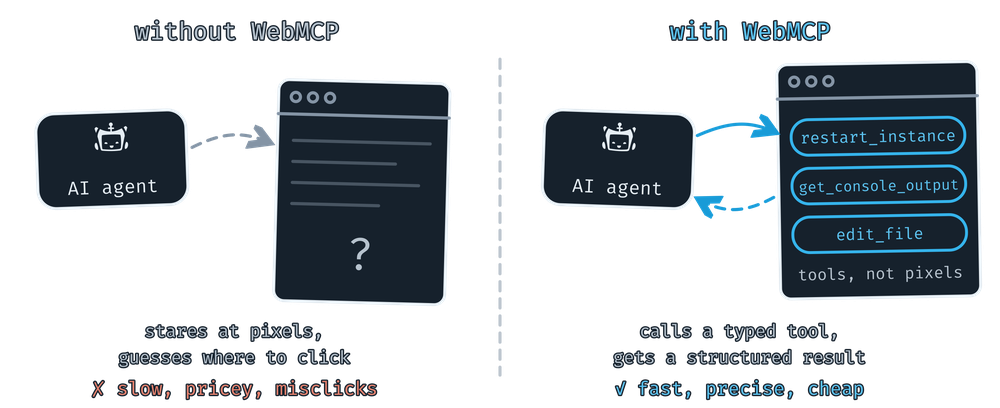
The part we like most is where the tools run - they live in the page, in your browser, in your session. There are no API keys to mint, no separate service to log into, and the agent only gets the access you already have. Every tool call goes through the exact same code paths as the buttons in the panel.
Compare that to "computer use" style agents that screenshot the page and move a virtual mouse around - that approach is slower, more expensive, and much more fragile - you're always one ambiguous button label away from clicking the wrong thing. For a control panel that manages live game servers, that difference matters.
We got here early
We shipped our first WebMCP tools in nodepanel back in April. At the time, there was barely anything that could call them. WebMCP lived behind a Chrome flag, and the main way to use them was through browser extensions that bridged page tools to a local agent, plus a handful of experimental clients. We started with read-only basics like listing your servers and reading console output, mostly to learn the shape of the thing, then kept building through the summer. Full file management landed in August, followed by a much bigger expansion covering settings, backups, scheduled tasks, and the entire server lifecycle.
Chrome moved WebMCP into a public origin trial, and this week OpenAI added WebMCP support to the ChatGPT desktop app's built-in browser. Now, when ChatGPT visits a WebMCP-enabled site, it can discover the site's tools and call them directly. Overnight, the audience for these tools went from "a handful of developers with the right extension installed" to anyone with ChatGPT on their desktop.
This means the tools we've been quietly building all year now have somewhere real to run.
"Why did my server crash?"
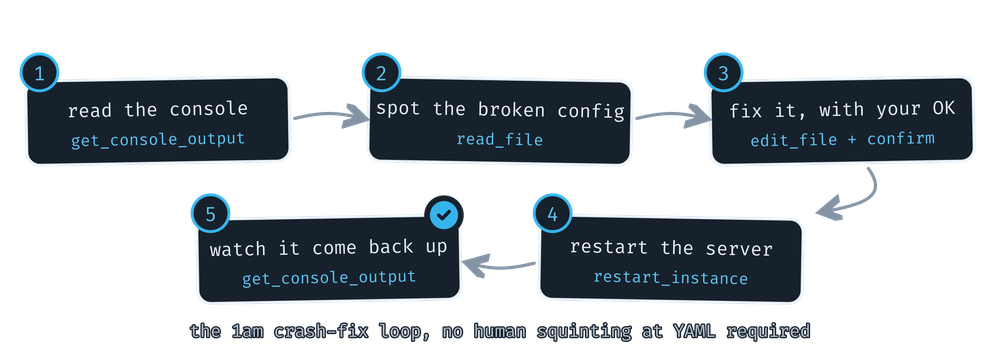
This is one of the flows we built first, because it's the question every server owner eventually asks at 1am. Open your server in nodepanel, ask your agent what happened, and it has enough context to start digging. It can pull the crash log with get_console_output, check live CPU and RAM with get_instance_metrics, and dig through get_instance_usage_history to see whether memory has been creeping up all week or suddenly spiked ten minutes ago.
The fix is where it gets genuinely useful. Say the console shows your Minecraft server dying on a broken plugin config, your agent can read_file the offending YAML, spot the unclosed quote, and repair it with edit_file, which works like a code editor's find-and-replace, changing exactly the bytes that are wrong and leaving everything else alone. Then restart_instance, and it watches the console to make sure the fix actually took. A complete diagnose-and-repair loop, in your browser tab, against the same file manager and console you'd use yourself.
Changing settings without hand-editing configs
Every game stores its settings differently, and some config formats are actively hostile to being rewritten by anything. So alongside the raw file tools, we exposed the panel's own settings system, backed by Rulesmith, the custom configuration engine we've been refining for years.
get_settings returns the same validated fields our settings pages use: labels, current values, allowed options, and the guardrails behind them. set_settings writes changes back through the same validation. Ask your agent to "turn off PvP and set the difficulty to hard" and it doesn't need to know which file Valheim keeps that in or what the syntax looks like. It finds the fields by label, sets them, and lets the panel write valid config. Your agent cannot produce a malformed file through that path, which is more than we can say for ourselves at 1am.
Automation you describe in a sentence
Our Automated Tasks scheduler is powerful, but like every scheduler ever built, it involves a form with a lot of dropdowns. Now you can just describe what you want:
Back up my server every night at 4am my time, and warn players in chat five minutes before the restart.
Your agent builds that with create_task, wiring up a scheduled trigger, a console command job for the chat warning, a five minute wait, then the restart and the backup, in order. It confirms the schedule and timezone with you first, creates the task, and double-checks its own work with list_tasks. Backups are exposed directly too, so "take a backup before we touch anything" is a one-liner with create_backup!
From zero to deployed server
The lifecycle tools take you from an empty slot to a running server. An agent can check your account's free slots with get_available_slots, create a new server with create_instance, deploy it into a slot with deploy_instance, and start it up. We were extra careful here. create_instance always does a dry run first, and returns the full plan (game, version, location, connection address) for you to approve before anything real happens.
Guardrails, because these are live servers
A tool that can delete files on a running game server deserves more caution than one that lists them, and WebMCP's safety model is still evolving, so we added our own guardrails.
Read-only tools are marked read-only and just work.
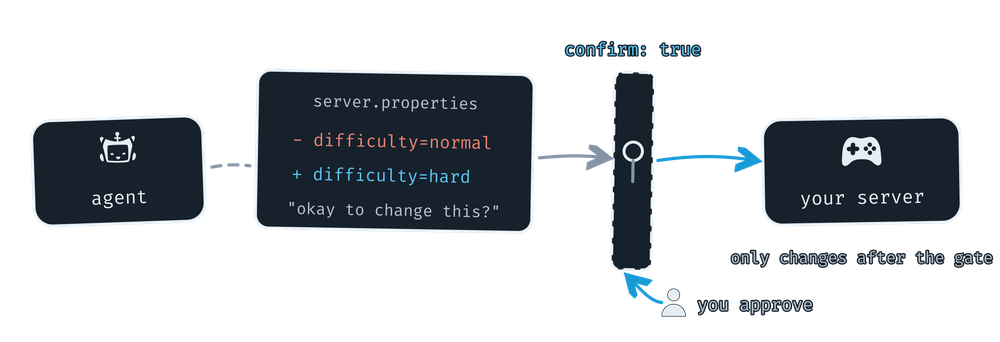
Anything destructive (deleting files, overwriting on copy, editing configs) requires your agent to pass an explicit
confirmflag, and each destructive tool description instructs your agent to show you exactly what will change before it sets that flag.delete_pathis blunt about it too: no undo, no recycle bin.Tools are page-scoped. File and console tools only exist while you're actually viewing that server, so an agent can't rummage through a server you don't have open.
Signed out, there is barely anything to call beyond an auth check and knowledgebase search.
It's not just the panel
We've also been wiring WebMCP into the free tools on nodecraft.com, turning static utility pages into things your agent can actually operate.
Our Minecraft item ID lists expose search and a
/givecommand builder that knows the syntax quirks of every version, numeric IDs, data values, and which target selectors existed yet. Ask for "a give command for 64 cyan wool on 1.8" and your agent gets it right, because the page told it the rules.The map art generator lets an agent load an image, tune the grid, palette version, dithering and framing, and hand you finished
.datfiles, while the live preview updates as it works.The NBT workbench gives agents structured read, search, and edit access to Minecraft NBT files, right in the browser. No more manual SNBT copy/pasting.
Nodecraft.com also offers knowledgebase search, our supported games list, and datacenter locations as tools, so an agent helping someone pick a host can pull real answers instead of guessing.
The future of WebMCP
WebMCP is still an origin trial, not a finished standard. The spec will keep moving underneath us, but that's fine. It already moved underneath us between April and now, and we kept up.
With ChatGPT's desktop browser speaking WebMCP and Chrome's origin trial open to everyone, "I asked an AI to fix my server and it did" is about to get a lot less weird.
Try it today by opening your server in nodepanel inside the ChatGPT desktop app or another WebMCP-capable browser, then just ask. If your agent does something brilliant, tell us. If it does something daft, definitely tell us. And if there are flows you want it to handle next, we want to hear those too!